
Free Practice Questions for the CompTIA A+ 220-1202 Exam (2026 Updated)
At Marks4sure, we are dedicated to providing IT professionals with the most accurate and reliable preparation materials for the CompTIA 220-1202 exam. To support your certification journey, we have made a selection of our premium 2026 A+ practice questions and answers available completely free. You can take this practice test as many times as you need. Every question includes a detailed, expertly verified explanation to ensure you fully grasp the core security concepts before test day.
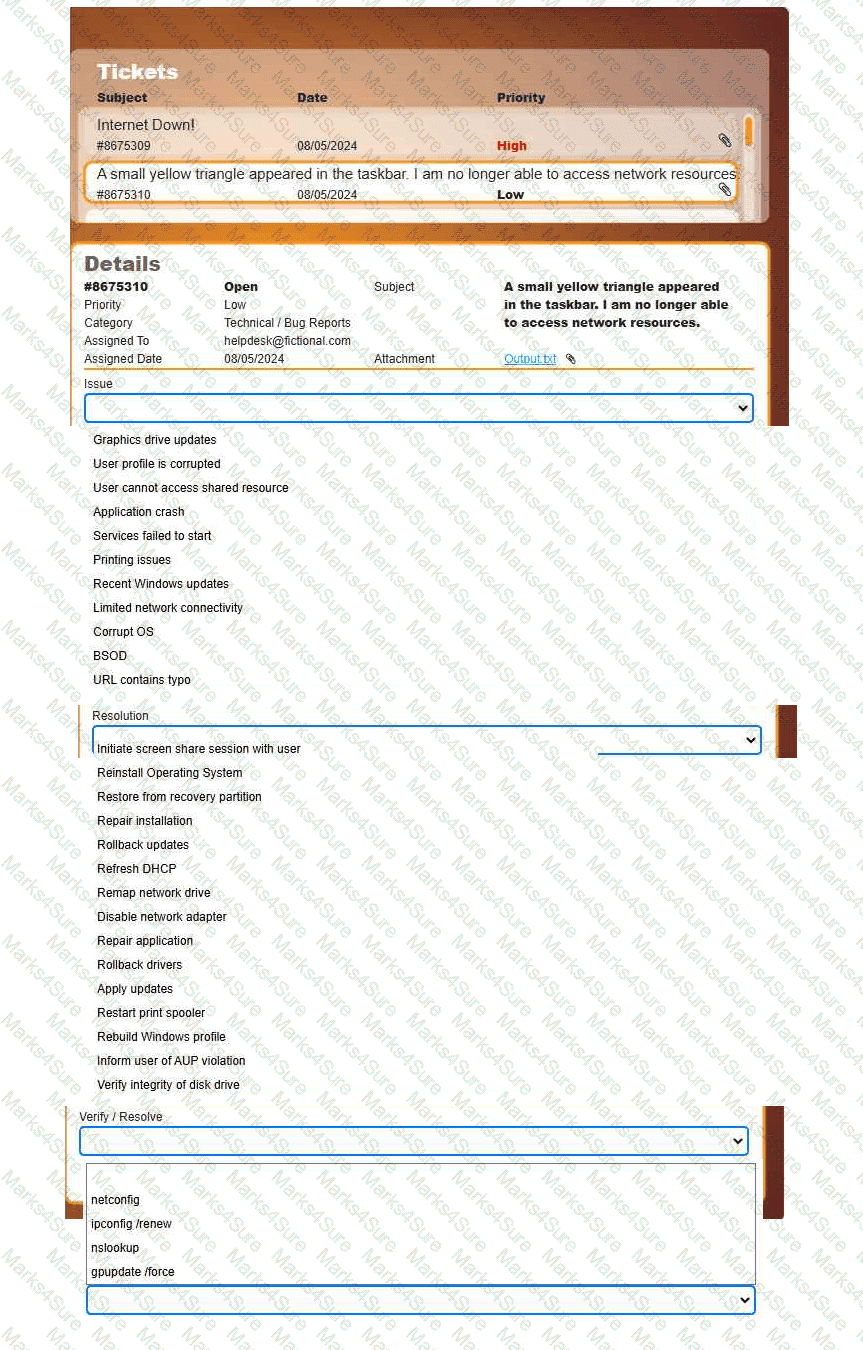
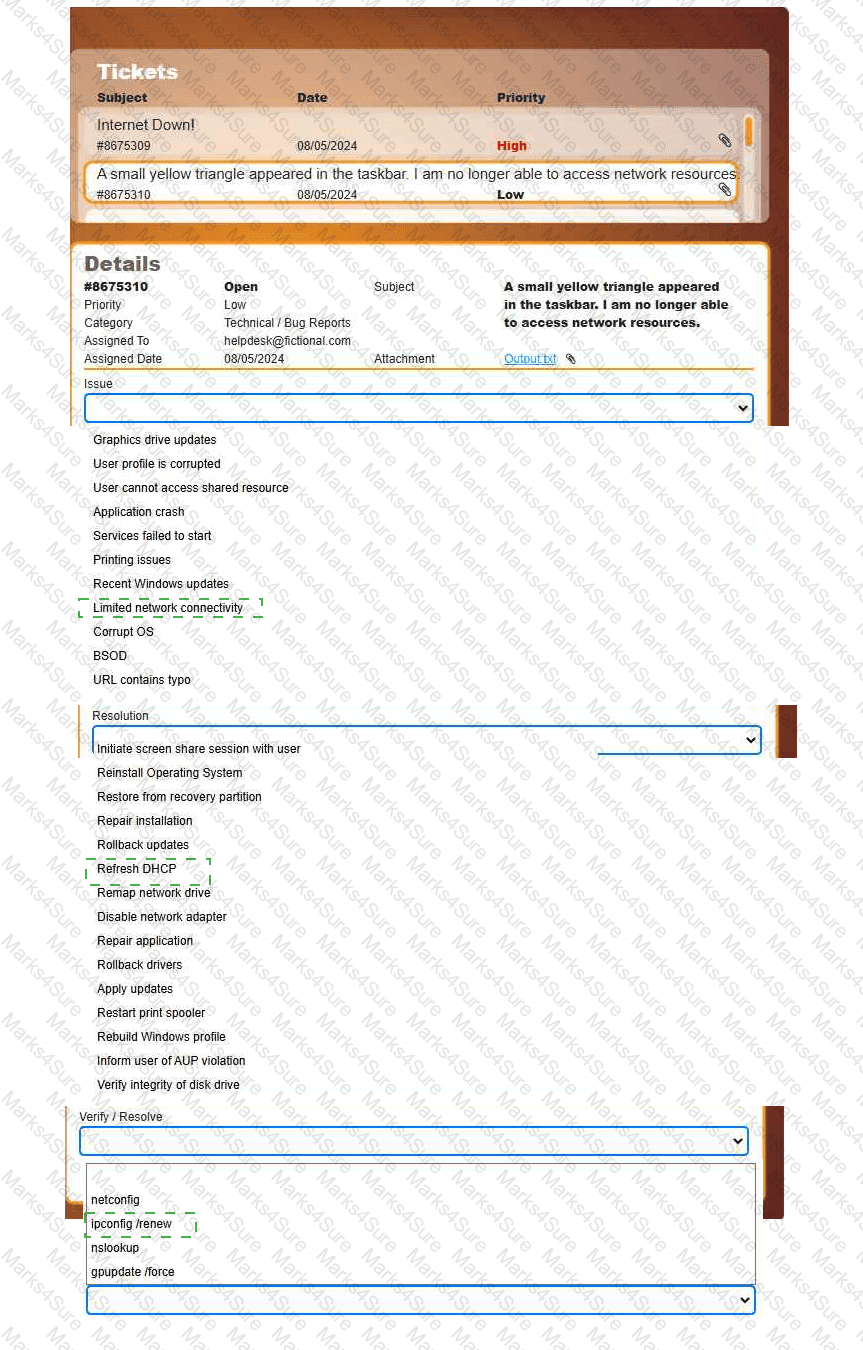
Welcome to your first day as a Fictional Company, LLC helpdesk employee. Please work the tickets in your helpdesk ticket queue.
INSTRUCTIONS
Click on individual tickets to see the ticket details, and view applicable attachments to
determine the problem.
Select the appropriate issue from the ' Issue ' drop-down menu. Then, select the most
efficient resolution from the ' Resolution ' drop-down menu. Finally, select the proper
command or verification to remediate or confirm your fix of the issue from the
' Verify/Resolve ' drop-down menu.
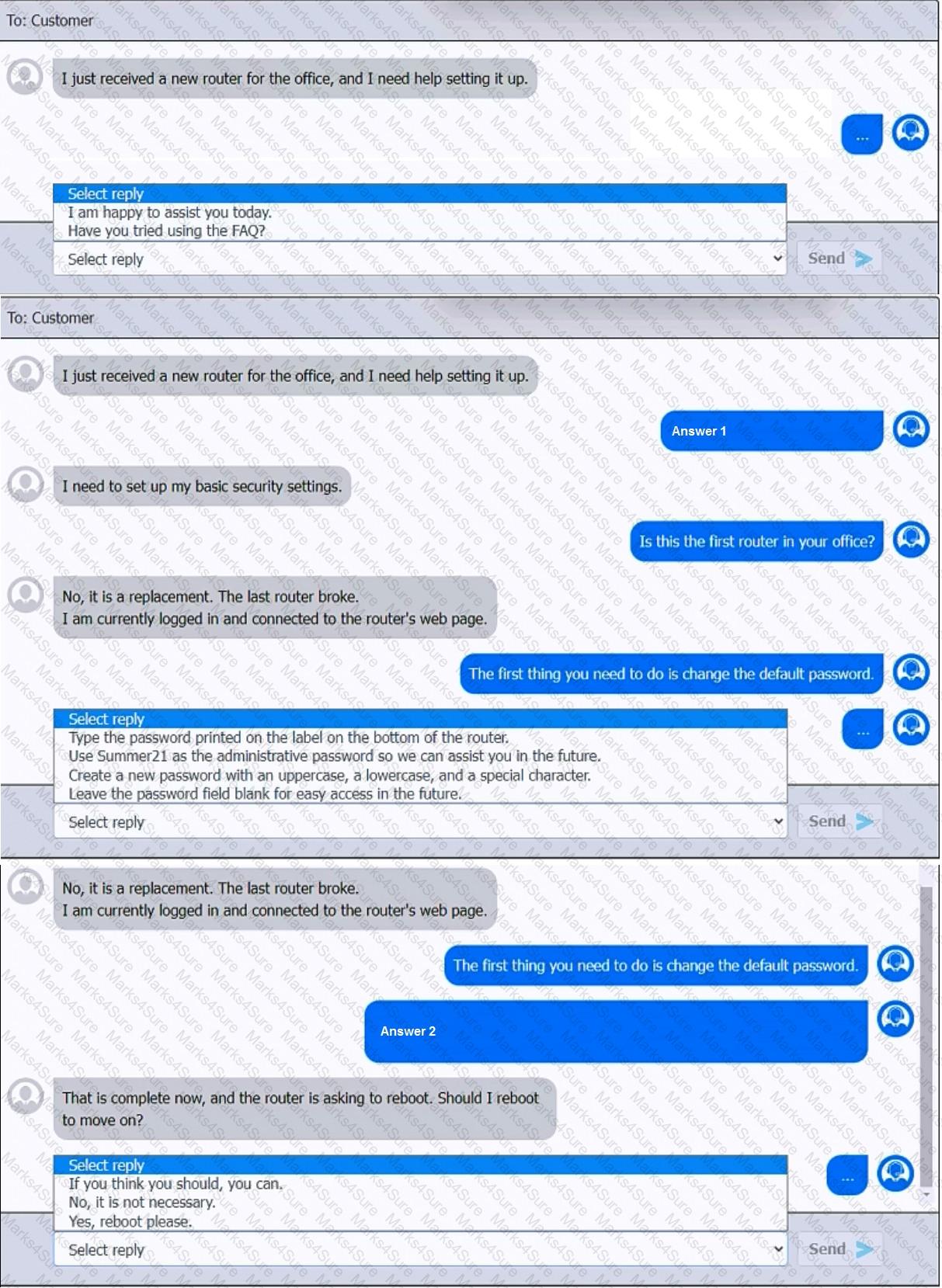
You have been contacted through the help desk chat application. A user is setting up a replacement SOHO router. Assist the user with setting up the router.
INSTRUCTIONS
Select the most appropriate statement for each response. Click the send button after each response to continue the chat.
If at any time you would like to bring back the initial state of the simulation, please click the Reset All button.
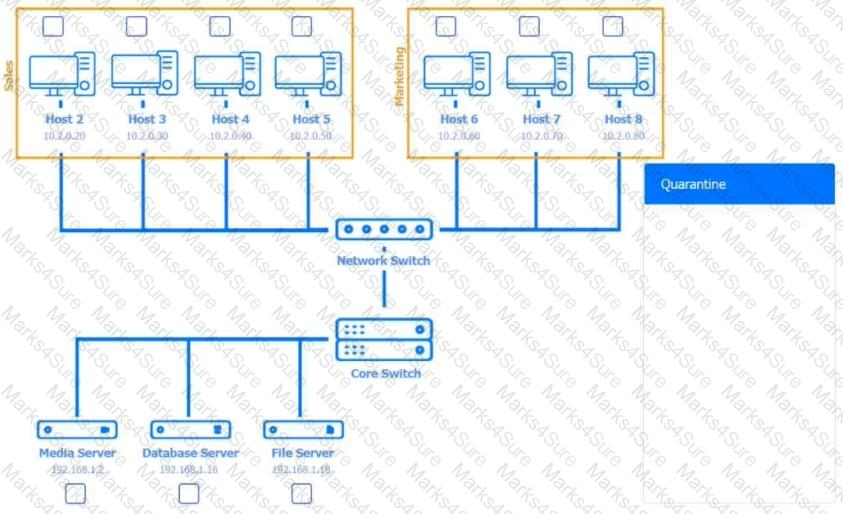
Multiple users are reporting audio issues as well as performance issues after downloading unauthorized software. You have been dispatched to identify and resolve any issues on the network using best practice procedures.
INSTRUCTIONS
Quarantine and configure the appropriate device(s) so that the users’ audio issues are resolved using best practice procedures.
Multiple devices may be selected for quarantine.
Click on a host or server to configure services.
If at any time you would like to bring back the initial state of the simulation, please click the Reset All button.










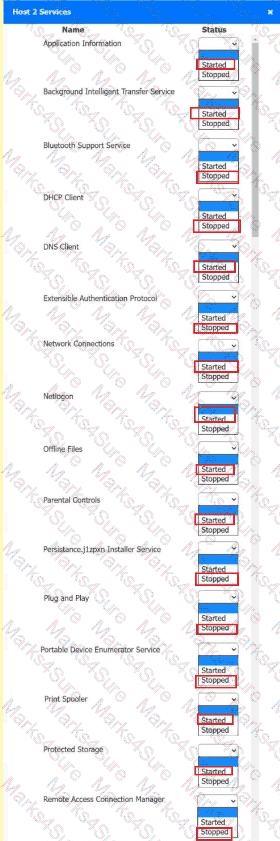 A screenshot of a computer AI-
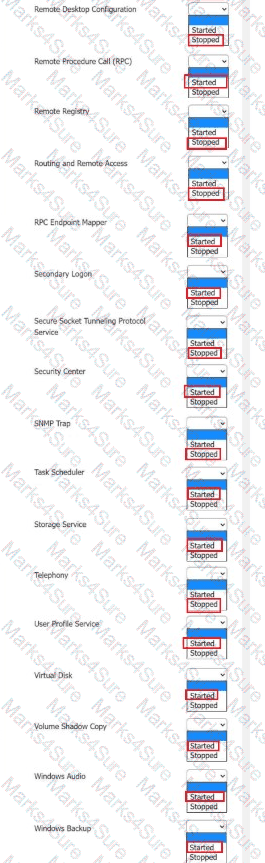 A screenshot of a computer AI-
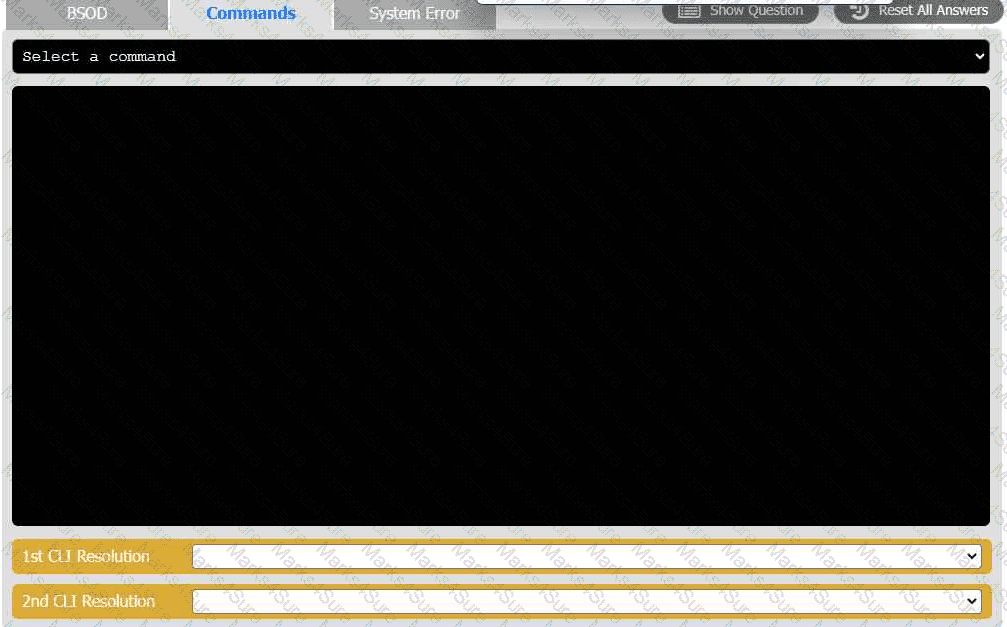
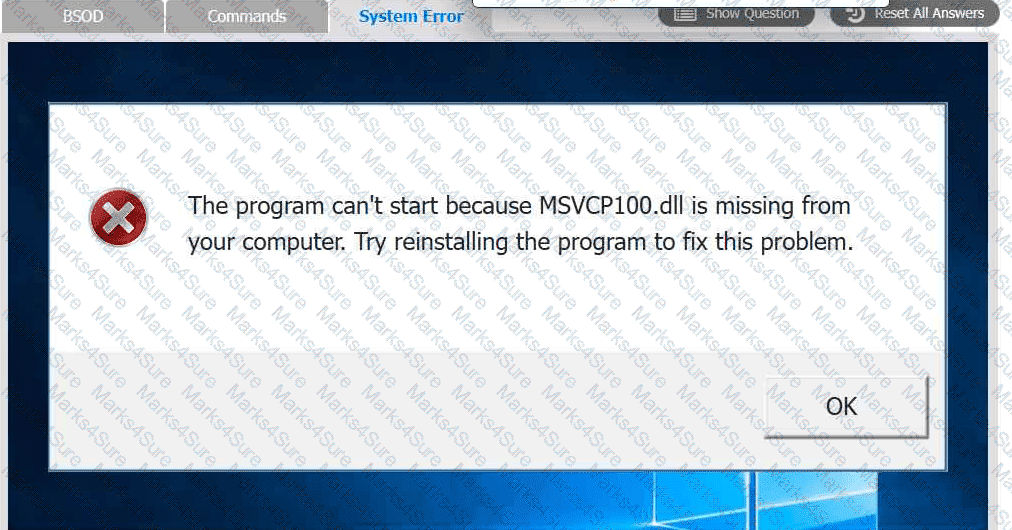
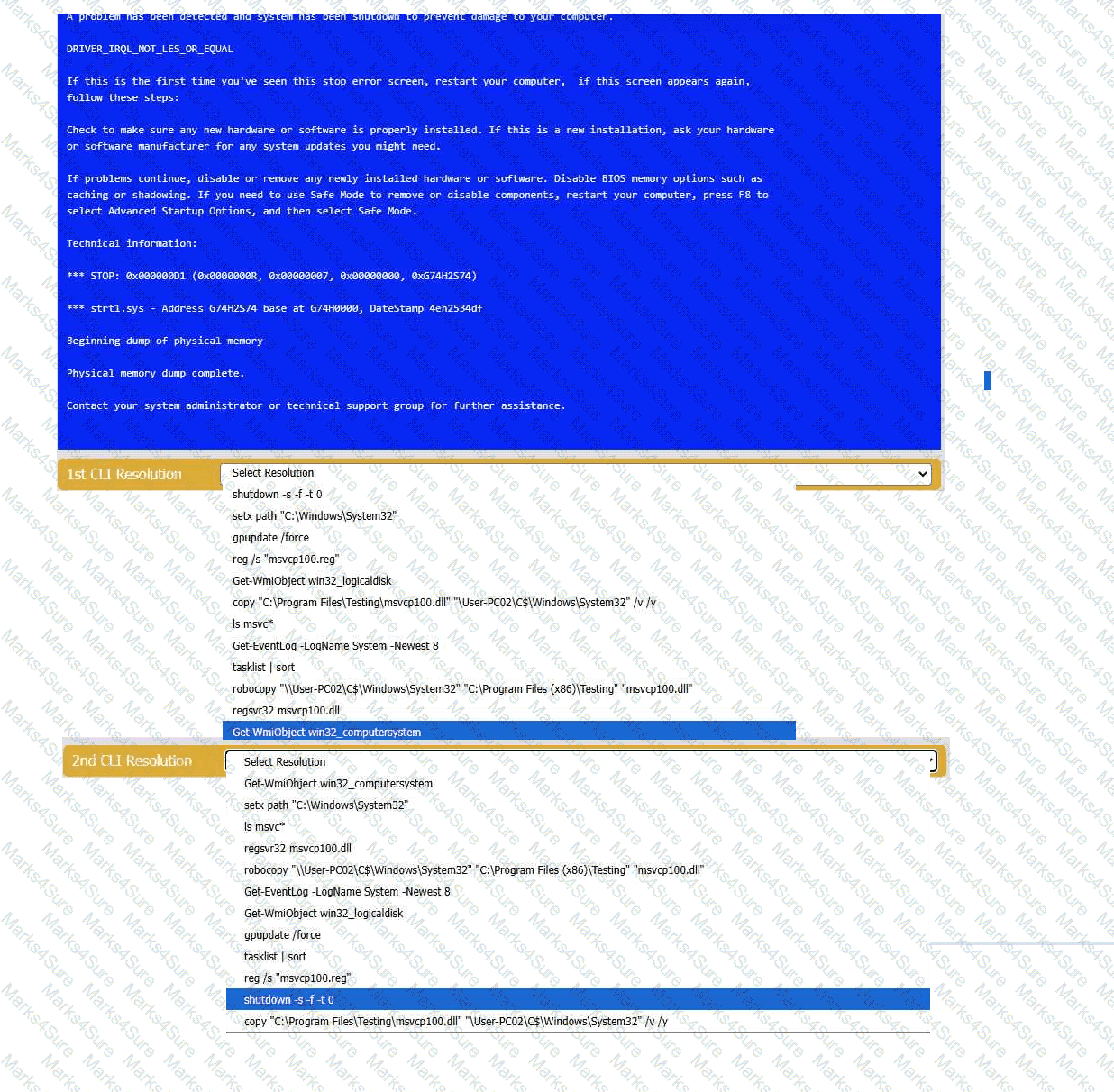
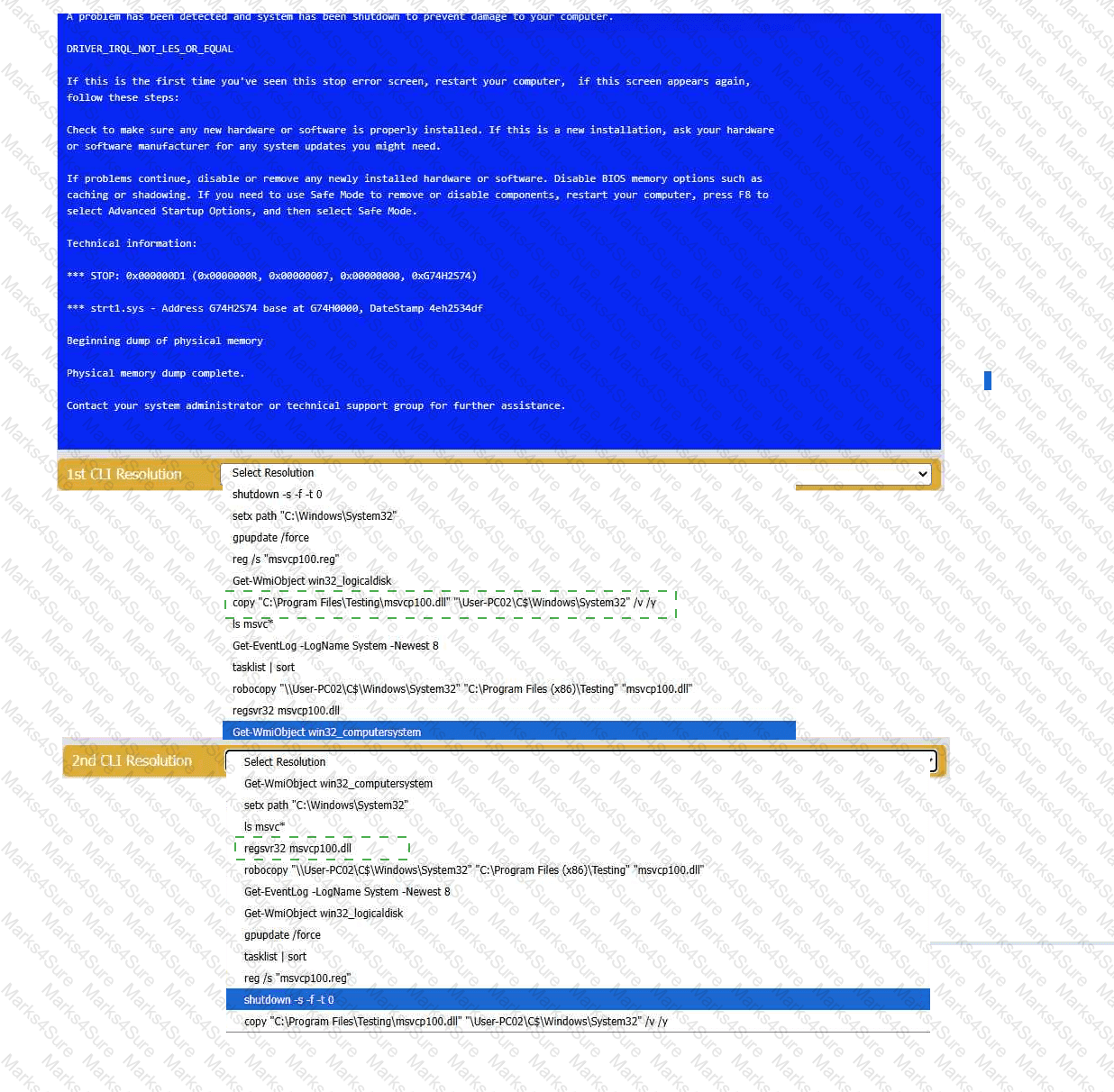
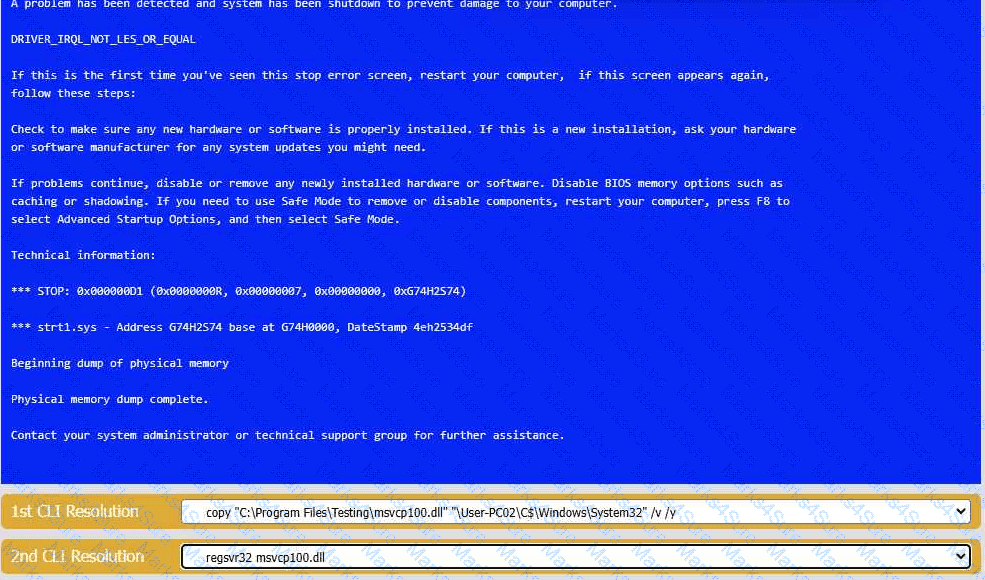
A user reports that after a recent software deployment to upgrade the Testing application, they can no longer use it. However, other employees can successfully
use the Testing program.
INSTRUCTIONS
Review the information in each tab to verify the results of the deployment and resolve
any issues discovered by selecting the:
· First command to resolve the issue
· Second command to resolve the issue
A technician needs to map a shared drive from a command-line interface. Which of the following commands should the technician use?
A user wants to dispose of a failed hard drive in a way that ensures the data is unrecoverable. Which of the following is the best at-home method?
An IT technician must install a new software application across Linux, macOS, and Windows systems within an organization. The installation files are stored on the intranet. Which of the following approaches should the technician take to ensure proper installation?
After a recent mobile OS upgrade to a smartphone, a user attempts to access their corporate email, but the application does not open. A technician restarts the smartphone, but the issue persists. Which of the following is the most likely way to resolve the issue?
An administrator requires information about a server to identify the product owner and whether it has any business-critical services. Which of the following can the administrator refer to in order to find this information?
A company wants to enforce the following browser requirements:
Administrators can add URLs to the Trusted URL list
Passwords will not be stored through the browser
When the browser is closed, all history will be saved
Browser security will be set to high
Specific URLs or ratings will be restricted from access
Which of the following is the best for the technician to configure?
Which of the following should an organization use when it wants to enable SSO for a third-party application by utilizing its existing identity service?
A technician wants to prevent electrical damage while disassembling a device. The technician turns off the device. Which of the following should the technician do next?
Which of the following methods would make data unrecoverable but allow the drive to be repurposed?
An employee is trying to connect their company laptop to an airport’s Wi-Fi during a business trip. Once the network is connected, a pop-up window appears with the airport logo, which the employee quickly closes. The internet connection is not working properly. Which of the following should a help desk technician suggest?
After using a third-party disk optimization software package, a technician restarts a laptop and receives the message “No operating system found.” The technician verifies that the BIOS properly recognizes the SSD. Which of the following should the technician do next?
Company employees do not have assigned workspaces and regularly work at different computers and physical locations. Which of the following should the company implement to maintain data security and minimize the amount of user data that needs to be transferred?
A technician needs to download and install a new web browser on a desktop. Which attribute should be used to verify the installer ' s authenticity?
A company’s Windows 10 devices have been infected with ransomware, and all files are now encrypted. The executives have decided against paying the ransom. Which of the following actions will achieve full operation without any trace of the ransomware?
A business is hiring a remote employee and must provide the employee with graphical interface access to the in-house Linux servers. Which of the following should the business use for this process?
A user reports that double-clicking an application ' s shortcut fails to launch the program. A technician believes the application process is running in the background in an unresponsive state. Which of the following tools should the technician use to resolve the issue?
MFA for a custom web application on a user ' s smartphone is no longer working. The last time the user remembered it working was before taking a vacation to another country. Which of the following should the technician do first?
Which of the following is the quickest way to move from Windows 10 to Windows 11 without losing data?
A project team needs special access on a shared repository to add new content, edit existing content, and prevent content deletion. Which of the following should an administrator do to configure this setup with the least amount of effort?
A user cannot upload files to corporate servers from their mobile device when outside the office, but uploads work fine in-office. What should a technician do to determine the root cause?
Independent contractors often work from a business ' s lobby. Although the business has Wi-Fi, contractors often plug in their laptops to Ethernet ports in the lobby. Which of the following should a security engineer do to most efficiently address a potential security concern with this network setup?
A help desk team was alerted that a company-owned cell phone has an unrecognized password-cracking application. Which of the following should the help desk team do to prevent further unauthorized installations from occurring?
When a corporate laptop is connected to the company network, it can reach external websites. However, it cannot reach any internal websites, displaying the error message “Cannot reach this page.” Which of the following should a technician configure?
Which of the following authentication methods is the best way to prevent users from frequently entering their credentials?
A company wants to prevent unauthorized physical access to its mobile devices. Which of the following should the company do? (Select two).
Which of the following concepts should a technician consider when discussing confidential work projects with individuals outside the company?
A small office reported a phishing attack that resulted in a malware infection. A technician is investigating the incident and has verified the following:
● All endpoints are updated and have the newest EDR signatures.
● Logs confirm that the malware was quarantined by EDR on one system.
● The potentially infected machine was reimaged.
Which of the following actions should the technician take next?
An administrator is investigating a zero-day vulnerability. If left unpatched, it could severely impact business. The patch requires downtime. What should the administrator do?
A technician completes the installation of an OS that appears to be successful. However, when the technician removes the USB drive that was used for the installation and restarts the system, the error “No boot device found” appears. Which of the following should the technician do next to resolve the issue?
After using a third-party disk optimization software package, a technician restarts a laptop and receives the message " No operating system found. " The technician verifies that the BIOS properly recognizes the SSD. Which of the following should the technician do next?
A customer asks a help desk technician for help in selecting new computers. The customer would like to avoid expensive licensing fees but would like all files to be kept locally. Which of the following operating systems should the technician recommend?
A user reports getting a BSOD (Blue Screen of Death) error on their computer at least twice a day. Which of the following should the technician use to determine the cause?
After a user installs a mobile application from an advertisement, the phone ' s battery dies a few hours later and becomes hot to touch, even when not in use. Which of the following should a technician do first?
A technician follows proper malware removal procedures but cannot remove all malware. They decide to reload the OS. What should they select?
What is the next step a technician should take after completing malware cleanup?
A technician needs to virtually meet with colleagues from around the world. Which of the following should the technician do first to organize this meeting?
Various alerts on a user ' s Windows 11 laptop are continually interrupting the user during videoconference calls. Which of the following should a support technician recommend to best solve the issue?
A technician needs to increase the security level on a laptop that will be used during a conference outside the country. Which of the following should the technician configure?
An administrator must rename the administrator account on a Windows desktop. Which tool is best for this?
An application ' s performance is degrading over time. The application is slowing, but it never gives an error and does not crash. Which of the following tools should a technician use to start troubleshooting?
A company wants to prevent unauthorized physical access to its mobile devices. Which of the following should the company do? (Select two).
Which of the following provides information to employees, such as permitted activities when using the organization ' s resources?
Which of the following is required to have a central log-in for a Windows computer?
A technician is preparing to replace the batteries in a rack-mounted UPS system. After ensuring the power is turned off and the batteries are fully discharged, the technician needs to remove the battery modules from the bottom of the rack. Which of the following steps should the technician take?
PDF + Testing Engine

Testing Engine
PDF (Q&A)
