
Free Practice Questions for the F5 LTM Specialist 301b Exam (2026 Updated)
At Marks4sure, we are dedicated to providing IT professionals with the most accurate and reliable preparation materials for the F5 301b exam. To support your certification journey, we have made a selection of our premium 2026 LTM Specialist practice questions and answers available completely free. You can take this practice test as many times as you need. Every question includes a detailed, expertly verified explanation to ensure you fully grasp the core security concepts before test day.
-- Exhibit –
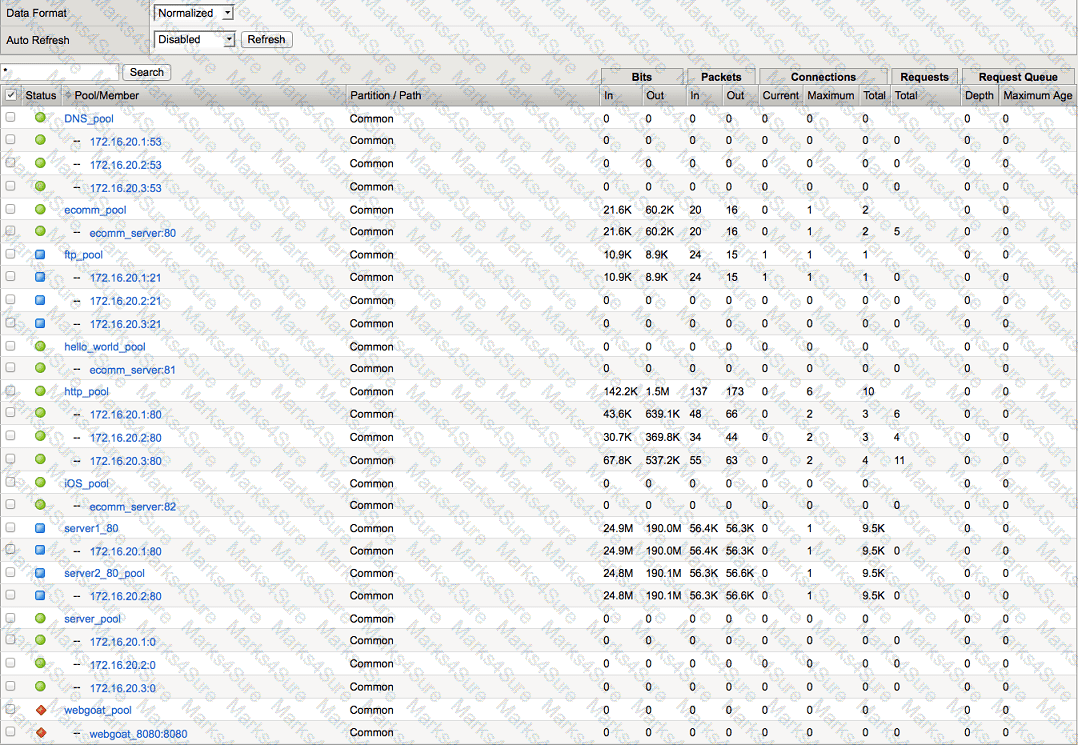
-- Exhibit --
Refer to the exhibit.
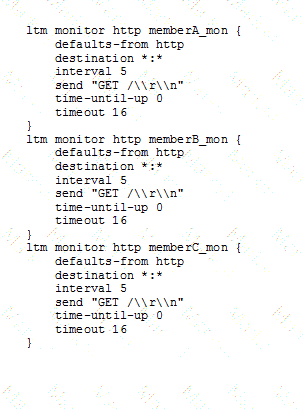
An administrator created a monitor to a pool member web server, which resulted in a pool member that is marked red. The administrator knows the web server is working when it is accessed from another computer.
What should the administrator do to correct the problem?
An LTM Specialist has configured a virtual server for www.example.com, load balancing connections to a pool of application servers that provide a shopping cart application. Cookie persistence is enabled on the virtual server. Users are able to connect to the application, but the user's shopping cart fails to update. A traffic capture shows the following:
Request:
GET /cart/updatecart.php HTTP/1.1
Host: www.example.com
Connection: keep-alive
Cache-Control: max-age=0
User-Agent: Mozilla/5.0 (Macintosh; Intel Mac OS X 10_7_5) AppleWebKit/537.4 (KHTML, like Gecko) Chrome/22.0.1229.94 Safari/537.4
Accept: text/html,application/xhtml+xml,application/xml;q=0.9,*/*;q=0.8
Accept-EncodinG. gzip,deflate,sdch
Accept-LanguagE. en-US,en;q=0.8
Accept-Charset: ISO-8859-1,utf-8;q=0.7,*;q=0.3
CookiE. BIGipServerwebstore_pool=353636524.20480.0000
Response:
HTTP/1.1 200 OK
DatE. Wed, 24 Oct 2012 18:00:13 GMT
Server: Apache/2.2.22 (Ubuntu)
X-Powered-By: PHP/5.3.10-1ubuntu3.1
Set-CookiE. cartID=647A5EA6657828C69DB8188981CB5; path=/; domain=wb01.example.com
Keep-AlivE. timeout=5, max=100
Connection: Keep-Alive
Content-TypE. text/html
No changes can be made to the application.
What should the LTM Specialist do to resolve the problem?
-- Exhibit –
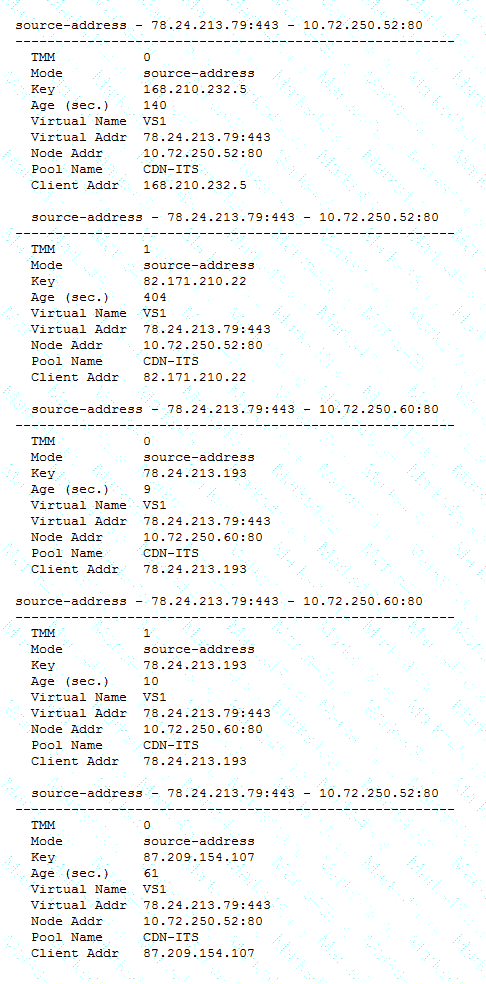
-- Exhibit --
Refer to the exhibit.
A virtual server is set up on an LTM device as follows:
Virtual server address 78.24.213.79
Default Persistence ProfilE. source_addr, 600s.
Pool NamE. Pool1
Pool Members: 10.72.250.52:80 and 10.72.250.60:80 (both on Internal Vlan)
There are several current connections to the virtual server, and pool member 10.72.250.52:80 has been set to a "Disabled" state.
A tcpdump on the Internal Vlan shows traffic going to 10.72.250.52:80.
How soon after the persistence table query was run can existing connections be refreshed/renewed to ensure that no requests are sent to 10.72.250.52?
An LTM device has been configured to log the reasons for generating TCP RST packets.
The following log entry occurs:
"01230140:3: RST sent from 192.168.1.100:80 to 192.168.1.124:39272, [0x112d82a:1721] {peer} TCP RST from remote system."
Which condition will trigger this log entry?
An LTM Specialist configures a new HTTP virtual server on an LTM device external VLAN. The web servers are connected to the LTM device internal VLAN. Clients trying to connect to the virtual server are unable to establish a connection. A packet capture shows an HTTP response from a web server to the client and then a reset from the client to the web server.
From which two locations could the packet capture have been collected? (Choose two.)
-- Exhibit –
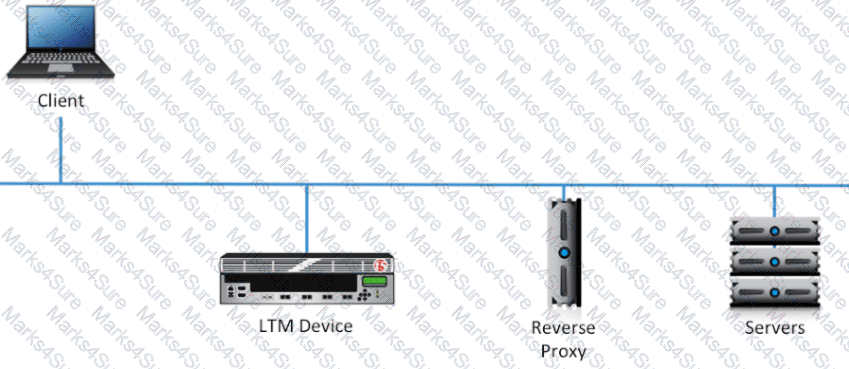
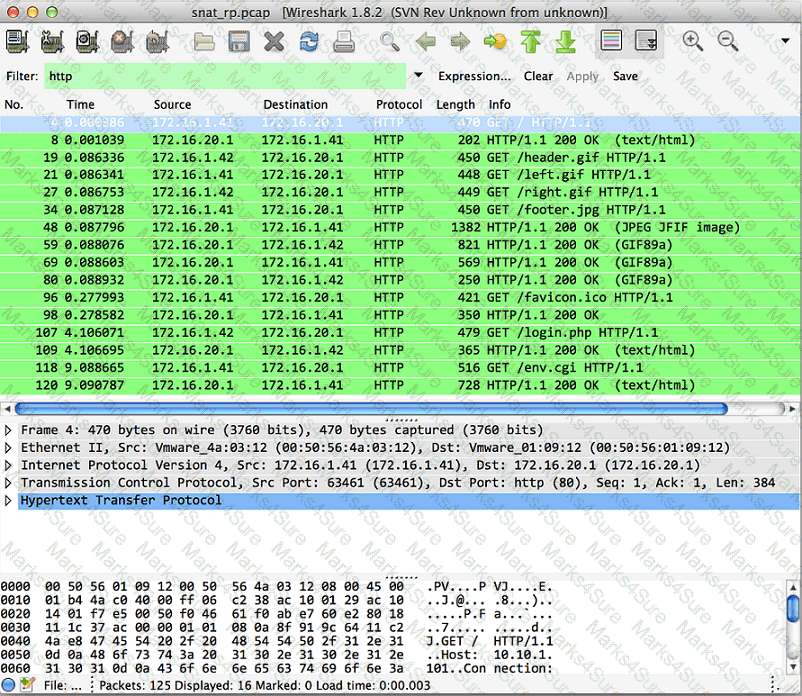
-- Exhibit --
Refer to the exhibits.
A virtual server has been configured for SSL offload on a single-arm network. On average, the virtual server will be handling 100,000 connections, with a peak of 130,000 connections. Between the virtual server and the web servers there is a single reverse proxy to provide site caching. The proxy is configured to perform source IP persistence before contacting the web servers. The site is logging users out immediately after logging them in.
What should the LTM Specialist do to resolve this issue?
-- Exhibit –
-- Exhibit --
Refer to the exhibit.
An LTM Specialist is troubleshooting an HTTP monitor that is marking a pool member as down. Connecting to the pool member directly through a browser shows the application is up and functioning correctly.
How should the send string be modified to correct this issue?
An LTM Specialist is creating a custom EAV monitor.
In which directory should the LTM Specialist upload the script?
An LTM Specialist needs to modify the logging level for tcpdump execution events. Checking the BigDB Key, the following is currently configured:
sys db log.tcpdump.level {
value "Notice"
}
Which command should the LTM Specialist execute on the LTM device to change the logging level to informational?
An LTM Specialist is troubleshooting an issue with a new virtual server. When connecting through the virtual server, clients receive the message "The connection was reset" in the browser, although connections directly to the pool member show the application is functioning correctly.
ltm pool srv1_https_pool {
members {
192.168.2.1:https{
address 192.168.2.1
}
}
}
ltm virtual https_example_vs {
destination 192.168.1.155:https
ip-protocol tcp
mask 255.255.255.255
pool srv1_https_pool
profiles {
http { }
tcp { }
}
snat automap
vlans-disabled
}
How should the LTM Specialist resolve this issue?
-- Exhibit –
-- Exhibit --
Refer to the exhibit.
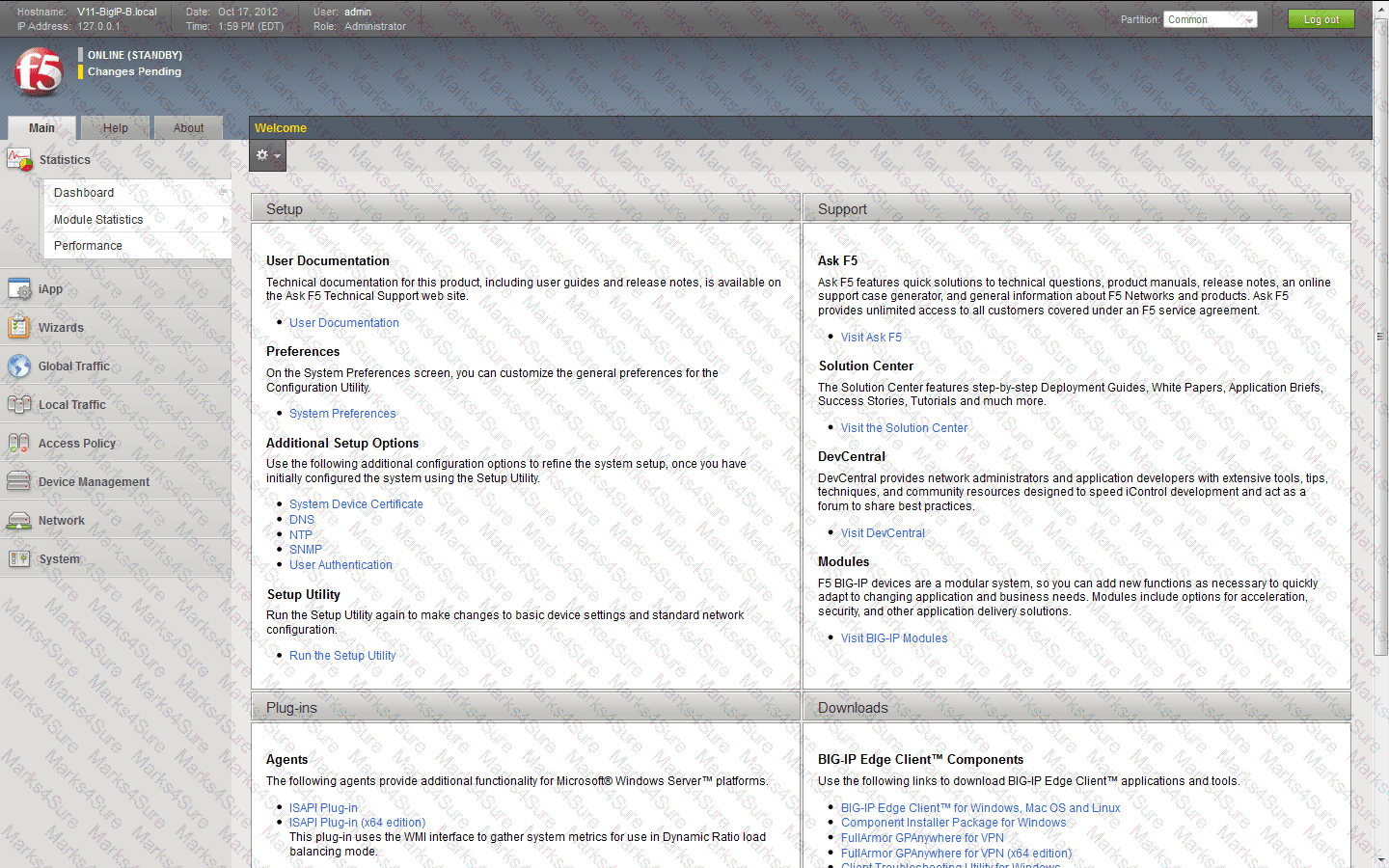
Which step should an LTM Specialist take to utilize AVR?
-- Exhibit –
-- Exhibit --
Refer to the exhibit.
An LTM Specialist creates a virtual server to load balance traffic to a pool of HTTPS servers. The servers use client certificates for user authentication. The virtual server has clientssl, serverssl, and http profiles enabled. Clients are unable to connect to the application through the virtual server, but they are able to connect to the application servers directly.
Which change to the LTM device configuration will resolve the problem?
An LTM Specialist loads a UCS file generated on a different LTM device and receives the following error message:
"mcpd[2395]: 01070608:0: License is not operational (expired or digital signature does not match contents)"
Which command should the LTM Specialist use to prevent the error?
The LTM device is configured to provide load balancing to a set of web servers that implement access control lists (ACL) based on the source IP address of the client. The ACL is at the network level and the web server is configured to send a TCP reset back to the client if it is NOT permitted to connect.
The virtual server is configured with the default OneConnect profile.
The ACL is defined on the web server as:
Permit: 192.168.136.0/24
Deny: 192.168.116.0/24
The packet capture is taken of two individual client flows to a virtual server with IP address 192.168.136.100.
Client A - Src IP 192.168.136.1 - Virtual Server 192.168.136.100:
Clientside:
09:35:11.073623 IP 192.168.136.1.55684 > 192.168.136.100.80: S 869998901:869998901(0) win 8192 < mss 1460,nop,wscale 2,nop,nop,sackOK >
09:35:11.073931 IP 192.168.136.100.80 > 192.168.136.1.55684: S 2273668949:2273668949(0) ack 869998902 win 4380 < mss 1460,nop,wscale 0,sackOK,eol >
09:35:11.074928 IP 192.168.136.1.55684 > 192.168.136.100.80: . ack 1 win 16425
09:35:11.080936 IP 192.168.136.1.55684 > 192.168.136.100.80: P 1:299(298) ack 1 win 16425
09:35:11.081029 IP 192.168.136.100.80 > 192.168.136.1.55684: . ack 299 win 4678
Serverside:
09:35:11.081022 IP 192.168.136.1.55684 > 192.168.116.128.80: S 685865802:685865802(0) win 4380 < mss 1460,nop,wscale 0,sackOK,eol >
09:35:11.081928 IP 192.168.116.128.80 > 192.168.136.1.55684: S 4193259095:4193259095(0) ack 685865803 win 5840 < mss 1460,nop,nop,sackOK,nop,wscale 6 >
09:35:11.081943 IP 192.168.136.1.55684 > 192.168.116.128.80: . ack 1 win 4380
09:35:11.081955 IP 192.168.136.1.55684 > 192.168.116.128.80: P 1:299(298) ack 1 win 4380
09:35:11.083765 IP 192.168.116.128.80 > 192.168.136.1.55684: . ack 299 win 108
Client B - Src IP 192.168.116.1 - Virtual Server 192.168.136.100:
Clientside:
09:36:11.244040 IP 192.168.116.1.55769 > 192.168.136.100.80: S 3320618938:3320618938(0) win 8192 < mss 1460,nop,wscale 2,nop,nop,sackOK >
09:36:11.244152 IP 192.168.136.100.80 > 192.168.116.1.55769: S 3878120666:3878120666(0) ack 3320618939 win 4380 < mss 1460,nop,wscale 0,sackOK,eol >
09:36:11.244839 IP 192.168.116.1.55769 > 192.168.136.100.80: . ack 1 win 16425
09:36:11.245830 IP 192.168.116.1.55769 > 192.168.136.100.80: P 1:299(298) ack 1 win 16425
09:36:11.245922 IP 192.168.136.100.80 > 192.168.116.1.55769: . ack 299 win 4678
Serverside:
09:36:11.245940 IP 192.168.136.1.55684 > 192.168.116.128.80: P 599:897(298) ack 4525 win 8904
09:36:11.247847 IP 192.168.116.128.80 > 192.168.136.1.55684: P 4525:5001(476) ack 897 win 142
Why was the second client flow permitted by the web server?
A client is attempting to log in to a web application that requires authentication. The following HTTP headers are sent by the client:
GET /owa/ HTTP/1.1
Authorization: Basic dXNlcm5hbWU6cGFzc3dvcmQ=
User-Agent: curl/7.26.0
Host: 10.0.0.14
Accept: */*
Accept-EncodinG. gzip,deflate
The web server is responding with the following HTTP headers:
HTTP/1.1 401 Unauthorized
Content-TypE. text/html
Server: Microsoft-IIS/7.5
WWW-AuthenticatE. NTLM
DatE. Wed, 16 Aug 1977 19:12:31 GMT
Content-LengtH. 1293
The client has checked the login credentials and believes the correct details are being entered.
What is the reason the destination web server is sending an HTTP 401 response?
An LTM Specialist wants to allow access to the Always On Management (AOM) from the network.
Which two methods should the LTM Specialist use to configure the AOM interface? (Choose two.)
An LTM Specialist is troubleshooting a problem on an eCommerce website. The user browses the online store using port 80, adding items to the shopping cart. The user then clicks the "Checkout" button on the site, which redirects the user to port 443 for the checkout process. Suddenly, the user's shopping cart is shown as empty. The shopping cart data is stored in memory on the server, and the default source address persistence profile is used on both virtual servers.
How should the LTM Specialist resolve this issue?
An LTM device supports two power supplies. The value of the BigDB key "platform.powersupplymonitor" is equal to enable.
Where would the error message be visible if one of the power supplies fails or is NOT plugged in?
-- Exhibit –
-- Exhibit --
Refer to the exhibit.
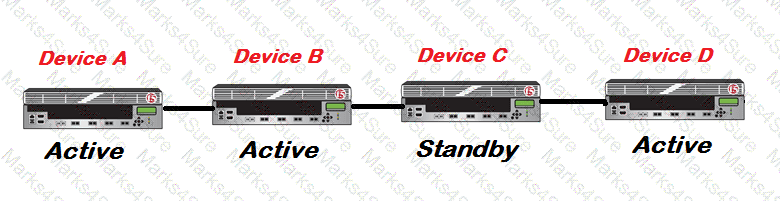
An LTM Specialist is upgrading the LTM devices.
Which device should be upgraded first?
What is the recommended procedure for upgrading a major TMOS release on a BIG-IP platform?
-- Exhibit --
-- Exhibit --
Refer to the exhibit.
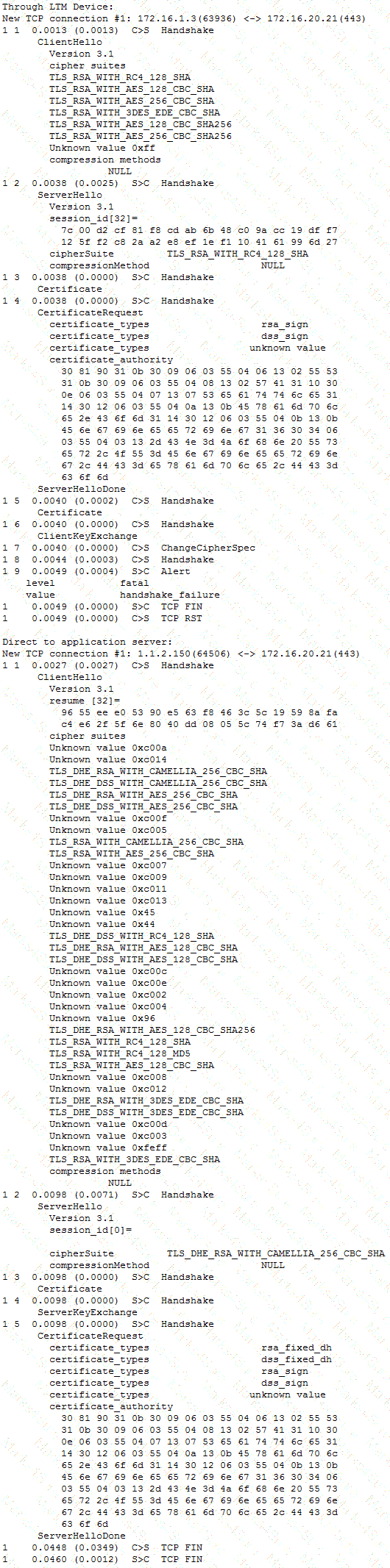
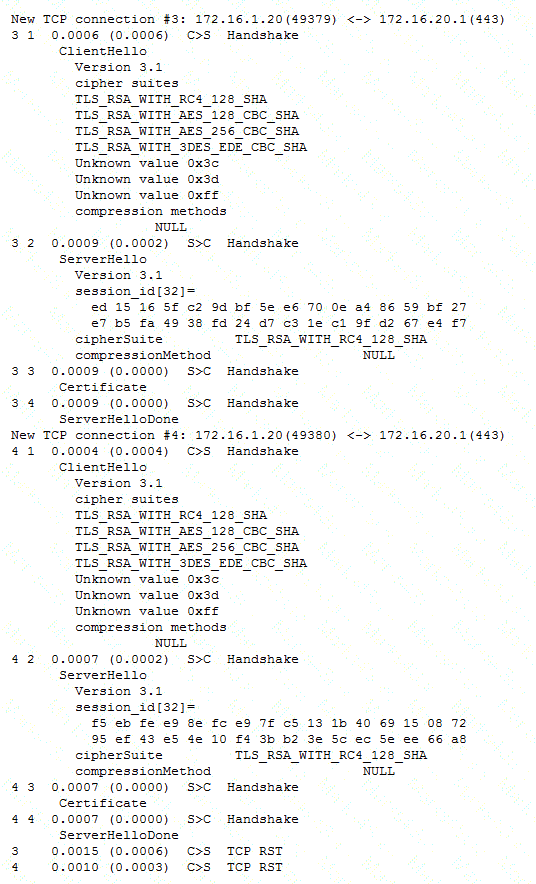
A company uses a complex piece of client software that connects to one or more virtual servers (VS) hosted on an LTM device. The client software is experiencing issues. An LTM Specialist must determine the cause of the problem. The LTM Specialist has the tcpdump extract. The client loses connection with the LTM device.
Where is the reset originating?
An application is configured on an LTM device:
Virtual server: 10.0.0.1:80 (VLAN vlan301)
SNAT IP: 10.0.0.1
Pool members: 10.0.1.1:8080, 10.0.1.2:8080, 10.0.1.3:8080 (VLAN vlan302)
Which packet capture should the LTM Specialist perform on the LTM device command line interface to capture only client traffic specifically for this virtual server?
An LTM Specialist is troubleshooting an issue where one LTM device in a three LTM device group is failing to synchronize after a synchronize to group command is issued. The LTM Specialist verifies there are no packet filters, port lock down, or network issues preventing the connection.
What are two reasons the synchronization group is having issues? (Choose two.)
-- Exhibit –
-- Exhibit --
Refer to the exhibits.
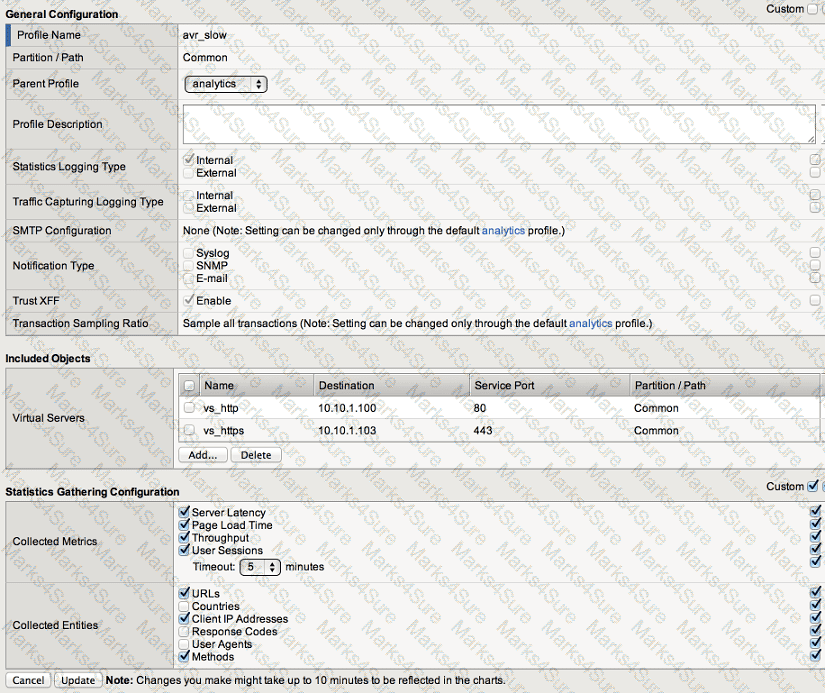
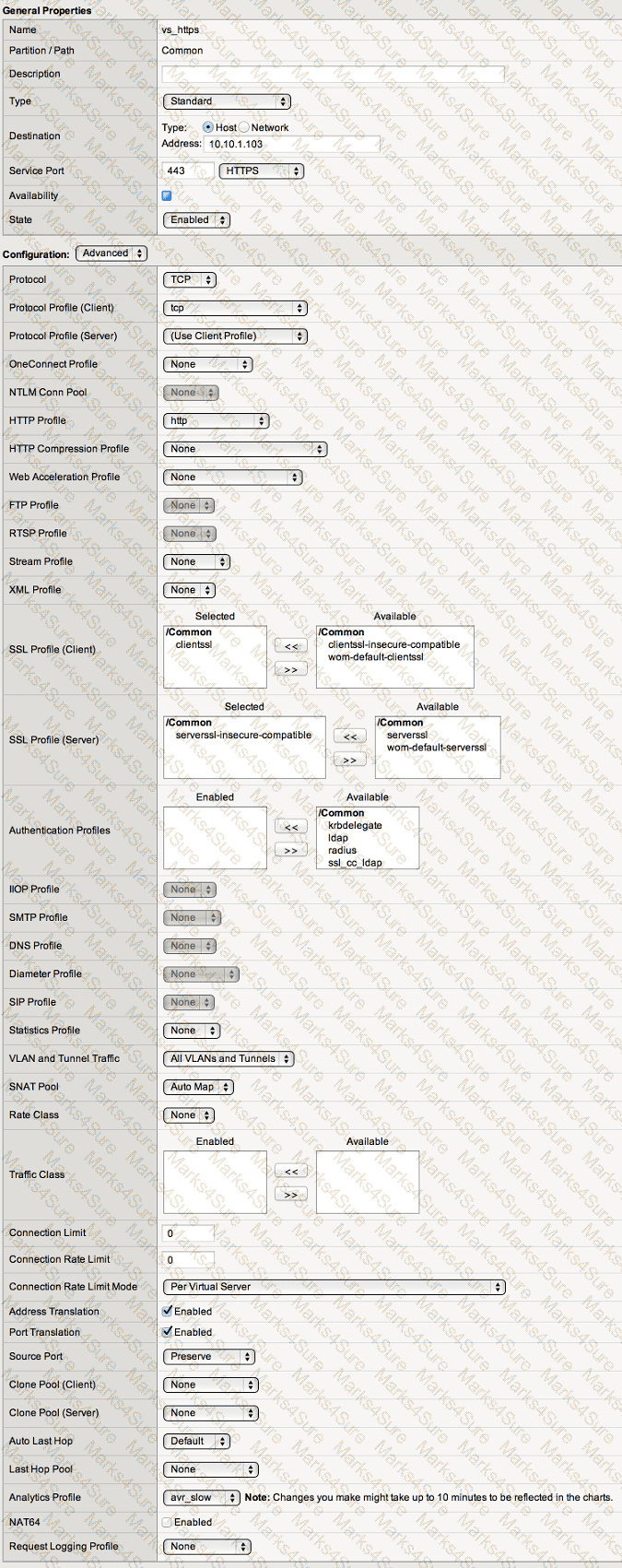
When observing the AVR statistics for the HTTPS_VS, an LTM Specialist realizes that HTTP status codes are NOT being recorded.
How should the LTM Specialist modify the configuration to record the HTTP status codes?
-- Exhibit –
-- Exhibit --
Refer to the exhibit.
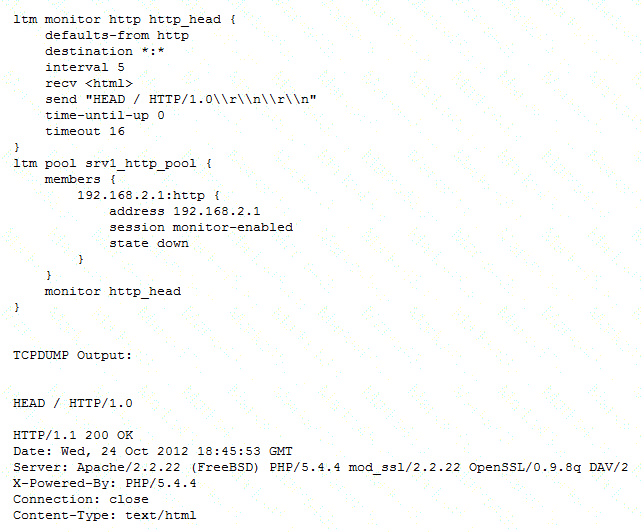
An LTM Specialist is troubleshooting a new HTTP monitor on a pool. The pool member is functioning correctly when accessed directly through a browser. However, the monitor is marking the member as down. The LTM Specialist captures the monitor traffic via tcpdump.
What is the issue?
Given a tcpdump on an LTM device from both sides of a connection on the External and Internal VLANs, how should an LTM Specialist determine if SNAT is enabled for a particular pool?
There are three servers in the pool: 172.16.20.1, 172.16.20.2, and 172.16.20.3, with the virtual IP address 10.0.20.88.
A user CANNOT connect to an HTTP application. To understand the problem and find a solution, the LTM Specialist runs two concurrent traces on the LTM device, with the following results:
Trace on client side:
tcpdump: verbose output suppressed, use -v or -vv for full protocol decode
listening on 0.0, link-type EN10MB (Ethernet), capture size 96 bytes
22:22:07.423759 IP 172.16.20.100.53875 > 10.0.20.88.80: S 998346084:998346084(0) win 5840 < mss 1460,sackOK,timestamp 67942058 0,nop,wscale 4 >
22:22:07.424056 IP 10.0.20.88.80 > 172.16.20.100.53875: S 4671780:4671780(0) ack 998346085 win 4380 < mss 1460,nop,wscale 0,nop,nop,timestamp 2392362490 67942058,sackOK,eol >
22:22:07.424776 IP 172.16.20.100.53875 > 10.0.20.88.80: . ack 1 win 365 < nop,nop,timestamp 67942058 2392362490 >
22:22:07.424790 IP 172.16.20.100.53875 > 10.0.20.88.80: P 1:149(148) ack 1 win 365 < nop,nop,timestamp 67942058 2392362490 >
22:22:07.424891 IP 10.0.20.88.80 > 172.16.20.100.53875: . ack 149 win 4528 < nop,nop,timestamp 2392362491 67942058 >
22:22:12.024850 IP 10.0.20.88.80 > 172.16.20.100.53875: R 1:1(0) ack 149 win 4528
6 packets captured
6 packets received by filter
0 packets dropped by kernel
Trace on server side:
tcpdump: verbose output suppressed, use -v or -vv for full protocol decode
listening on internal, link-type EN10MB (Ethernet), capture size 96 bytes
22:22:07.424881 IP 172.16.20.100.53875 > 172.16.20.2.80: S 51116678:51116678(0) win 4380 < mss 1460,nop,wscale 0,nop,nop,timestamp 2392362491 0,sackOK,eol >
22:22:08.424893 IP 172.16.20.100.53875 > 172.16.20.2.80: S 51116678:51116678(0) win 4380 < mss 1460,nop,wscale 0,nop,nop,timestamp 2392363491 0,sackOK,eol >
22:22:09.625082 IP 172.16.20.100.53875 > 172.16.20.2.80: S 51116678:51116678(0) win 4380 < mss 1460,nop,wscale 0,nop,nop,timestamp 2392364691 0,sackOK,eol >
22:22:10.825194 IP 172.16.20.100.53875 > 172.16.20.2.80: S 51116678:51116678(0) win 4380 < mss 1460,sackOK,eol >
4 packets captured
4 packets received by filter
0 packets dropped by kernel
What should the LTM Specialist do to solve the problem?
A virtual server for a set of web services is constructed on an LTM device. The LTM Specialist has created an iRule and applied this iRule to the virtual server:
when HTTP_REQUEST {
switch [HTTP::uri] {
"/ws1/ws.jsp" {
log local0. "[HTTP::uri]-Redirected to JSP Pool"
pool JSP
}
default { log local0. "[HTTP::uri]-Redirected to Non-JSP Pool"
pool NonJSP
}
}
}
However, the iRule is NOT behaving as expected. Below is a snapshot of the log:
/WS1/ws.jsp-Redirected to JSP Pool
/WS1/ws.jsp-Redirected to JSP Pool
/WS1/ws.jsp-Redirected to JSP Pool
/WS1/WS.jsp-Redirected to Non-JSP Pool
/ws1/WS.jsp-Redirected to Non-JSP Pool
/WS1/ws.jsp-Redirected to JSP Pool
/ws1/ws.jsp-Redirected to Non-JSP Pool
What should the LTM Specialist do to resolve this?
An LTM device is deployed in a one-armed topology. The virtual server, clients, and web servers are connected on the LTM device internal VLAN. A client tries to connect to the virtual server and is unable to establish a connection. A packet capture from the LTM device internal VLAN shows that the HTTP request is being forwarded to the web server.
From which two additional locations should protocol analyzer data be collected? (Choose two.)
-- Exhibit –
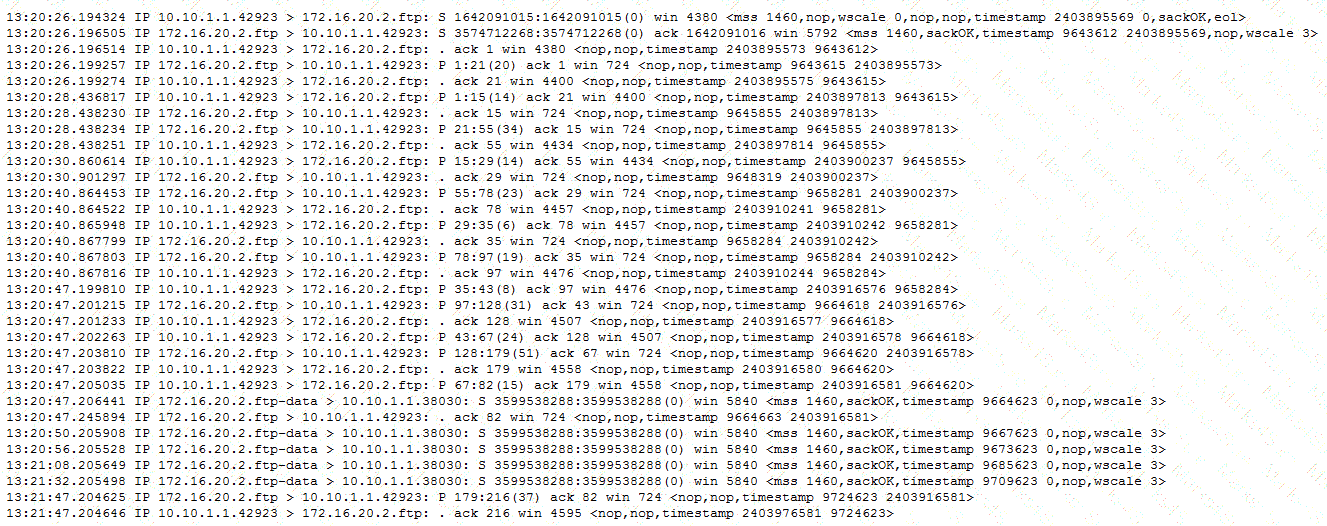
-- Exhibit --
Refer to the exhibit.
An LTM Specialist configures a virtual server to load balance to a pool of FTP servers. File transfers are failing. The virtual server is configured as follows:
ltm virtual ftp_vs {
destination 10.10.1.103:ftp
ip-protocol tcp
mask 255.255.255.255
pool ftp_pool
profiles {
tcp { }
}
vlans-disabled
}
Which change will resolve the problem?
A web application requires the client to provide the destination server and service identification.
Which HTTP header will supply this information?
-- Exhibit –
-- Exhibit --
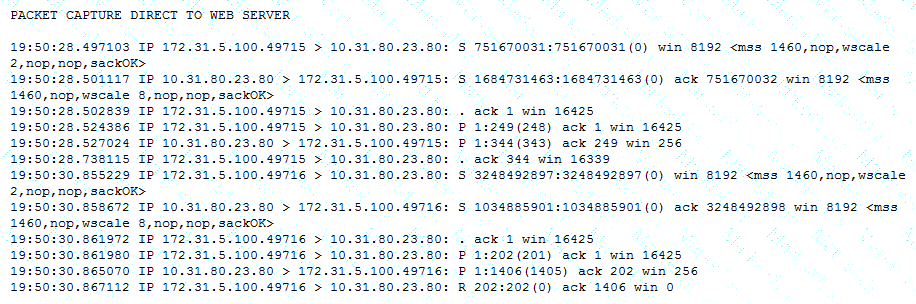
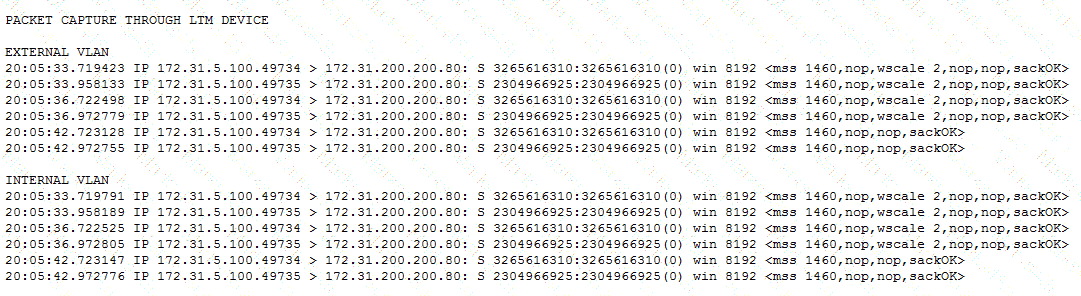
Refer to the exhibits.
Users are able to access the application when connecting directly to the web server but are unsuccessful when connecting to the virtual server. Return traffic bypasses the LTM device using Layer 2 nPath routing.
Which configuration change resolves this problem?
A web developer has created a custom HTTP call to a backend application. The HTTP headers being sent by the HTTP call are:
GET / HTTP/1.1
User-Agent: MyCustomApp (v1.0)
Accept: text/html
Cache-Control: no-cache
Connection: keep-alive
CookiE. somecookie=1
The backend server is responding with the following:
HTTP/1.1 400 Bad Request
DatE. Wed, 20 Jul 2012 17:22:41 GMT
Connection: close
Why is the HTTP web server responding with a HTTP 400 Bad Request?
Given this as the first packet displayed of an ssldump:
2 2 1296947622.6313 (0.0001) S > CV3.1(74) Handshake
ServerHello
Version 3.1
random[32]=
19 21 d7 55 c1 14 65 63 54 23 62 b7 c4 30 a2 f0
b8 c4 20 06 86 ed 9c 1f 9e 46 0f 42 79 45 8a 29
session_id[32]=
c4 44 ea 86 e2 ba f5 40 4b 44 b4 c2 3a d8 b4 ad
4c dc 13 0d 6c 48 f2 70 19 c3 05 f4 06 e5 ab a9
cipherSuite TLS_RSA_WITH_RC4_128_SHA
compressionMethod NULL
In reviewing the rest of the ssldump, the application data is NOT being decrypted.
Why is ssldump failing to decrypt the application data?
-- Exhibit –
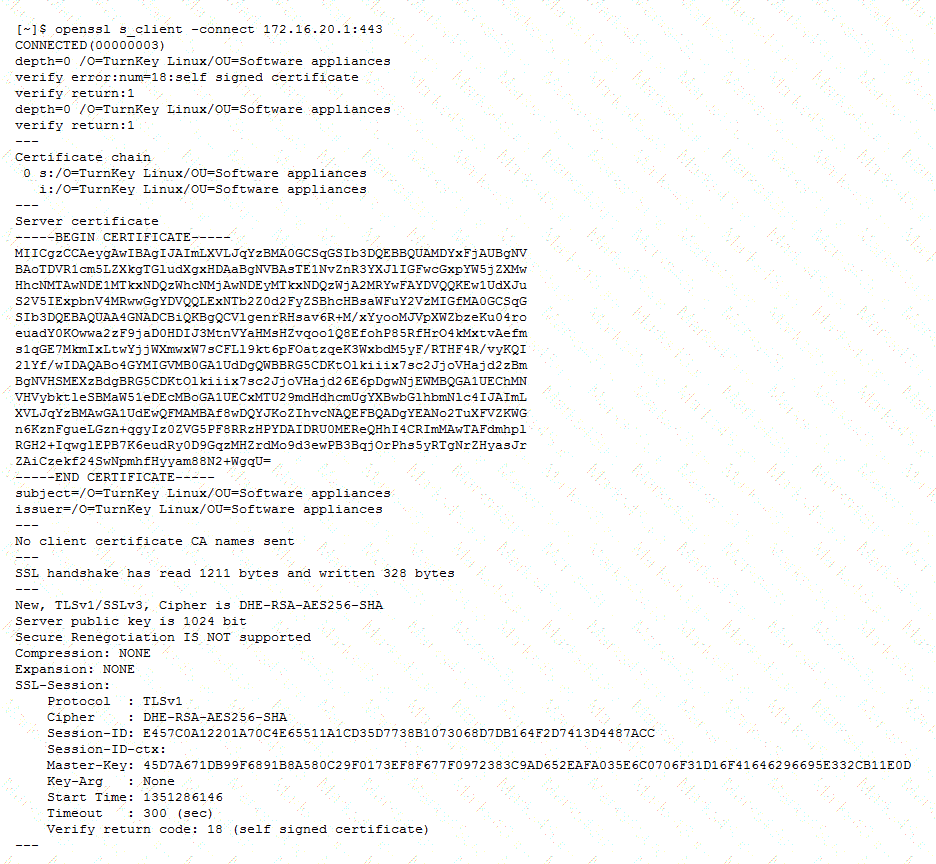
-- Exhibit --
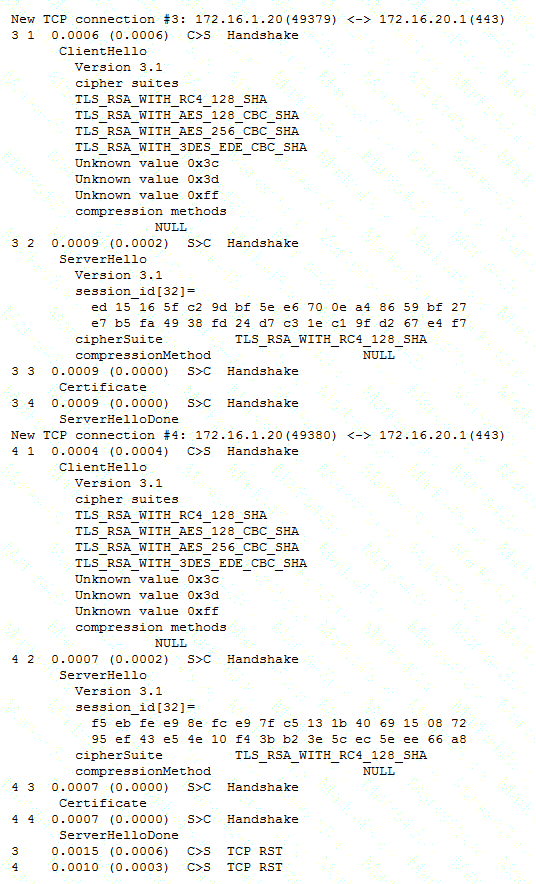
Refer to the exhibits.
After upgrading LTM from v10 to v11, users are unable to connect to an application. The virtual server is using a client SSL profile for re-terminating SSL for payload inspection, but a server SSL profile is being used to re-encrypt the request.
A client side ssldump did NOT show any differences between the traffic going directly to the server and the traffic being processed by the LTM device. However, packet capture was done on the server, and differences were noted.
Which modification will allow the LTM device to process the traffic correctly?
-- Exhibit –
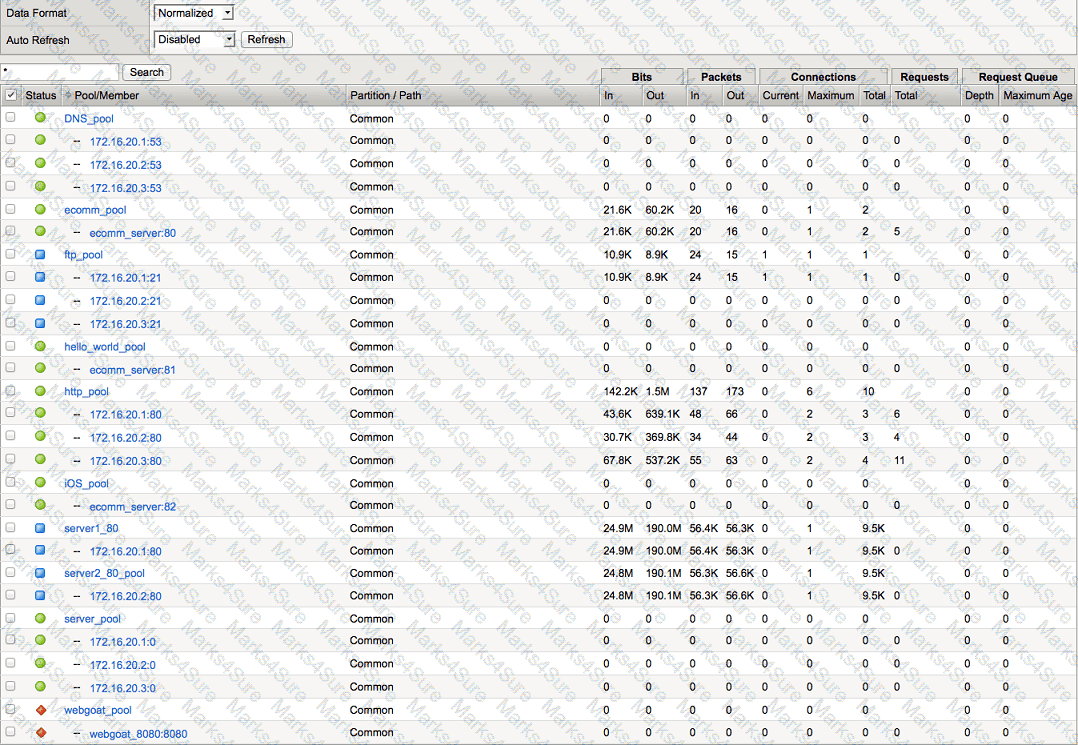
-- Exhibit --
Refer to the exhibit.
Which pool can be removed without affecting client traffic?
An HA pair of LTM devices configured in Active-Standby mode stops responding to traffic and causes an outage. The Active device becomes Standby, but the partner device stays in Standby mode instead of taking over as Active. A reboot and restart of the services brings the LTM device to Active mode for a short time, but then it goes into Standby mode again.
Which two configuration components caused this condition? (Choose two.)
-- Exhibit –
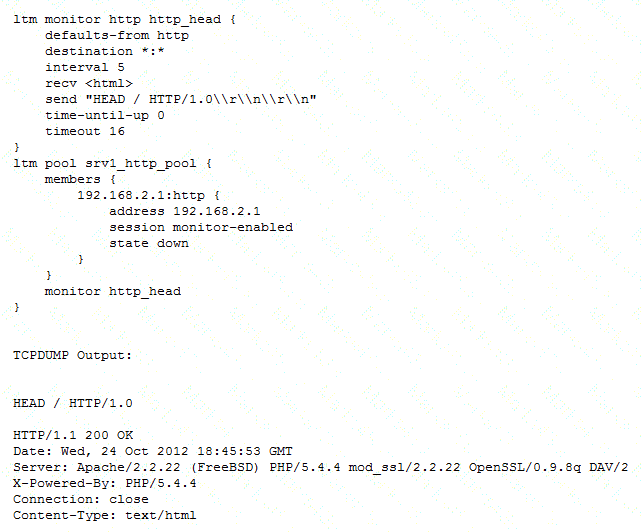
-- Exhibit --
Refer to the exhibit.
An LTM Specialist is troubleshooting a new HTTP monitor on a pool. The pool member is functioning correctly when accessed directly through a browser, although the monitor is marking the member as down. As part of the troubleshooting, the LTM Specialist has captured the monitor traffic via tcpdump.
How should the LTM Specialist resolve this issue?
A user is having issues with connectivity to an HTTPS virtual server. The virtual server is on the LTM device's external vlan, and the pools associated with the virtual server are on the internal vlan. An LTM Specialist does a tcpdump on the external interface and notices that the host header is incomplete.
In which location should the LTM Specialist put a traffic analyzer to gather the most pertinent data?
-- Exhibit –
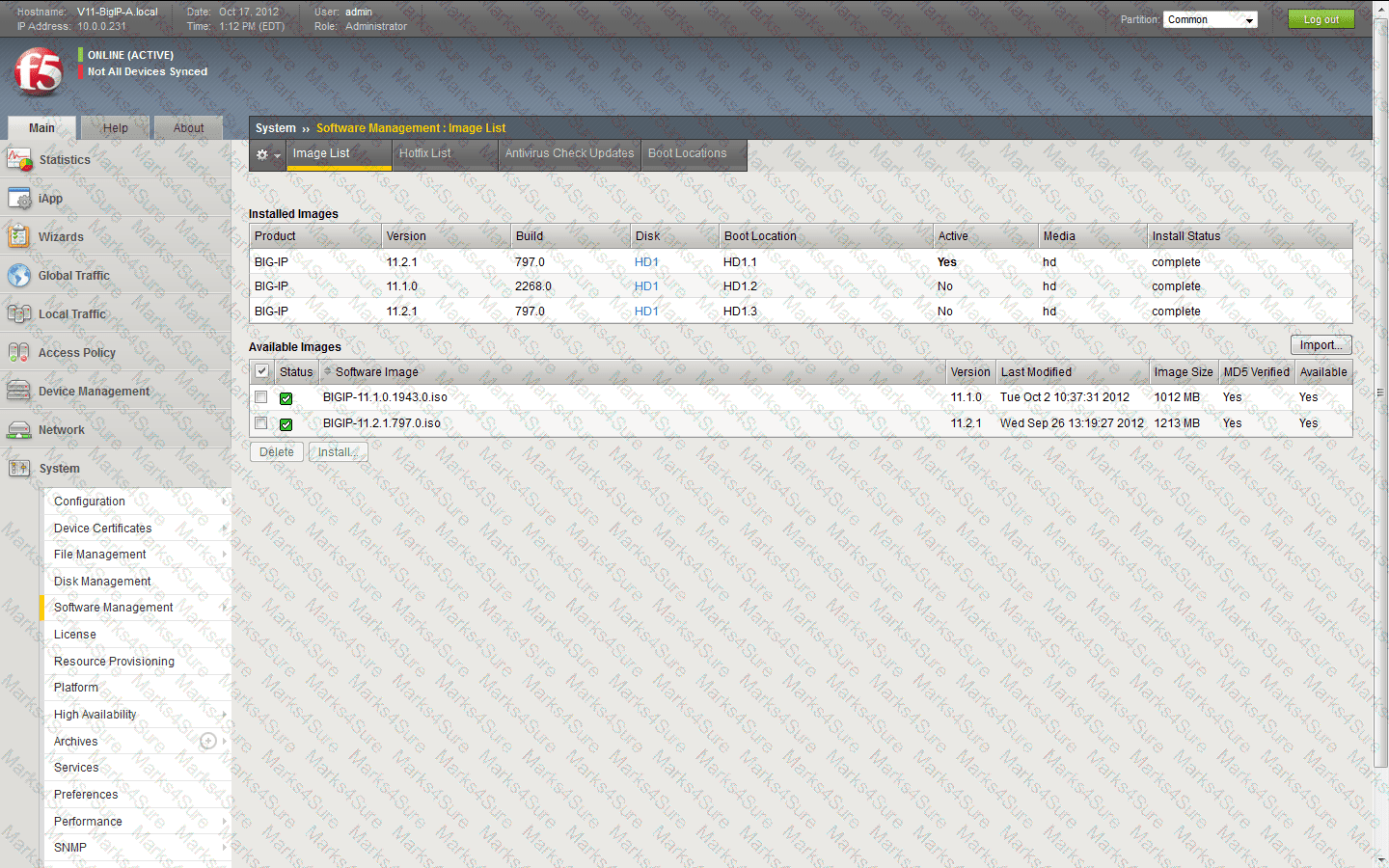
-- Exhibit --
Refer to the exhibit.
An LTM Specialist has uploaded a qkview to F5 iHealth.
Within the GUI, what is the correct procedure to comply with the recommendation shown in the exhibit?
A BIG-IP Operator has made a grave error and deleted a few virtual servers on the active LTM device fronting the web browsing proxies. The BIG-IP Operator has NOT yet performed a configuration sync.
Which command should the LTM Specialist execute on the active LTM device to force a failover to the standby node and restore web browsing?
An LTM device has a virtual server configured as a Performance Layer 4 virtual listening on 0.0.0.0:0 to perform routing of packets to an upstream router. The client machine at IP address 192.168.0.4 is attempting to contact a host upstream of the LTM device on IP address 10.0.0.99.
The network flow is asymmetrical, and the following TCP capture displays:
# tcpdump -nnni 0.0 'host 192.168.0.4 and host 10.0.0.99'
tcpdump: verbose output suppressed, use -v or -vv for full protocol decode
listening on 0.0, link-type EN10MB (Ethernet), capture size 96 bytes
05:07:55.499954 IP 192.168.0.4.35345 > 10.0.0.99.443: S 3205656213:3205656213(0) ack 3267995082 win 1480
05:07:55.499983 IP 10.0.0.99.443 > 192.168.0.4.35345: R 1:1(0) ack 1 win 0
05:07:56.499960 IP 192.168.0.4.35345 > 10.0.0.99.443: S 3205656213:3205656213(0) ack 3267995082 win 1480
05:07:56.499990 IP 10.0.0.99.443 > 192.168.0.4.35345: R 1:1(0) ack 1 win 0
4 packets captured
Which option within the fastL4 profile needs to be enabled by the LTM Specialist to prevent the LTM device from rejecting the flow?
-- Exhibit –

-- Exhibit --
Refer to the exhibit.
An LTM Specialist configures a virtual server that balances HTTP connections to a pool of three application servers. Approximately one out of every three connections to the virtual server fails.
Which two actions will resolve the problem? (Choose two.)
A new VLAN vlan301 has been configured on a highly available LTM device in partition ApplicationA. A new directly connected backend server has been placed on vlan301. However, there are connectivity issues pinging the default gateway. The VLAN self IPs configured on the LTM devices are 192.168.0.251 and 192.168.0.252 with floating IP 192.168.0.253. The LTM Specialist needs to perform a packet capture to assist with troubleshooting the connectivity.
Which command should the LTM Specialist execute on the LTM device command line interface to capture the attempted pings to the LTM device default gateway on VLAN vlan301?
-- Exhibit –
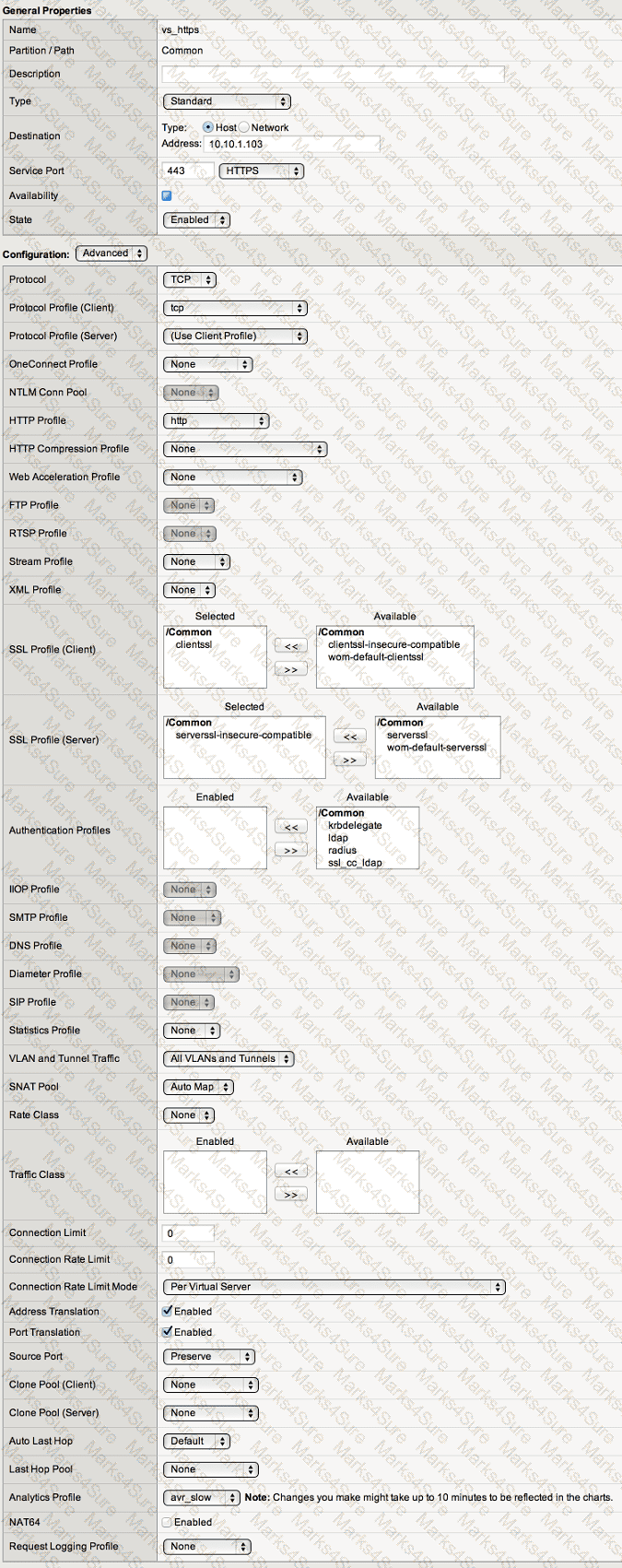
-- Exhibit --
Refer to the exhibit.
An LTM Specialist is troubleshooting an issue with an application configured on an LTM device. The application works properly when accessed directly via the servers; however, it does not work when accessed via the LTM device. The virtual server, 192.168.1.211:443, is configured to SNAT using the address 192.168.1.144 and references a pool with the member 192.168.10.80:443. The virtual server has no Client or Server SSL profiles associated.
Which configuration change will allow the application to function through the virtual server?
-- Exhibit –
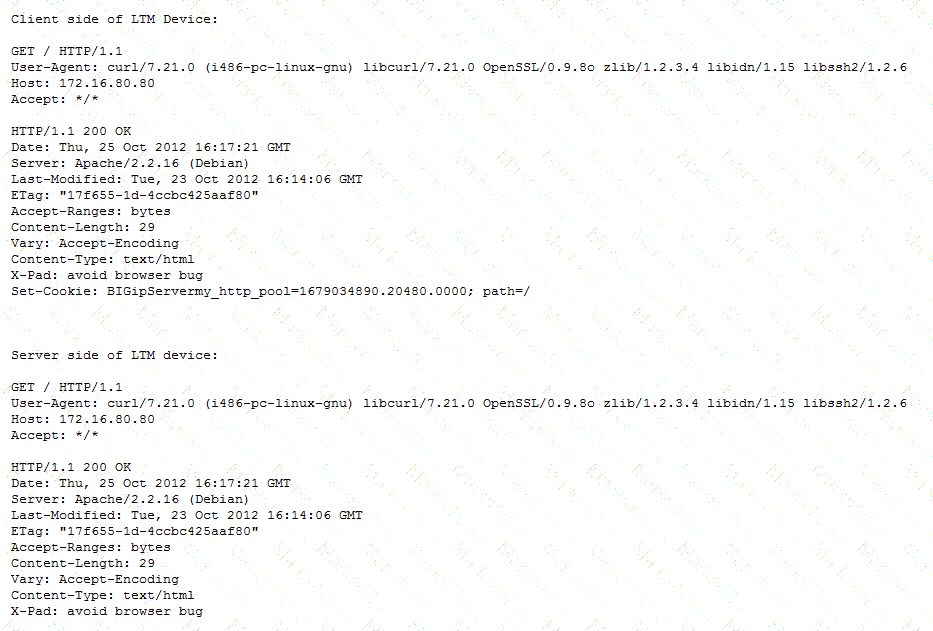
-- Exhibit --
Refer to the exhibit.
A web application is configured to allow sessions to continue even after a user computer is shut down for the night. A new LTM device is configured to load balance the web application to several servers. The application owner reports that application users are logged out of the web application whenever their browser is restarted or computer is rebooted.
What is the problem?
A virtual server for a set of web services is constructed on an LTM device. The LTM Specialist has created an iRule and applied this iRule to the virtual server:
when HTTP_REQUEST {
switch [HTTP::uri] {
"/WS1/ws.jsp" {
log local0. "[HTTP::uri]-Redirected to JSP Pool"
pool JSP
}
default { log local0. "[HTTP::uri]-Redirected to Non-JSP Pool"
pool NonJSP
}
}
}
However, the iRule is NOT behaving as expected. Below is a snapshot of the log:
/WS1/ws.jsp-Redirected to JSP Pool
/WS1/ws.jsp-Redirected to JSP Pool
/WS1/ws.jsp-Redirected to JSP Pool
/WS1/WS.jsp-Redirected to Non-JSP Pool
/ws1/WS.jsp-Redirected to Non-JSP Pool
/WS1/ws.jsp-Redirected to JSP Pool
/ws1/ws.jsp-Redirected to Non-JSP Pool
What is the problem?
An LTM Specialist has just captured trace /var/tmp/trace.cap for site www.example.com while listening on virtual address 10.0.0.1:443 configured on partition ApplicationA. The data payload being captured is SSL encrypted.
Which command should the LTM Specialist execute to decrypt the data payload?
An LTM Specialist defines a receive string in the HTTP monitor and then assigns it to the HTTP pool. The monitor has an interval of 5 seconds and a timeout of 16 seconds.
If the receive string is NOT seen in the the HTTP payload after 20 seconds, how does the LTM device mark the monitor status?
Given:
Filesystem Size Used Avail Use% Mounted on
/dev/md11 248M 248M 0 100% /
/dev/md13 3.0G 76M 2.8G 3% /config
/dev/md12 1.7G 1.1G 476M 71% /usr
/dev/md14 3.0G 214M 2.6G 8% /var
/dev/md0 30G 2.2G 26G 8% /shared
/dev/md1 6.9G 288M 6.3G 5% /var/log
none 3.9G 452K 3.9G 1% /dev/shm
none 3.9G 19M 3.9G 1% /var/tmstat
none 3.9G 1.2M 3.9G 1% /var/run
prompt 4.0M 12K 4.0M 1% /var/prompt
/dev/md15 12G 8.3G 3.1G 74% /var/lib/mysql
Which command is used to produce this output?
An LTM Specialist notices the following error on the stdout console:
mcpd[2395]: 01070608:0: License is not operational(expired or digital signature does not match contents)
Which command should be executed to verify the LTM device license?
An LTM Specialist troubleshooting an issue looks at the following /var/log/ltm entries:
Oct 2 04:52:42 slot1/tmm7 crit tmm7[21734]: 01010201:2: Inet port exhaustion on 10.143.109.5 to 10.143.147.150:53 (proto 17)
Oct 2 05:37:16 slot1/tmm7 crit tmm7[21734]: 01010201:2: Inet port exhaustion on 10.143.109.5 to 10.143.147.150:53 (proto 17)
Oct 2 05:57:32 slot1/tmm2 crit tmm2[21729]: 01010201:2: Inet port exhaustion on 10.143.109.5 to 10.143.147.150:53 (proto 17)
Oct 2 06:30:03 slot1/tmm7 crit tmm7[21734]: 01010201:2: Inet port exhaustion on 10.143.109.5 to 10.143.147.150:53 (proto 17)
Oct 2 06:37:44 slot1/tmm2 crit tmm2[21729]: 01010201:2: Inet port exhaustion on 10.143.109.5 to 10.143.147.150:53 (proto 17)
Oct 2 06:47:05 slot1/tmm5 crit tmm5[21732]: 01010201:2: Inet port exhaustion on 10.143.109.5 to 10.143.147.150:53 (proto 17)
Which configuration item should the LTM Specialist review to fix the issue?
An LTM device is load balancing telnet and ssh applications in a client/server environment experiencing significant packet delay.
Which setting in the TCP profile should reduce the amount of packet delay?
-- Exhibit –
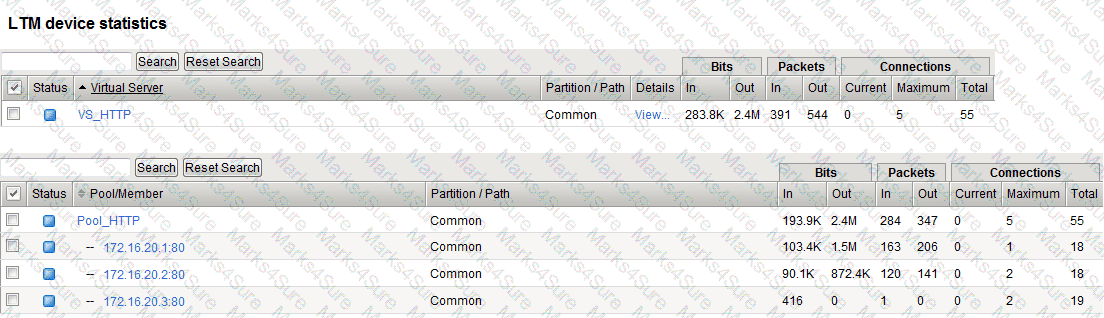
-- Exhibit --
Refer to the exhibit.
An LTM Specialist is investigating intermittent page load issues being reported by users.
What should the LTM Specialist do to resolve the issue?
A web application is meant to log the URI of the resource that responded to the client's initial Request-URI.
Which HTTP header will supply this information?
-- Exhibit –
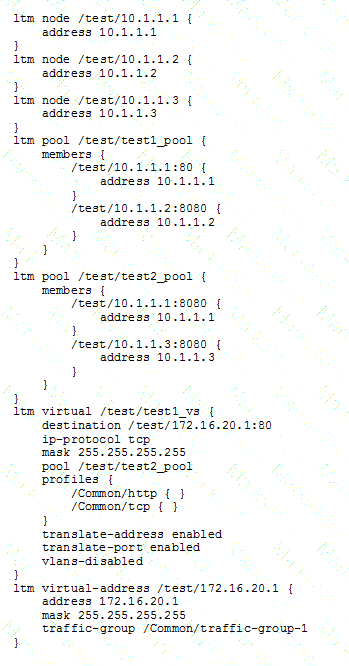
-- Exhibit --
Refer to the exhibit.
An LTM Specialist is reviewing the 'test' partition.
Which objects, in order, can be removed from the partition?
An F5 LTM Specialist needs to perform an LTM device configuration backup prior to RMA swap.
Which command should be executed on the command line interface to create a backup?
PDF + Testing Engine

Testing Engine
PDF (Q&A)
