
Spring Sale Limited Time 65% Discount Offer - Ends in 0d 00h 00m 00s - Coupon code: pass65

9L0-415 OS X Support Essentials 10.9 Questions and Answers

Questions 4

The function of journaling in the Mac OS Extended (Journaled) file system is to ________.

Options:

A.

protect volume structure integrity in cases of unexpected shutdown

B.

provide a backup of user files

C.

provide support for resource forks, extended attributes, and metadata

D.

provide support for Spotlight searches

Buy Now
Questions 5

When an OS X computer starts up and a standard user logs in, in what order do the three components below launch?

Options:

A.

1. login items

2. launch agents

3. launch daemons

B.

1. launch agents

2. login items

3. launch daemons

C.

1. launch daemons

2. launch agents

3. login items

D.

1. launch daemons

2. login items

3. launch agents

Buy Now
Questions 6

In OS X Mountain Lion, where do most applications that are NOT sandboxed store their user-specific preferences?

Options:

A.

In a preferences database file in /Library/

B.

In .DS_Store files, at the root level of ~/

C.

In a preferences database file in ~/Library/

D.

In application-specific preferences files in ~/Library/Preferences/

Buy Now
Questions 7

How can you find out which application the Finder will use to open a specific document?

Options:

A.

Select the document icon in the Finder, choose Get Info from the File menu, and click the disclosure triangle next to

" Open with " in the Info window to reveal the selected application in the pop-up menu.

B.

Select the document icon in the Finder, and choose Show Default Application from the File menu.

C.

Control-click the document icon in the Finder, and choose Show Application from the shortcut menu.

D.

Select the document icon in the Finder, choose Show Inspector from the File menu, click Application Bindings in the Inspector window, and scroll to locate the selected application in the pop-up menu.

Buy Now
Questions 8

In what order do these three OS X components load at startup?

Options:

A.

1. Firmware

2. Booter

3. Kernel

B.

1. Kernel

2. Firmware

3. Booter

C.

1. Firmware

2. Kernel

3. Booter

D.

1. Booter

2. Kernel

3. Firmware

Buy Now
Questions 9

How can a user with the short name anna exclude the /Users/anna/Downloads/ folder from Time Machine backups?

Options:

A.

Open Time Machine, choose Preferences from the Time Machine menu, click the Exclusions tab, click the Add (+) button, navigate to the /Users/anna/Downloads/ folder, and click Submit.

B.

Open the Time Machine pane of System Preferences, click Options, and add the /Users/anna/Downloads/ folder to the list of excluded items.

C.

Control-click the anna account ' s Downloads folder in the Finder, click the Sharing and Permissions disclosure button, click the Add (+) button, add the Time Machine user to the list of users, and set the Time Machine user ' s access to " No Access. "

D.

In Terminal, execute the command sudo defaults write /Library/Preferences/com.apple.TimeMachine

excludedFolders -array-add /Users/anna/Downloads.

Buy Now
Questions 10

Which folder contains items that instruct the launchd process what to launch during OS X Mountain Lion startup?

Options:

A.

/System/Library/LaunchDaemons/

B.

/var/run/launchd/

C.

/etc/launchd/

D.

/Library/Extensions/

Buy Now
Questions 11

You have a user account on an OS X Mountain Lion computer that has multiple user accounts. How can you interact with another user ' s Dropbox folder that has default permissions?

Options:

A.

You can see its contents, but you cannot add files to it.

B.

You can neither see its contents nor add files to it.

C.

You cannot see its contents, but you can add files to it.

D.

You can see its contents and you can add files to it.

Buy Now
Questions 12

You want to delete several applications by dragging them to the Trash. What fact should you be aware of?

Options:

A.

Some applications install files outside the Applications folder, so dragging an app to the Trash may not remove all of its files.

B.

User data for apps purchased in the Mac App Store will also be deleted when the app is dragged to the Trash.

C.

You must restart the Mac in order to permanently delete applications from the Trash.

D.

Apps purchased in the Mac App Store cannot be dragged to the Trash.

Buy Now
Questions 13

Which of these is a recovery key storage location that FileVault 2 offers when you enable it?

Options:

A.

Your iCloud account

B.

The System Keychain

C.

The OS X Recovery partition

D.

An Apple server

Buy Now
Questions 14

How do you reset the printing system in OS X Mountain Lion?

Options:

A.

Open the Print & Scan pane of System Preferences, and delete all of the printers in the Printers list.

B.

Navigate to /Library/Printers/ in the Finder, select all items, and move them to the Trash.

C.

Open Printer Setup Utility and choose Reset Printing System from the Printer Setup Utility menu.

D.

Open the Print & Scan preferences, Control-click in the Printers list, and choose Reset printing system from the shortcut menu.

Buy Now
Questions 15

Which statement best describes how Time Machine stores files from an OS X Mountain Lion computer, when backing up to a directlyconnected FireWire hard disk drive?

Options:

A.

Each file is saved to the external hard disk once. Files that do not change between backups are represented by hard links to save space.

B.

Each file is saved to the external hard disk once. Files that do not change between backups are represented by symbolic links to save space.

C.

Each file is saved to the external hard disk once. File changes are stored in a database on the external hard disk.

D.

Each file is rewritten to the external hard disk during each backup.

Buy Now
Questions 16

You can deselect the option to " Reopen windows when logging back in " from the logout verification dialog. You can deselect the option to " Close windows when quitting an application " from General preferences. Also from General preferences, you can select the option to " Ask to keep changes when closing documents, " which turns off the Auto Save feature.

Options:

A.

Where can you adjust application Auto Save and Resume options?

B.

How can you identify which applications are installed on your Mac?

C.

How can you identify if a Mac requires a firmware update?

D.

How can you prevent a user from installing software updates?

Buy Now
Questions 17

The Setup Assistant process guides a user through initial configuration of OS X Mavericks.

Options:

A.

What steps should you use when troubleshooting application issues?

B.

What are the minimum hardware requirements for upgrading a system with OS X Mavericks?

C.

What two methods can be used to create an external OS X Recovery disk?

D.

What process is used to guide a user through the initial configuration of OS X Mavericks?

Buy Now
Questions 18

If an issue disappears when a Safe Boot is successful, you must find and remove the third-party startup resource that caused the issue. The best way to isolate the problem is to start up the Mac in Verbose mode and then observe where the startup process fails. Verbose mode is initiated by holding down Command-V during system startup.

Options:

A.

Which changes are made when OS X Safe Boots?

B.

What backup destination disks does Time Machine support?

C.

How do network devices acquire and use self-assigned TCP/IP addresses?

D.

How do you further resolve an issue that disappears when the Mac successfully safe-boots?

Buy Now
Questions 19

Metadata is information stored outside of a file or folder. It provides additional information about files and folders. Examples include: file flags, extended file attributes, and permissions.

(No Answer)

Options:

A.

How can an OS X system automatically connect to a Wi-Fi network?

B.

What ' s a profile? How are profiles managed?

C.

What can you enable to locate a lost Mac system?

D.

What is file system metadata? What are some examples of file system metadata?

Buy Now
Questions 20

What are the primary user session stages in OS X? What are the visual and audible cues of these items?

Options:

A.

An item ' s ownership and permissions can be identified using the Info or Inspector windows in the Finder.

B.

In the Mac App Store, you can view the current Apple ID by selecting Store from the menu bar. You can get further details regarding this Apple ID, by selecting View My Account in the same menu.

C.

Each primary stage of the user session can be indicated by the following: the login window process displays the login screen; the user launched process loads applications like the Finder after user authentication; and the user environment is active any time the user is logged into the system.

D.

During user logout, the user ' s login window process does the following: requests that all user applications quit; automatically quits any user background processes; runs any logout scripts; records the logout to the main system.log file; resets device permissions and preferences to their defaults; and quits the user ' s login window and launched processes.

Buy Now
Questions 21

Any account password reset process won ' t change any keychain passwords. Therefore, the user ' s keychains won ' t automatically open when the user logs in with her new password. The user will have to manually change her keychain passwords using the Keychain Access utility.

Options:

A.

How does resetting a user ' s account password affect that user ' s login keychain?

B.

How does a user that changes his own account password affect his login keychain?

C.

How does network service order affect network connectivity?

D.

How does the Spotlight search service use metadata?

Buy Now
Questions 22

What ' s AirDrop, and how do you know if a specific Mac supports it?

Options:

A.

AirDrop provides a quick and easy method to share files locally via Wi-Fi. AirDrop creates a secure peer-to-peer network between local devices. You can verify that a Mac supports AirDrop from the Finder Go menu.

B.

Archive files are much simpler to create in the Finder and are compatible with third-party operating systems. Disk images are more difficult to create and manage, but they offer greater flexibility. Primarily, disk images can be easily modified and converted. However, OS X style disk images aren ' t compatible with third-party operating systems.

C.

The DNS service is used to translate host names to IP addresses via forward lookups and translate IP addresses to host names via reverse lookups. DNS is architected as a hierarchy of worldwide domain servers. Local DNS servers provide name resolution and possibly host names for local clients. These local DNS servers connect to DNS servers higher in the DNS hierarchy to resolve both unknown host names and host local domain names.

D.

Any account password reset process won ' t change any keychain passwords. Therefore, the user ' s keychains won ' t automatically open when the user logs in with her new password. The user will have to manually change her keychain passwords using the Keychain Access utility.

Buy Now
Questions 23

Client software is used to access network services provided by server software. The connection is established using a common network protocol known by both the client and server software. Thus, the client and server software can be from different sources.

Options:

A.

What ' s the best source for acquiring printer drivers for OS X?

B.

What ' s the relationship between clients and servers as it relates to network service access?

C.

What ' s target disk mode and how is it engaged?

D.

What ' s the primary interface for configuring network service applications?

Buy Now
Questions 24

The OS X Mavericks installer can be downloaded from the Mac App Store for free.

Options:

A.

How do you share printers with other users?

B.

How can you identify duplicate fonts?

C.

How does the OS X built-in firewall work?

D.

How can you acquire the OS X Mavericks installer?

Buy Now
Questions 25

The Privacy pane of Security & Privacy preferences can be used to allow or disallow applications ' access to Location Services, Contacts, Calendars, Reminders, social network services, and Accessibility application access.

Options:

A.

How can you acquire the OS X Mavericks installer?

B.

How can you limit the use of Location Services?

C.

How can you identify duplicate fonts?

D.

What does the master password do?

Buy Now
Questions 26

How does the default organization of the file system allow users to safely share local files and folders?

Options:

A.

The volume formats supported as system volumes for OS X are Mac OS Extended (Journaled) and Mac OS Extended (Journaled, Encrypted).

B.

The keychain system manages encrypted files that are used to securely save your items. By default, every user has login and Local Items keychains that use the same password as his account. Not even other administrative users can access your keychain secrets without knowing the keychain ' s password.

C.

Every home folder contains a Public folder that other users can read and a Drop Box folder that other users can write to. All other subfolders in a user ' s home folder (except the optional Sites folder) have default permissions that don ' t allow access to other users. The Shared folder is also set for all users to share items.

D.

The Archive option in the Finder creates compressed zip archive files.

Buy Now
Questions 27

The Font Book application shows a small dot next to the name of any font that has duplicate resources.

Options:

A.

What happens during user logout?

B.

How is 802.1X configured on OS X systems?

C.

How can you identify duplicate fonts?

D.

How can you limit the use of Location Services?

Buy Now
Questions 28

How can you verify that the system can establish a connection to a remote network host?

Options:

A.

All Apple software updates are handled via the Mac App Store.

B.

The Activity Monitor application is used to monitor open processes and applications.

C.

The Traceroute tab of Network Utility allows you to verify the connection hops between your Mac and a remote host.

D.

A Safe Boot is initiated by holding down the Shift key during system startup

Buy Now
Questions 29

What ' s unique about the permissions of the /Users/Shared folder?

Options:

A.

When fast user switching is enabled, all users are allowed to see other users ' locally connected disks.

B.

The Shared folder is set up to allow all users to read and write files, but only the user who owns an item can delete it from the Shared folder. This is accomplished using the sticky bit permissions setting.

C.

The Ping tab of Network Utility allows you to test basic connectivity to another network host by sending and then waiting for the return of a ping packet.

D.

You can prevent automatic updates for all users by disabling the options in App Store preferences. You can further restrict a user ' s ability to use the Mac App Store by configuring Parental Controls for the user ' s account.

Buy Now
Questions 30

The minimum requirements for upgrading OS X Mavericks are:

• OS X v10.6.8 or later

• 2 GB of memory

• 8 GB of available space

• Some features require an Apple ID

• Some features require a compatible Internet service provider

• Compatible Mac model (as listed on www.apple.com/osx/specs/)

Options:

A.

What are the minimum hardware requirements for upgrading a system with OS X Mavericks?

B.

What are the system requirements for using FileVault 2?

C.

What two volume formats are supported for an OS X system volume?

D.

What are the requirements for purchasing applications via the Mac App Store?

Buy Now
Questions 31

FileVault 2 protects the entire system volume and all its data by using strong XTS- AES 128 encryption. During system startup, a FileVault-enabled user must enter her password to decrypt the system volume.

Options:

A.

How does FileVault 2 protect a user ' s data?

B.

How does the Secure Empty Trash feature in Finder work?

C.

Where are application preferences stored?

D.

How does the OS X built-in firewall work?

Buy Now
Questions 32

Additional Apple devices must be authorized to use the iCloud Keychain service using a combination of the Apple ID password and another method. One method involves using an iCloud Security Code; the other method is to authorize access from another Apple device that has already been configured for the iCloud Keychain service.

Options:

A.

What ' s a profile? How are profiles managed?

B.

What ' s a network location? Who can access network locations?

C.

What ' s required to set up the iCloud Keychain service on multiple Apple devices?

D.

What ' s the best source for acquiring printer drivers for OS X?

Buy Now
Questions 33

How is Quick Look able to preview so many file types?

Options:

A.

Quick Look uses a number of plug-ins that give it the capability to preview documents. These plug-ins live in Quick Look folders in any Library folder on OS X.

B.

During installation of OS X Mavericks, the only optional choice is to define an installation destination other than the Mac computer ' s current default system disk.

C.

The Finder doesn ' t show items with periods at the beginning of their filenames or items with the hidden file flag enabled. Both methods for hiding items can only be managed from the command line interface.

D.

Any application that supports Auto Save and the Finder can manage document locking.

Buy Now
Questions 34

How can an OS X system automatically connect to a Wi-Fi network?

Options:

A.

A new OS X system can only automatically connect to Wi-Fi networks that have no standard authentication mechanism, otherwise known as an " open network. " However, a configured OS X system can automatically reconnect to authenticated Wi-Fi networks, provided that the appropriate information was saved to the Keychain system.

B.

Code-signed items include a digital signature that the system can use to verify the authenticity and integrity of the application or process and its resources.

C.

A standard user can connect to any non-WPA Enterprise Wi-Fi network via the Wi-Fi status menu. Because the system Keychain must be modified for WPA Enterprise connections, only an administrative user can establish these types of connections.

D.

The Activity Monitor application is used to monitor open processes and applications.

Buy Now
Questions 35

Bluetooth devices must be paired to each other for communication to occur. Bluetooth preferences in the System Preference application is responsible for pairing your Mac with Bluetooth peripherals. You can quickly open Bluetooth preferences from the Bluetooth status menu.

Options:

A.

Which items aren ' t loaded when OS X Safe Boots?

B.

Which action must take place in order for a Mac to communicate with a Bluetooth peripheral? Where can this be configured?

C.

What are some privacy and security concerns with the Spotlight service?

D.

What two methods are used to hide items from the Finder?

Buy Now
Questions 36

What ' s target disk mode and how is it engaged?

Options:

A.

Documents saved to iCloud can be managed from the application that was used to create and save the document. iCloud documents don ' t appear anywhere in the Finder that a user would normally look.

B.

The Disk Utility Verify and Repair feature is used to verify or repair the partition scheme and directory structure of a volume. These elements contain the information used to locate files and folders on the volume.

C.

A network location is a saved state of Network preferences that contains all network interface settings. Only administrators can define network locations, but if more than one location exists, all users can switch between the various network locations via the Apple menu.

D.

Target disk mode is a Mac-specific hardware feature that, when engaged, will share the Mac computer ' s internal disks through the FireWire ports. Target disk mode can be engaged from Startup Disk preferences or by holding down the T key as you turn on the Mac.

Buy Now
Questions 37

How can you encrypt a disk without losing its contents?

Options:

A.

The Archive option in the Finder creates compressed zip archive files.

B.

From the Finder, you can encrypt a disk without losing its contents by secondary (or Control-) clicking the disk and then choosing Encrypt from the shortcut menu.

C.

Though Spotlight indexes file and folder permissions, it allows other users to search the contents of locally attached nonsystem volumes when ownership is ignored on those volumes.

D.

From the " Connect to Server " dialog in the Finder, you can connect to:

• Apple File Protocol (AFP)

• Server Message Blocks/Common Internet File System (SMB/CIFS)

• SMB2

• Network File System (NFS)

• Web-based Distributed Authoring and Versioning (WebDAV)

• File Transfer Protocol (FTP) network file services

Buy Now
Questions 38

What ' s the security risk of enabling client sharing services?

Options:

A.

If a network device needs to send data to another network device on the same LAN, it addresses the outgoing packets based on the destination device ' s MAC address.

B.

Assuming the default settings for OS X, a standard user can only configure directly attached or local network printers from the Print dialog. Also, the appropriate drivers must be installed before the standard user configuring the printer.

C.

Any application that supports Auto Save and the Finder can manage document locking.

D.

If a client sharing service is compromised, an unauthorized user can control your Mac and execute unwanted applications or processes.

Buy Now
Questions 39

What can you enable to locate a lost Mac system?

Options:

A.

The master password is used to reset local account passwords.

B.

Using the Finder Info window you can force an application to open in 32-bit mode. This step is necessary for a 64-bit application to support older 32-bit plug-ins or application resources.

C.

To automatically connect a file share when the user logs in to the system, drag the share from the Finder to the user ' s login items in Users & Groups preferences. Or you can drag the share to the right side of the user ' s Dock, and it will automatically connect when the user clicks the share ' s icon in the Dock.

D.

iCloud Find My Mac allows you to remotely locate a lost Mac system. You enable this feature in iCloud preferences. To locate a lost Mac system, you can use the iCloud website or the Find My iPhone app on an iOS device.

Buy Now
Questions 40

The system version, build number, and hardware serial number are located in the About This Mac dialog or the login screen. The system version number defines the specific version of OS X currently installed. The system build number is an even more specific identifier used primarily by developers. Finally, the hardware serial number is a unique number used to identify your specific Mac.

Options:

A.

How can you reset a user ' s home folder permissions?

B.

What are the system requirements for using FileVault 2?

C.

Where can you locate the system version number, build number, and serial number? What ' s the significance of these numbers?

D.

How can you acquire the OS X Mavericks installer?

Buy Now
Questions 41

What three primary sources can Migration Assistant pull from?

Options:

A.

The OS X Recovery Disk Assistant can create a small OS X B. Recovery disk that lacks the OS X installation assets. An OS X Installation disk, which includes the full OS X installation assets, can be created by using the create install media command line tool found inside the Install OS X Mavericks application.

B.

A network client uses the subnet mask to determine whether the destination IP address is on the LAN. If the destination IP address isn ' t on the LAN, it ' s assumed the destination address is on another network, and the client sends the data to the IP address of the local network router. The network router then sends the data, via a WAN connection, on to another router that it thinks is closer to the destination. This continues across WAN

C.

Time Machine starts with a full copy of the file system to the backup disk. Then it maintains a list of changes to the file system, and every hour copies only the changes to the backup disk. In the backup, it creates a simulation of the full file system using hard links for files that haven ' t changed.

D.

Migration Assistant can migrate information from other OS X systems, Windows systems, and other disks, including Time Machine backups.

Buy Now
Questions 42

The Finder populates the Network folder using information provided by the dynamic network services discovery protocols. Computers providing services appear as resources inside the Network folder, and service discovery zones or workgroups appear as folders. Any currently connected servers also appear in the Network folder.

Options:

A.

Which items fall under the file quarantine system?

B.

How can you limit the use of Location Services?

C.

How are items inside the Finder ' s Network folder populated?

D.

How can you identify if a Mac requires a firmware update?

Buy Now
Questions 43

How does the keychain system help protect your information?

Options:

A.

Time Machine always ignores temporary files, Spotlight indexes, items in the Trash, log files, and anything else that can be considered a cache. Time Machine also ignores any files an application has defined as exempt, or any files you have defined as exempt in Time Machine preferences.

B.

When fast user switching is enabled, all users are allowed to see other users ' locally connected disks.

C.

The keychain system manages encrypted files that are used to securely save your items. By default, every user has login and Local Items keychains that use the same password as his account. Not even other administrative users can access your keychain secrets without knowing the keychain ' s password.

D.

By default, system files and security updates are automatically installed when available.

Buy Now
Questions 44

Sandboxed applications are only allowed access to specific items. They ' re otherwise completely cut off from the rest of the system, so they can ' t cause harm. All Mac App Store applications are required to be sandboxed.

Options:

A.

What are the advantages of application sandboxing?

B.

What does the master password do?

C.

What happens during system shutdown?

D.

What are Safe Sleep and Power Nap?

Buy Now
Questions 45

What ' s the easiest method in OS X to configure VPN settings?

Options:

A.

The Archive option in the Finder creates compressed zip archive files.

B.

The easiest method to configure VPN settings is to use a configuration profile containing all the relevant VPN setup information.

C.

The Setup Assistant process guides a user through initial configuration of OS X Mavericks.

D.

The Disk Utility Verify and Repair feature is used to verify or repair the partition scheme and directory structure of a volume. These elements contain the information used to locate files and folders on the volume.

Buy Now
Questions 46

Why would you want to open an application in 32-bit mode?

Options:

A.

Documents saved to iCloud can be managed from the application that was used to create and save the document. iCloud documents don ' t appear anywhere in the Finder that a user would normally look.

B.

Using the Finder Info window you can force an application to open in 32-bit mode. This step is necessary for a 64-bit application to support older 32-bit plug-ins or application resources.

C.

The master password is used to reset local account passwords.

D.

The OS X Mavericks installer can be downloaded from the Mac App Store for free.

Buy Now
Questions 47

If it appears that all configured printers are having problems, what ' s a potential quick fix?

Options:

A.

Using the Finder Info window you can force an application to open in 32-bit mode. This step is necessary for a 64-bit application to support older 32-bit plug-ins or application resources.

B.

If a master password is reset because it was lost, Legacy FileVault accounts can ' t be reset by the new master password.

C.

If all printers appear to be having problems, a quick fix is to reset the entire printing system by using secondary (or

Control-) click in the printer list and then choosing " Reset printing system. "

D.

If a network device needs to send data to another network device on the same LAN, it addresses the outgoing packets based on the destination device ' s MAC address.

Buy Now
Questions 48

Most common IP addresses and subnet masks share the same IPv4 formatting. An IPv4 address is a 32-bit number represented in four groups of three-digit numbers, known as octets, separated by periods. Each octet has a value between 0 and 255. An IPv6 address is a 128-bit number that ' s presented in eight groups of four-digit hexadecimal numbers separated by colons. This allows for a huge range of addresses, and as a result IPv6 addressing essentially includes subnet information.

Options:

A.

How can you identify duplicate fonts?

B.

What types of files are omitted from Time Machine backups?

C.

How does IPv4 addressing differ from IPv6 addressing?

D.

How does the Secure Empty Trash feature in Finder work?

Buy Now
Questions 49

On an optional configuration step in the Setup Assistant in OS X Mountain Lion, pressing Command-Q lets you skip the step.

Options:

A.

True

B.

False

Buy Now
Questions 50

Which of these must you know about a corporate VPN server before you can configure the VPN software on an OS X computer to access the corporate network?

Options:

A.

If the corporate VPN server supports DNSSEC

B.

If the corporate VPN server supports PPPoE

C.

If the corporate VPN server supports PPTP, L2TP over IPSec, or Cisco IPSec

D.

If network protocols will be encapsulated by the corporate VPN server

Buy Now
Questions 51

Which folder contains instructions for the launchd process to start certain items when a user logs in to an OS X Mountain Lion computer?

Options:

A.

/etc/launchd/

B.

/Library/LaunchAgents/

C.

/var/run/launchd/

D.

/Library/Extensions/

Buy Now
Questions 52

A new 5 MB file was backed up by Time Machine yesterday. Today the file was edited, and has grown to 6 MB. It is about to be backed up by Time Machine again. How does Time Machine perform this backup?

Options:

A.

Time Machine copies the 6 MB file to the backup drive, and deletes the original backup copy of the file from the backup drive.

B.

Time Machine copies the 6 MB file to the backup drive, and keeps both the new backup file and the original backup file on the backup drive.

C.

Time Machine identifies the 1 MB of file changes, copies those changes to a new file on the backup drive, and keeps both the new backup file and the original backup file.

D.

Time Machine identifies the 1 MB of file changes, copies those changes to a new file on the backup drive, then creates a 500 KB parity file, and keeps all three files: the two new files representing the 1 MB of file changes, and the original backup file.

Buy Now
Questions 53

Review the screenshot, and then answer the question below.
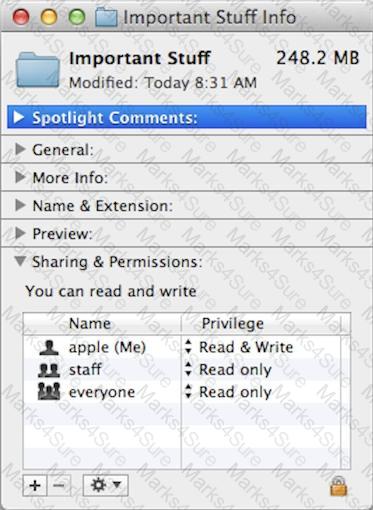
9L0-415 Question 53

If you change the folder privilege for " everyone " to Read & Write, Finder, by default, will change the permissions of items inside the folder to match.

Options:

A.

True

B.

False

Buy Now
Questions 54

In OS X, which is a valid method to reset permissions and ACLs on a home folder to their default settings?

Options:

A.

Start the computer from the OS X Recovery partition, open Terminal from the Utilities menu, enter resetpassword at the prompt, select the system volume and the user account, and click Reset.

B.

Open Disk Utility from the Utilities folder on the startup volume, select the volume with the home folder, and click Repair Permissions.

C.

Select the user home folder in the Finder, choose Get Info, choose Reset Permissions from the action pop-up menu, and authenticate as the user.

D.

Start the computer from the OS X Recovery partition, select Password Reset from the OS X Utilities window, select the system volume and the user account, and click Reset.

Buy Now
Questions 55

Which steps will let you retrieve a file from a Time Machine backup on an external hard disk connected to your Mac?

Options:

A.

Open Time Machine, use the timeline to reach the appropriate date and time, select the file, and click Restore.

B.

In the Finder enter a search term in the Spotlight search field, click the Add (+) button to add a search criterion, and choose Search Time Machine, then use the timeline to reach the appropriate date and time, select the file, and click Restore.

C.

Open System Preferences, click the Time Machine icon, click Retrieve, use the timeline to reach the appropriate date and time, select the file, and click Restore.

D.

Control-click the icon of the folder in which you want the restored file to appear, open Time Machine from the shortcut menu, choose Restore from the Time Machine menu, use the timeline to reach the appropriate date and time, select the file, and click Restore.

Buy Now
Questions 56

On a Mac running OS X Mountain Lion, how can you display a list of installed software updates?

Options:

A.

Open System Information, click System Report, and then in the sidebar under Software, click Installations.

B.

Open Software Update preferences and click Installed Software.

C.

Open Installer, choose Show Files from the File menu, and then in the Files section under /var/log/, select install.log.

D.

Open Software Update and click Receipts.

Buy Now
Questions 57

What is the role of the launchd process in the startup of an OS X Mountain Lion computer?

Options:

A.

The kernel starts launchd, then launchd starts all the other processes involved in startup.

B.

The init process starts launchd, then launchd starts the items stored in the StartupItems folder.

C.

launchd starts the init process, then init starts all the other processes involved in startup.

D.

The init process starts launchd, then launchd starts the scripts stored in /etc/chron/.

Buy Now
Questions 58

Which statement is TRUE of file and folder permissions in the Finder in OS X Mountain Lion?

Options:

A.

A user with Read-only permissions to a folder CANNOT rename any files in that folder.

B.

A user with Write-only permissions to a folder can rename any file in that folder.

C.

A user with Read-only permissions to a folder CANNOT view any files in that folder.

D.

A user with Write-only permissions to a folder can delete any file in that folder.

Buy Now
Questions 59

Which utility is on the OS X Recovery partition?

Options:

A.

Boot Camp Assistant

B.

Console

C.

Firmware Password Utility

D.

Activity Monitor

Buy Now
Questions 60

You upgrade a Snow Leopard Mac that has legacy FileVault encryption to Mountain Lion. If a user forgets his login password, how can you help him regain access to his encrypted home folder?

Options:

A.

Log in to the admin user account, open Keychain Access, open the user ' s login keychain, and then let the user view the account password.

B.

At the Login Window, enter an incorrect password three times in a row. When the " forgot your password " dialog appears, click the Arrow next to Master Password. Enter the master password, and then reset the user account password.

C.

Log in to the admin user account, open Users & Groups preferences, click Reset Password, enter the admin password, and then reset the user account password.

D.

At the Login Window, enter an incorrect password three times in a row. When the " forgot your password " dialog appears, click the Arrow next to Apple ID. Enter the user ' s Apple ID, and then reset the user account password.

Buy Now
Questions 61

How can you display the contents of a hidden folder on a mounted volume in Finder?

Options:

A.

From the Go menu, choose " Go to Folder, " enter the path to the hidden folder, and click Go.

B.

From the View menu, choose " Show hidden items. "

C.

From the Finder menu, choose Preferences, and select " Show hidden items. "

D.

Select the volume icon and choose " Show hidden items " from the Action menu.

Buy Now
Questions 62

How do you start up an OS X Mountain Lion computer in Safe Mode?

Options:

A.

Hold down Shift during startup.

B.

Open Terminal, type safe_boot, press Return, and then restart the Mac.

C.

Hold down Command-Option-P-R during startup.

D.

Start up from the OS X Recovery partition, and then choose Safe Boot from the Startup Disk menu.

Buy Now
Questions 63

In a default OS X Mountain Lion installation, which permission is assigned to the top level of each user ' s home folder to make it accessible to Guest users who log in locally?

Options:

A.

Everyone has Read & Write access.

B.

The staff group has Read & Write access.

C.

The wheel group has Read only access.

D.

Everyone has Read only access.

Buy Now
Questions 64

Which of these files will Time Machine, by default, NOT back up?

Options:

A.

An encrypted file that was created to track passwords

B.

A file that Time Machine identifies as conflicting with a previously backed-up file

C.

A Time Machine preference .plist file

D.

Any file in the Trash

Buy Now
Exam Code: 9L0-415
Exam Name: OS X Support Essentials 10.9
Last Update: Apr 30, 2026
Questions: 218

PDF + Testing Engine

$63.52  $181.49

Testing Engine

$50.57  $144.49
buy now 9L0-415 testing engine

PDF (Q&A)

$43.57  $124.49
buy now 9L0-415 pdf

