
Spring Sale Limited Time 65% Discount Offer - Ends in 0d 00h 00m 00s - Coupon code: pass65

9L0-422 OS X Support Essentials 10.10 Questions and Answers

Questions 4

Which tool can you use to search log files?

Options:

A.

Archive Utility

B.

Activity Monitor

C.

Console

D.

Network Utility

Buy Now
Questions 5

You ' re troubleshooting a Mac. Which is a valid reason for shutting down AND THEN starting up a Mac instead of selecting Restart from the Apple menu?

Options:

A.

Mac does a full POST on startup only after a shutdown.

B.

Mac loads a clean user session on startup only after a shutdown.

C.

Mac performs disk checks on startup only after a shutdown.

D.

Mac archives errors from the session to the log only during a shutdown.

Buy Now
Questions 6

A computer running OS X Server 4 on your network is sharing files. On a Mac with OS X Yosemite, if you browse to the server from the sidebar in the Finder, which protocol will the Mac use by default to connect to the server?

Options:

A.

AFP

B.

FTP

C.

SMB3

D.

NFS

Buy Now
Questions 7

Along with IMAP, POP, and SMTP, which protocol does the Mail application in OS X support?

Options:

A.

Exchange Web Services (EWS)

B.

WebDAV

C.

MAPI

D.

Exchange ActiveSync (EAS)

Buy Now
Questions 8

In the Finder, which statement is true of file and folder permissions?

Options:

A.

A user with Write-only permissions for a folder can delete any file in that folder.

B.

A user with Write-only permissions for a folder can rename any file in that folder.

C.

A user with Read-only permissions for a folder can ' t view any files in that folder.

D.

A user with Read-only permissions for a folder can ' t rename any files in that folder.

Buy Now
Questions 9

Which statement best describes how Time Machine stores files from an OS X computer when backing up to an external hard drive connected via FireWire?

Options:

A.

Each file is rewritten to the external disk during each backup.

B.

Each file is saved to the external disk once. File changes are stored in a database on the external disk.

C.

Each file is saved to the external disk once. Files that don ' t change between backups are represented by symbolic links to save space.

D.

Each file is saved to the external disk once. Files that don ' t change between backups are represented by hard links to save space.

Buy Now
Questions 10

Which folder contains instructions for the launchd process to start certain items when a user logs in to an OS X computer?

Options:

A.

/etc/launchd/

B.

/var/run/launchd/

C.

/Library/Extensions/

D.

/Library/LaunchAgents/

Buy Now
Questions 11

Which folder contains items that tell launchd what to launch when OS X starts up?

Options:

A.

/etc/launchd/

B.

/var/run/launchd/

C.

/Library/Extensions/

D.

/System/Library/LaunchDaemons/

Buy Now
Questions 12

Which of these files will Time Machine, by default, NOT back up?

Options:

A.

Any file in the Trash

B.

A Time Machine preference .plist file

C.

An encrypted file

D.

A file that Time Machine identifies as conflicting with a file that was previously backed up

Buy Now
Questions 13

When you ' re starting up a Mac, which keyboard shortcut can you use to display detailed information about the startup process?

Options:

A.

Shift

B.

Command-V

C.

Command-S

D.

Option

Buy Now
Questions 14

In the Finder, how can you access the Library folder that ' s hidden inside the current user ' s home folder?

Options:

A.

Hold down the Option key. From the Go menu in the Finder, choose Library.

B.

Hold down the Option key. From the Action menu in the Finder, choose

" Show hidden items. "

C.

Navigate to the user ' s home folder. From the View menu in the Finder, choose " Show hidden items. "

D.

From the Finder menu, choose Preferences and select " Show hidden items. "

Buy Now
Questions 15

You ' re logged in to a Mac as a standard user. How can you display the OS X Yosemite build number?

Options:

A.

Choose About This Mac from the Apple menu, then click the OS X version number to reveal the build number.

B.

In the General pane of System Preferences, click the Info disclosure triangle to reveal the build number.

C.

Type build number in Spotlight, then scroll through the results until the build number appears.

D.

Choose Software Update from the Apple menu, then choose Build Number from the Update menu.

Buy Now
Questions 16

Which process can you use to start up a Mac in target disk mode?

Options:

A.

Start up from the OS X Recovery partition, choose Target Disk Mode from the Startup Disk menu, then restart the Mac.

B.

Hold down the S key as the Mac starts up, then enter the command shutdown -r -target.

C.

Restart your Mac, then hold down the T key as the Mac starts up.

D.

Hold down the Option key as the Mac starts up, until a dialog appears, then select Target Disk Mode from the dialog.

Buy Now
Questions 17

On your OS X computer, you want the Finder to display filename extensions by default. How can you configure this setting?

Options:

A.

Choose Show View Options from the View menu in the Finder, and select the option " Show all filename extensions. "

B.

Choose Preferences from the Finder menu, click Advanced, and select the option " Show all filename extensions. "

C.

Control-click anywhere on the Desktop, select Preferences from the pop-up menu, and select the option " Show all filename extensions. "

D.

Choose Get Info from the File menu; click the disclosure triangle next to Name & Extension, deselect " Hide extension, " and click Change All.

Buy Now
Questions 18

You want to make documents available across your Mac and iOS devices. In the screenshot, click an icon of the preference pane where you can enable this feature.
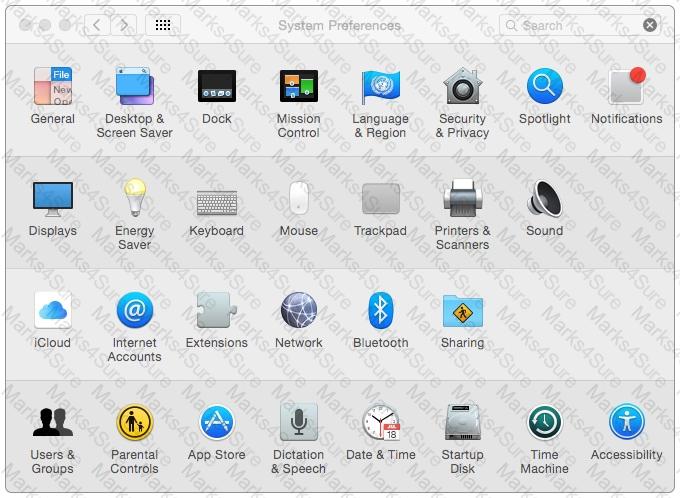
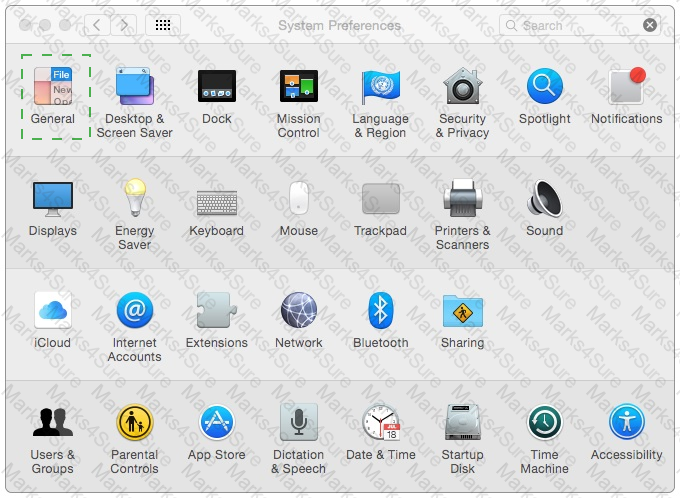
9L0-422 Question 18

Options:

Buy Now
Questions 19

How do you start up a Mac in Safe Mode?

Options:

A.

Hold down Command-Option-P-R during startup.

B.

Start up from the OS X Recovery partition, then choose Safe Boot from the Startup Disk menu.

C.

Hold down Shift during startup.

D.

Open Terminal, type shutdown -safe, press Return, then restart the Mac.

Buy Now
Questions 20

Which describes the function of Safe Boot in OS X?

Options:

A.

To facilitate troubleshooting by preventing loading of third-party components in the operating system at startup

B.

To prevent users from accessing sensitive system files by loading Simple

Finder instead of Finder at startup

C.

To increase data security by assigning all standard users Read-only privileges to mounted local volumes

D.

To increase data security by modifying Sharing settings, so only essential protocols are enabled at startup

Buy Now
Questions 21

What should you be aware of when dragging apps to the Trash?

Options:

A.

Some apps install files outside the Applications folder, so dragging an app to the Trash may not remove all of its files.

B.

You can ' t drag apps purchased in the Mac App Store to the Trash.

C.

User data for apps purchased in the Mac App Store is also deleted when you drag the app to the Trash.

D.

You must restart the Mac to permanently delete apps from the Trash.

Buy Now
Questions 22

Review the screenshot of a system configuration, then answer the question below.
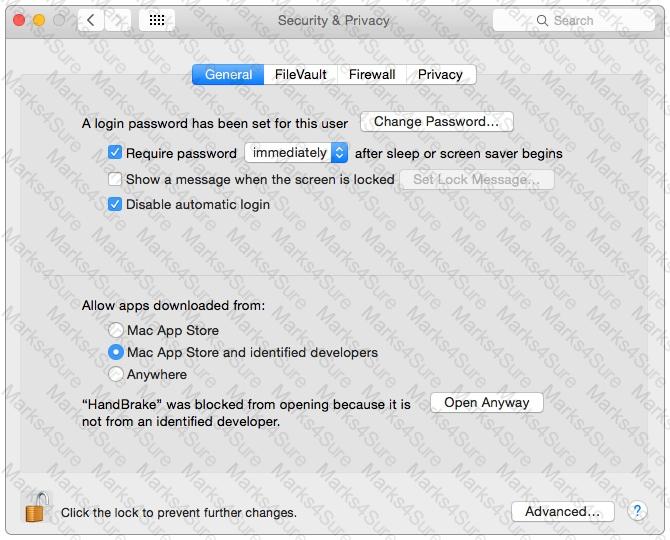
9L0-422 Question 22

Your Mac is configured as shown in the screenshot. Using Safari, you download an app from an unidentified developer and double-click the app icon. What happens?

Options:

A.

The app opens without an alert message.

B.

The app opens after an alert message that the app is from an unidentified developer.

C.

An alert message asks whether you want to open this app from an unidentified developer.

D.

The app doesn ' t open, and an alert message tells you that the app is from an unidentified developer.

Buy Now
Questions 23

Review the screenshot of a portion of the Disk Utility application window, then answer the question below.
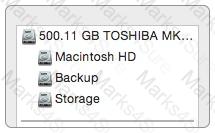
9L0-422 Question 23

Which statement best describes the item that ' s selected?

Options:

A.

It ' s one of three stripes in a RAID set.

B.

It ' s one of three file systems on a partition.

C.

It ' s one of three partitions on a disk.

D.

It ' s one of three disks in a RAID set.

Buy Now
Questions 24

How can you check the signal strength (RSSI) and transmit rate of a Wi-Fi network your computer is connected to?

Options:

A.

Option-click the Wi-Fi menu item, it will be listed below the network name.

B.

In Network Utility, click the Wireless Performance tab.

C.

In Network preferences, secondary-click the Wi-Fi network service and choose Connection Status.

D.

In Network Diagnostics, click the Interface Status tab and choose Wi-Fi from the interface pop-up menu.

Buy Now
Exam Code: 9L0-422
Exam Name: OS X Support Essentials 10.10
Last Update: Apr 30, 2026
Questions: 82

PDF + Testing Engine

$63.52  $181.49

Testing Engine

$50.57  $144.49
buy now 9L0-422 testing engine

PDF (Q&A)

$43.57  $124.49
buy now 9L0-422 pdf

