
Free Practice Questions for the Salesforce Tableau Data Analyst Analytics-DA-201 Exam (2026 Updated)
At Marks4sure, we are dedicated to providing IT professionals with the most accurate and reliable preparation materials for the Salesforce Analytics-DA-201 exam. To support your certification journey, we have made a selection of our premium 2026 Tableau Data Analyst practice questions and answers available completely free. You can take this practice test as many times as you need. Every question includes a detailed, expertly verified explanation to ensure you fully grasp the core security concepts before test day.
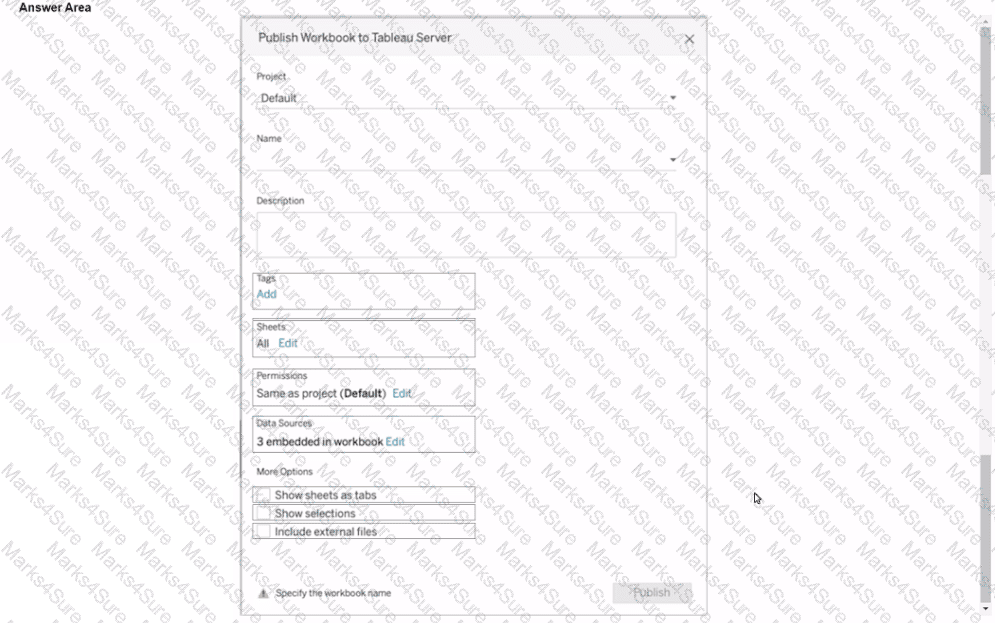
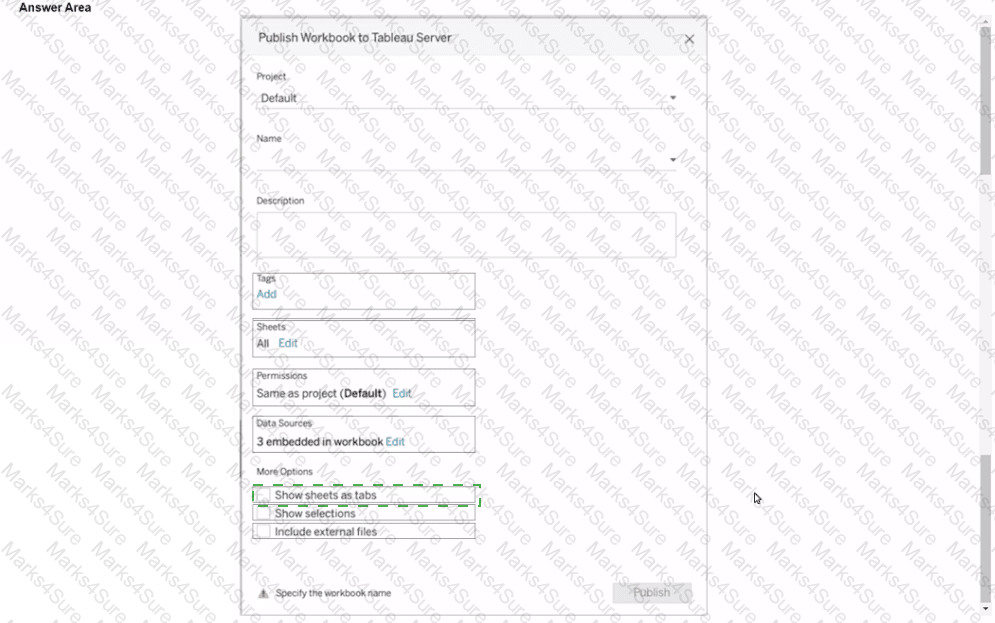
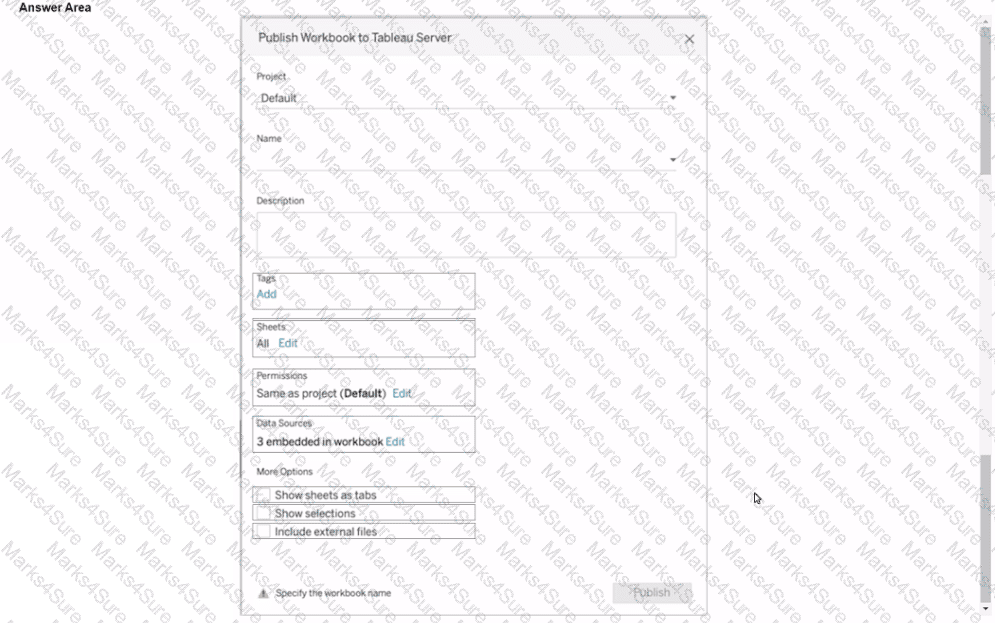
You plan to publish a workbook to Tableau Server.
You want to ensure that users can see other published dashboards from their current dashboard.
Which setting should you configure? (Click the appropriate Option in the Answer Area.)
A Data Analyst needs to calculate the first Tuesday of each month in the data.
Which set of functions should the analyst use to perform this calculation?
You create the following worksheet
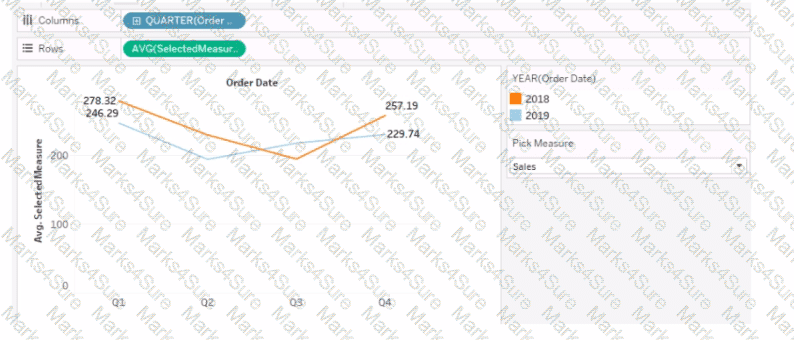
The Pick Measure parameter contains the following list of values
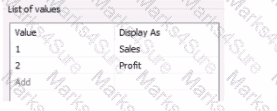
Users can select a value from Pick Measure to change the visualization to show either the Sales measure or the Profit measure.
Which formula is used in the Selected Measure calculated field lo switch between measures?
You plan to create a visualization that has a dual axis chart. The dual axis chart will contain a shape chart and a line chart will use the same measure named Population on the axis.
You need to configure be shapes to be much larger than the line.
What should you do?
A Data Analyst needs to analyze the financial performance of the sales team. In order to make the dashboards easier to understand, the analyst needs to format the financial values to show the dollar symbol ($) in front of the value.
How should the analyst enable this formatting across the workbook?
You have a dashboard that contains confidential information about patients health. The data needs to always be up to date tor a team of healthcare workers How should you share me dashboard with the healthcare workers?
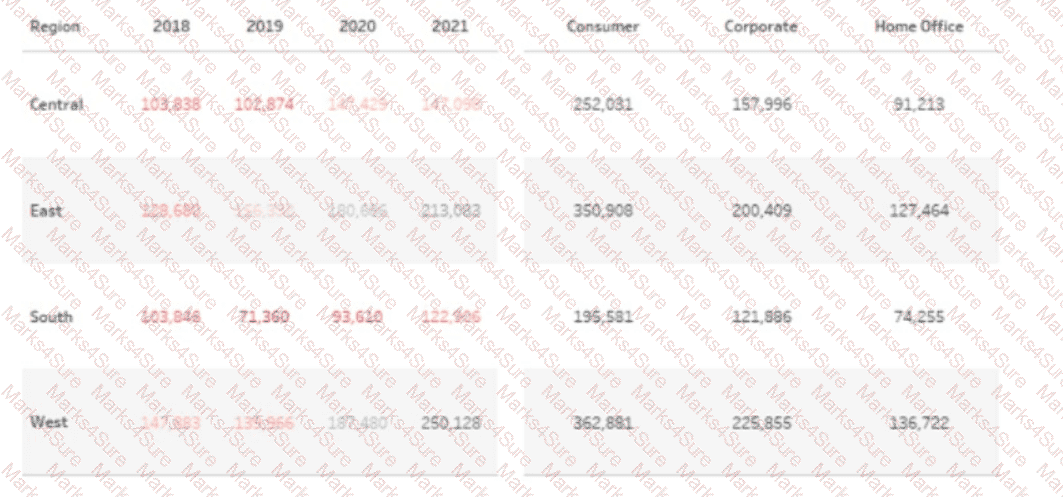
You have the following visualization.
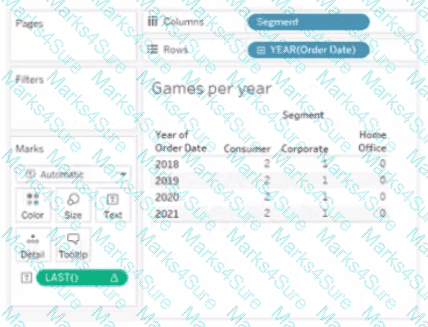
The Last() calculation is set to compute using Table (across)
Which value will appear in the crosstab for the Consumer segment of the year 2018 if you change compute to use Oder Dale?
You subscribe to a view that delivers a daily email to your inbox.
You want to make the subscription available to other stakeholders.
What should you do?
A Data Analyst is subscribed to several views.
The analyst needs to unsubscribe from the views.
What should the analyst use?
You have the following dataset.
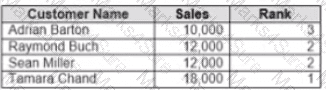
Yon need to calculate the ranking shown in the Rank field.
How should you complete the formula? (Use the dropdowns in the Answer Area to select the correct options to complete the formula ?


In a dataset, a Data Analyst has a string field named Name that contains unnecessary semicolons.
Which function should the analyst use to remove the semicolons from the Name field?
Which function should a Data Analyst use to aggregate total regional sales for a dataset regardless of what is in the view?
A Data Analyst has the following chart.
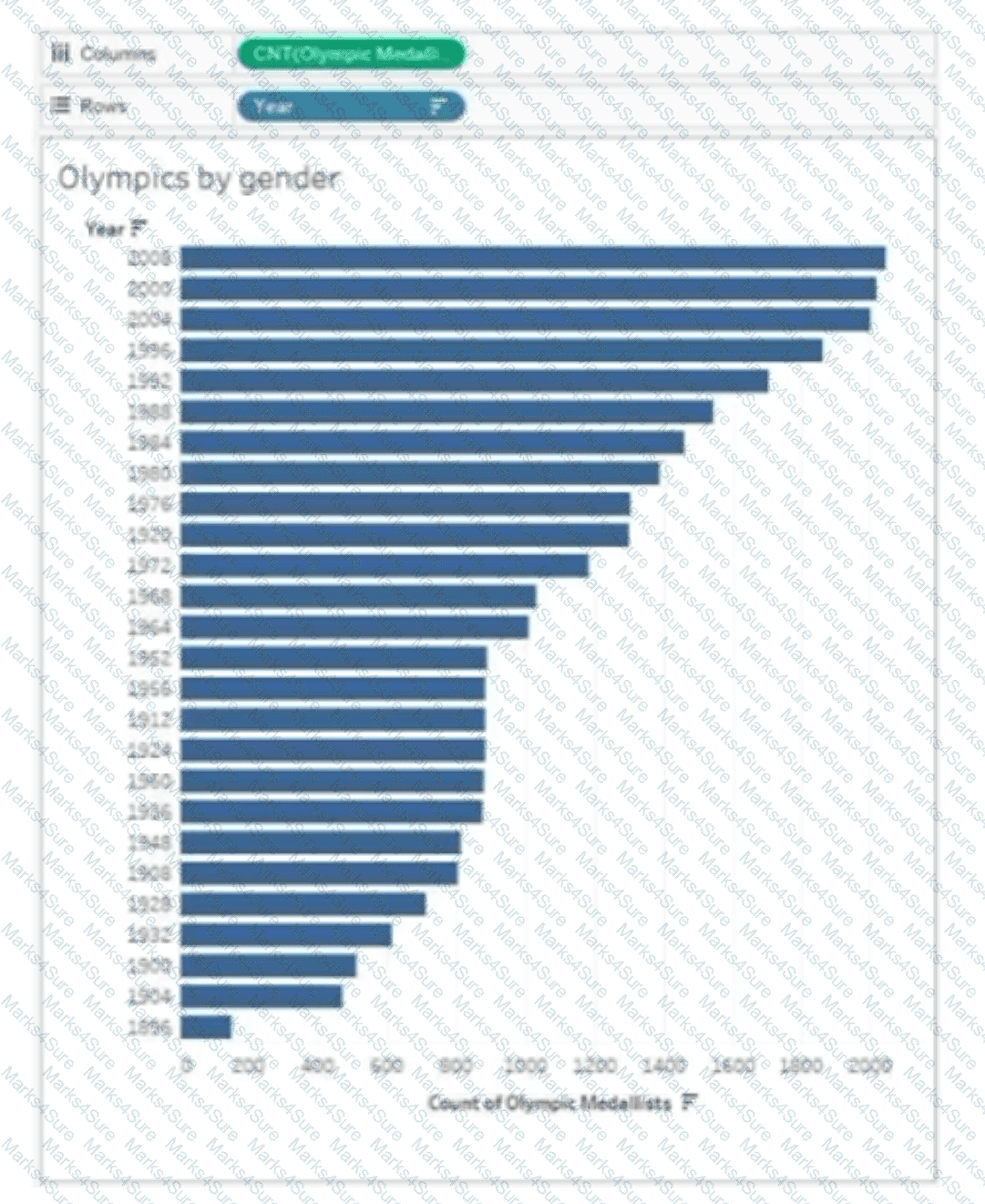
The analyst needs the top 10 values to appear in a different color. The top 10 values must be colored dynamically.
What should the analyst do?
A Data Analyst is creating a new data source made up of multiple tables and decides to use relationships during the creation process.
What is the advantage of using a relationship?
You want to create the following dashboard that will contain two sheets.
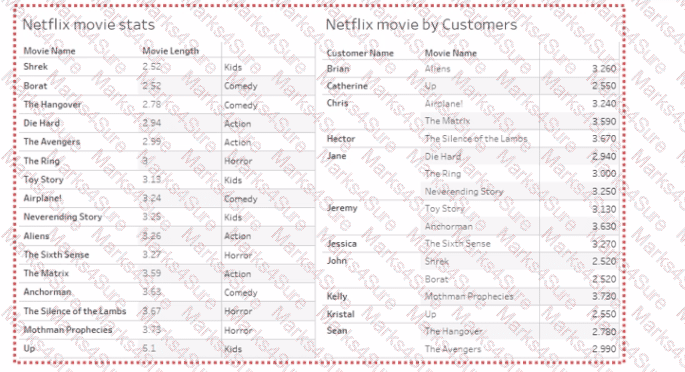
What should you do?
You have a data source that contains 20 tables.
You want the tables to be organized within the Data pane based on the type of data contained within the tables.
What should you use?
A Data Analyst has a dataset that contains the fallowing rows of sales data.
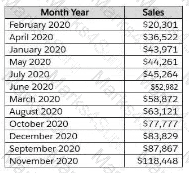
The analyst needs to return a value of TRUE if a month has sales greater than $50,000; otherwise, the formula must return a value of FALSE.
Which two formulas achieve this goal? (Choose two.)
From Tableau Desktop you sign in lo a Tableau Server site.
What appears in the list of available data sources when you search for a published data source?
A Data Analyst has the following bar chart.
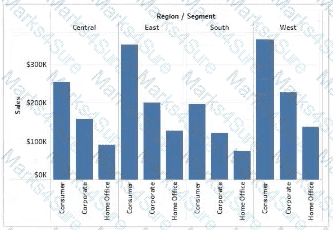
The analyst wants the chart to appear as shown in the following exhibit.
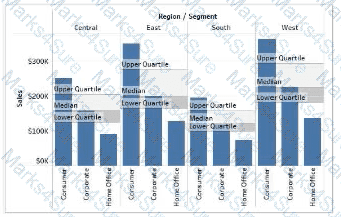
What should the analyst add?
A Data Analyst loads a dataset from Microsoft Excel. The following is a sample of the data.
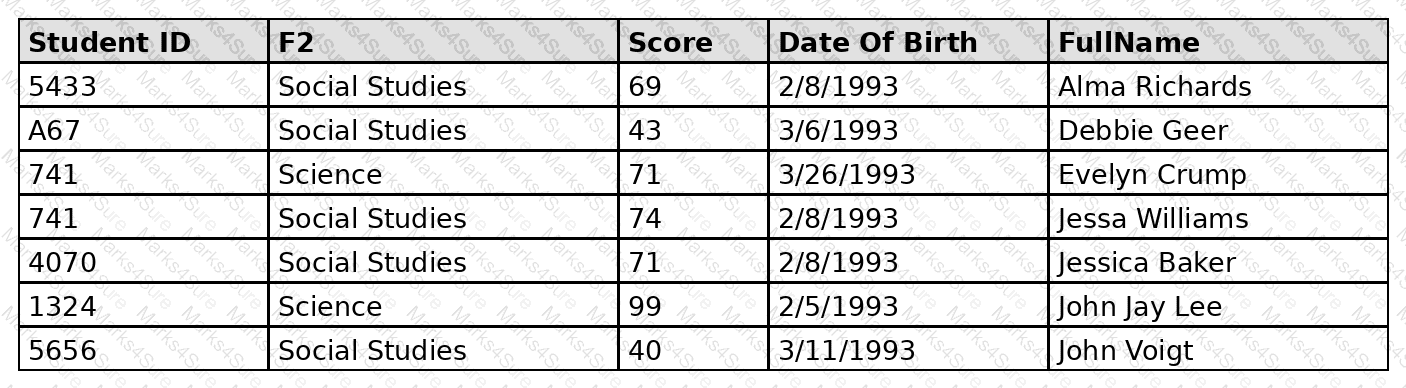
FullName contains student names. Some names contain a first name and a last name. Some names contain a first name, a middle name, and a last name.
The analyst needs to divide FullName into three separate fields: one for the first name, one for the middle name, and one for the last name. The solution must minimize effort for the analyst.
What should the analyst do?
You have the following dashboard.
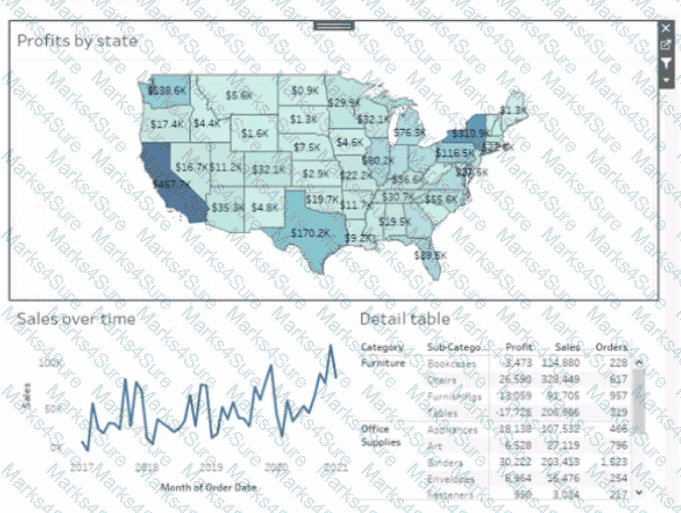
Currently the map is used as a filter that affects the data on the otter sheets of the dashboard
You need to configure the dashboard to ensure that selecting a data point on the map only tillers the Detail table
What should you do?
You connect to a database server by using Tableau Prep. The database server has a data role named Role1.
You have the following field in the data.

You need to apply the Role1 data role to the Material field.
Which two actions should you perform? Choose two.
You have the following visualization.
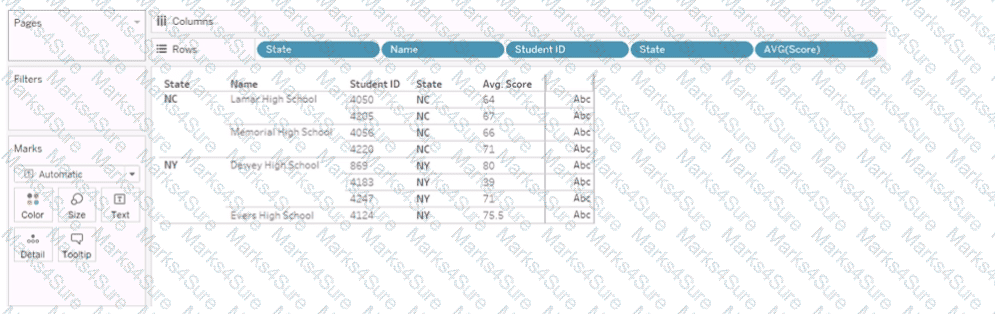
You Create a table calculation named Rank_Score that has a formula of RANK(AVG([Score]), and you drag Rank_Score to Text on the Marks cards.
What is the Rank Score value for Student ID 4220?
A Data Analyst needs to add a custom color palette to Tableau Desktop for use across multiple workbooks. The palette must reflect the company ' s branding.
What should the analyst do?
A Data Analyst has two tables named EmployeeInfo and DepartmentInfo. EmployeeInfo contains four fields named Full Name, Department ID, Start Date, and Salary. DepartmentInfo contains four fields named Department Name, Size, Department ID, and VP. The analyst wants to combine the tables to meet the following requirements:
EmployeeInfo is the first table that is dragged to the canvas,
The records must contain the Full Name, and the Department Name, Size, and VP fields if available,
Not all records have an exact match.
Which type of join should the analyst use?
Below are some of the values in the Order_ID field:
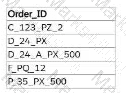
Which calculation should a Data Analyst use to return the two-letter combinations starting with the letter " P " for each of these values?
A Data Analyst has a data source with row data for service calls and their activity log.
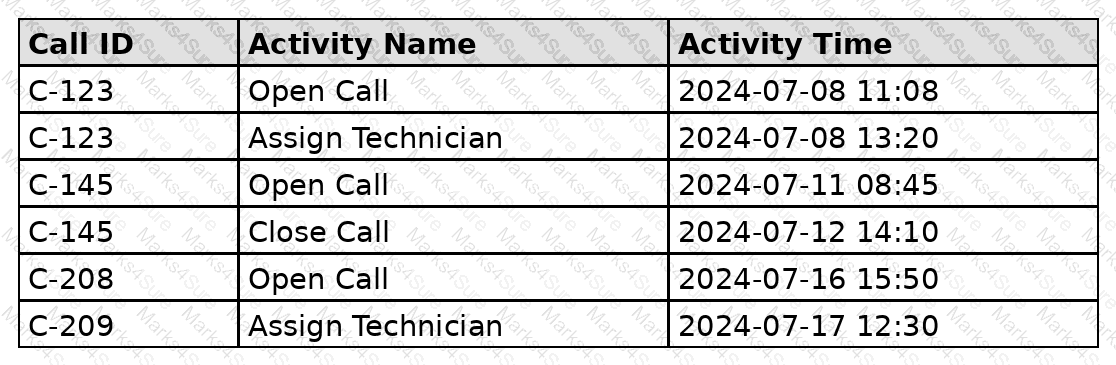
Which calculation allows the analyst to count the calls that have never had a technician assigned to them?
You have the Mowing two tables that contains data about the books in a library.

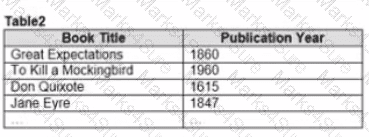
Both tables are incomplete so there are books missing from the tables.
You need to combine the tables. The solution must ensure that all the data is retained
Which type of join should you use?
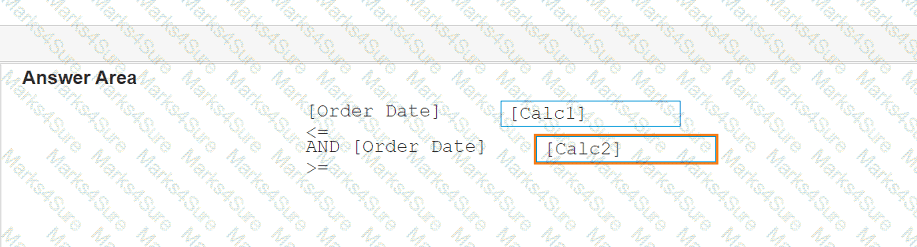
You have the following calculated fields in a worksheet.
[Calc1] = DATEADD ( ' year ' , -1, TODAY ())
[Calc2] = DATETRUNC ( ' month ' , DATEADD ( ' year ' , -1, TODAY ())
You want to calculate the month to date value of the prior year.
How should you complete the formula? (Drag the appropriate Options to the Answer Area and drop into the correct locations.)


You have the following dashboard that contains two sheets.
You want to minimize the whitespace between the sheets.
What should you configure?
You have the following data source in tableau Server.
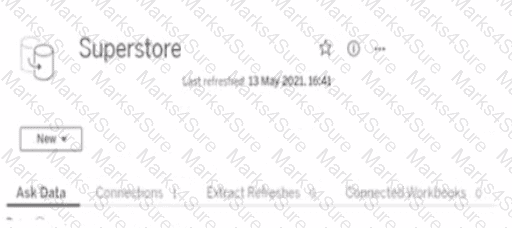
You need to ensure that the data is updated every hour.
What should you select?
A Data Analyst has the following chart that shows the number of song downloads per year since the release of the song.
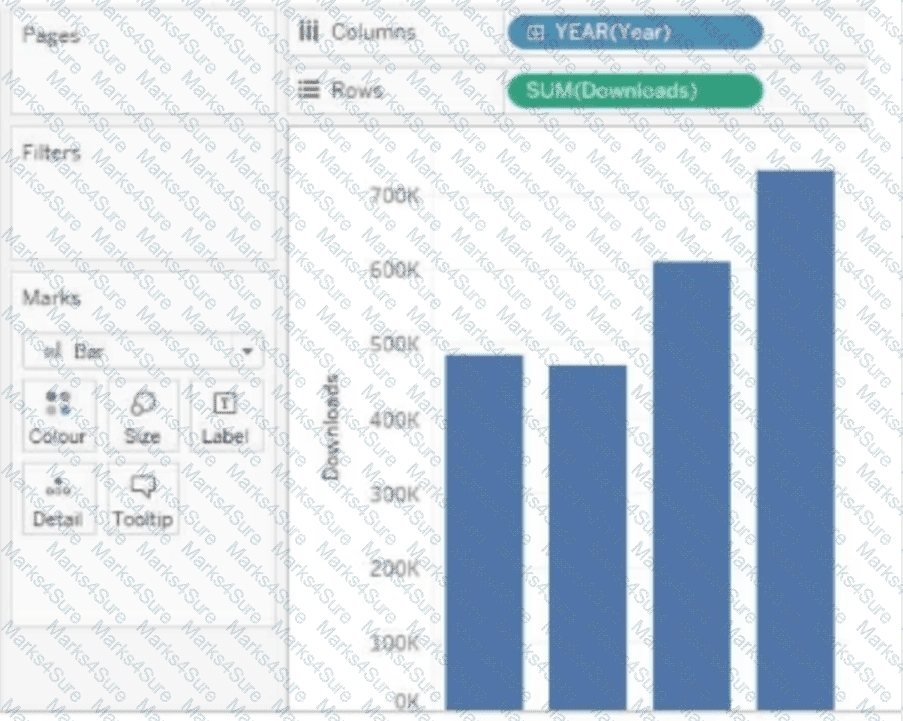
The required result is a cumulative progression of downloads across the years.
Which quick table calculation should the analyst use?
You have two tables named Employeelnfo and DepartmentInfo. Employeelnfo contains four fields named Full Name, Department ID, Start Date, and Salary.
DepartmentInfo contains four fields named Department Name, Size, Department ID, and VP.
You want to combine the tables to meet the following requirements:
. Each record in Employeelnfo must be retained in the combined table.
. The records must contain the Department Name, Size, and VP fields.
· Every record must have a full name.
Which type of join should you use?
A Data Analyst looks into the item hierarchy in a dashboard.
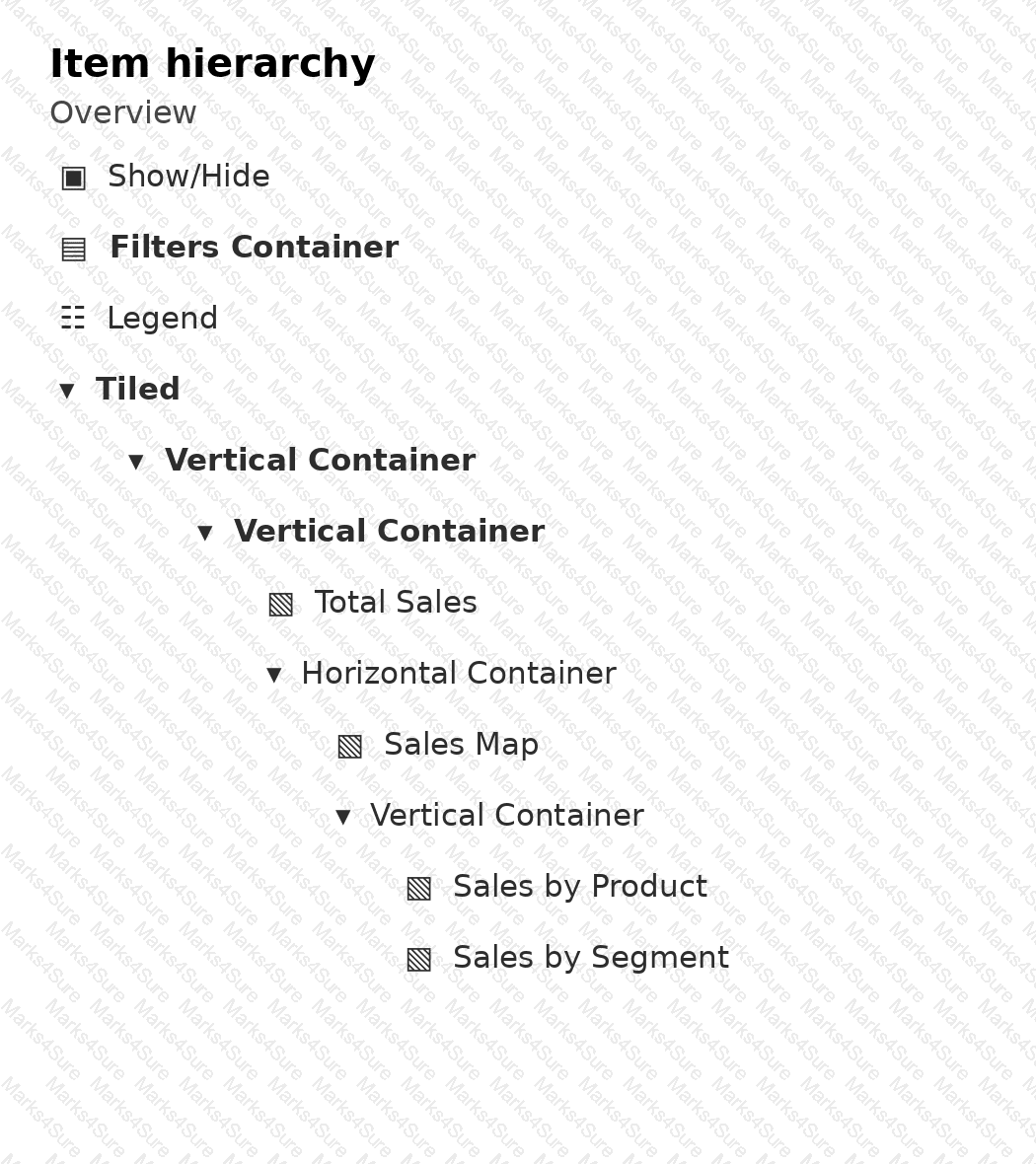
Which three elements are floating? Choose three.
You have the following dataset:
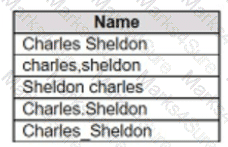
Which grouping option should you use in Tableau Prep to group all five names automatically?
You are creating a new dashboard.
You need to add a button to the dashboard that allows users to export the dashboard as an image.
Which type of object should you use?
When using the INCLUDE Level of Detail (LOD) calculation, where should the dimension referenced by the INCLUDE function be located on the sheet?
A Data Analyst is working with the following dataset.
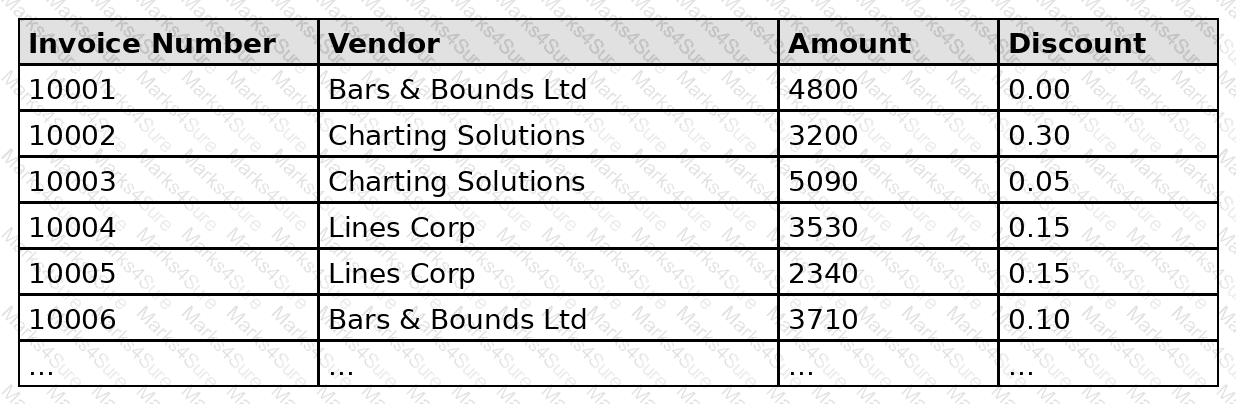
The analyst is trying to build a box plot showing the distribution of discounts offered to different vendors. The desired box plot and the analyst’s current result are shown below.
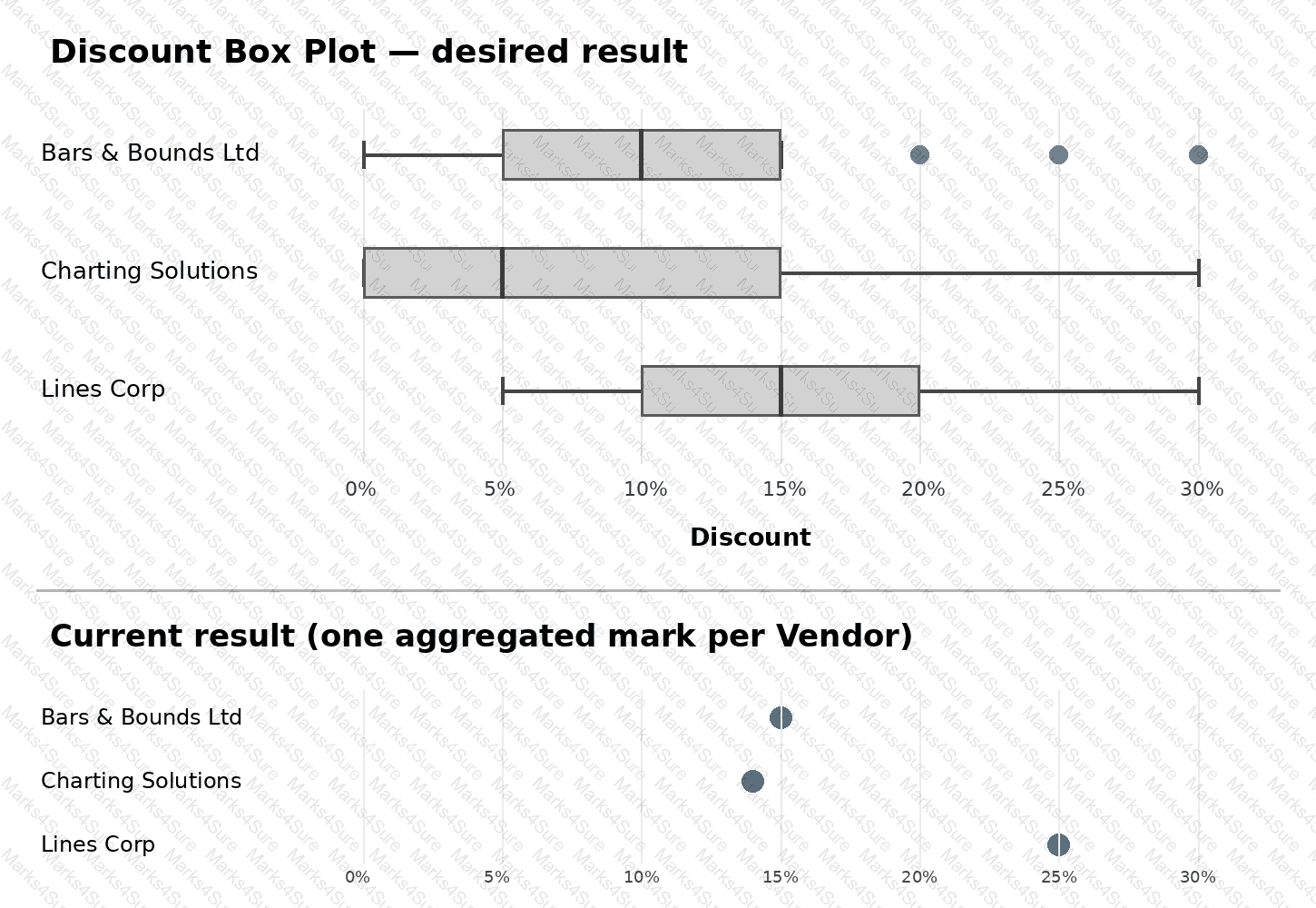
The analyst has dragged Vendor onto Rows and Discount onto Columns, added a reference line, and selected Box Plot without changing any default configuration settings.
Which action does the analyst need to take next to achieve the desired box plot?
You create the following story that contains two story point.
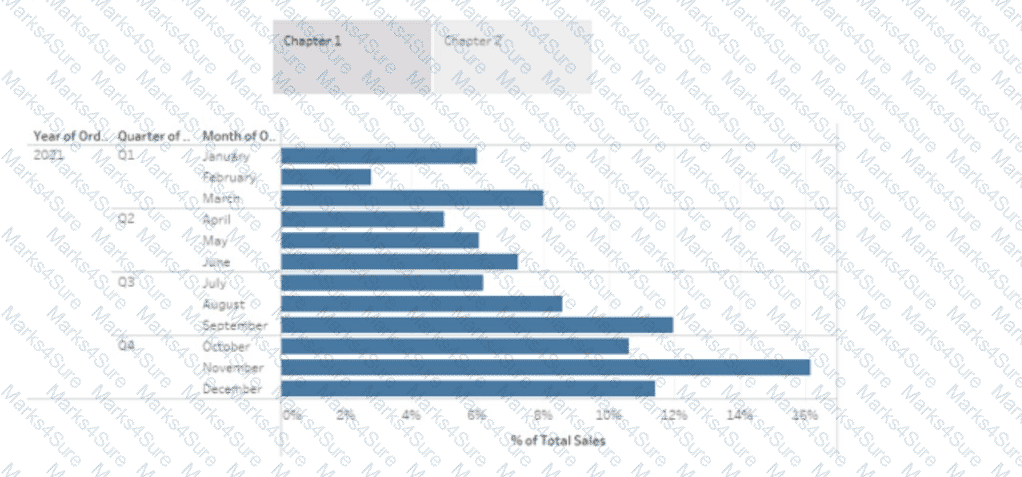
You want to change the story point format to show the current story point number out of the total number of story points.
Which Layout option should you use?
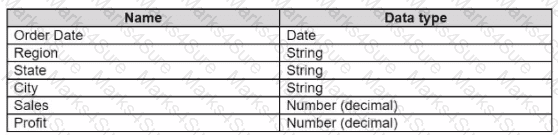
You have a data source that contains the following columns.
You have the following view that shows the percentage of total sales by category:
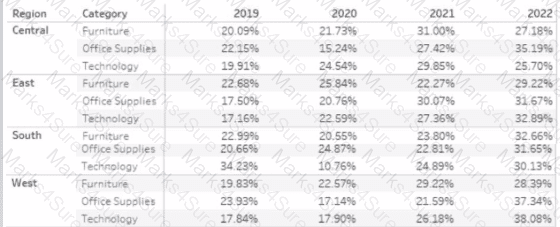
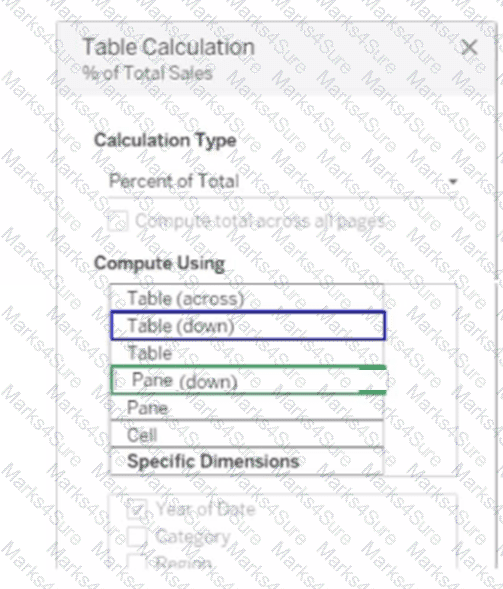
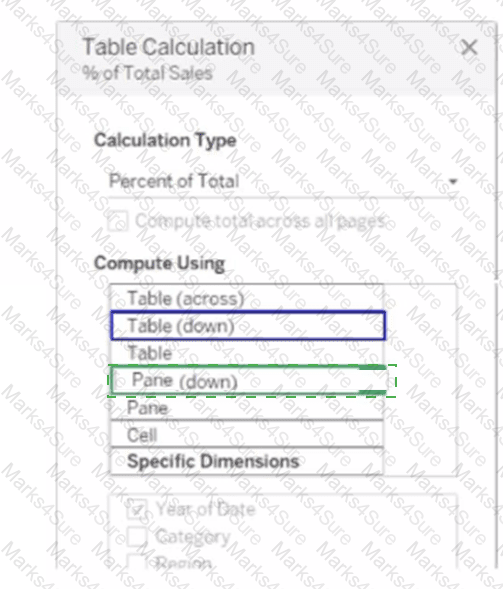
You want to change the calculation to show the percentage of total sales within the categories of every region annually. Which Compute Using option should you use? (Click the appropriate Option in the Answer Area.)
You have a dashboard that contains a parameter named Start Date.
You need to create an extract from a Microsoft Excel file. The extract must be filtered based on Start Date.
What should you do?
A Data Analyst is creating an annual report in Microsoft Word.
In Tableau Desktop, the analyst built a chart in a worksheet.
The analyst wants to create an image of the chart to add to the annual report.
Which two options should the analyst use to create the image? (Choose two.)
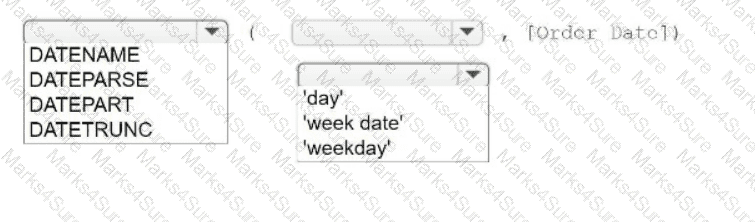
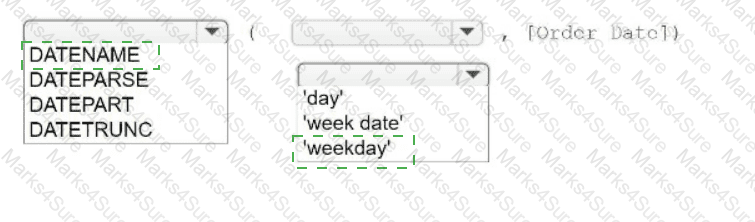
You have a table that contains four columns named Order Date, Country, Sales, and Profit.
You need to add a column that shows the day of the week for each row. For example, orders placed on August 31, 2022, will show a day of
Wednesday.
How should you complete the formula? (Use the dropdowns in the Answer Area to select the correct options to complete the formula.)
A Data Analyst has the following dataset in Microsoft Excel.
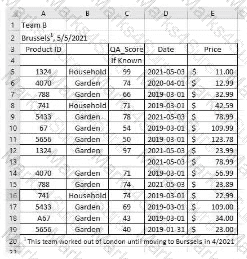
The analyst is using Data Interpreter to cleanse the dataset. Data Interpreter provides the following results.
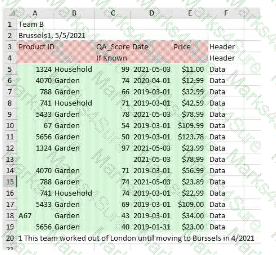
How many rows of data will be ingested into Tableau as values?
You have a database that includes field named sales, City and Region.
You have the following chart that shows the number of sales made in different cities.
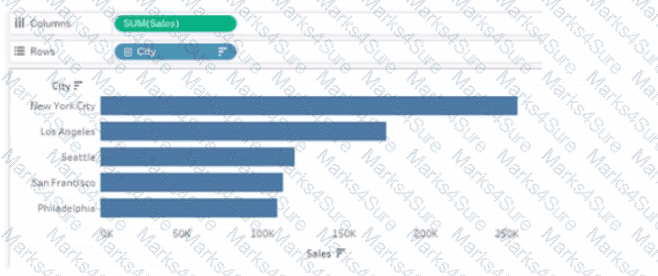
You want to dynamically show the corresponding region when users hover their mouse over any of the bars.
What should you do?
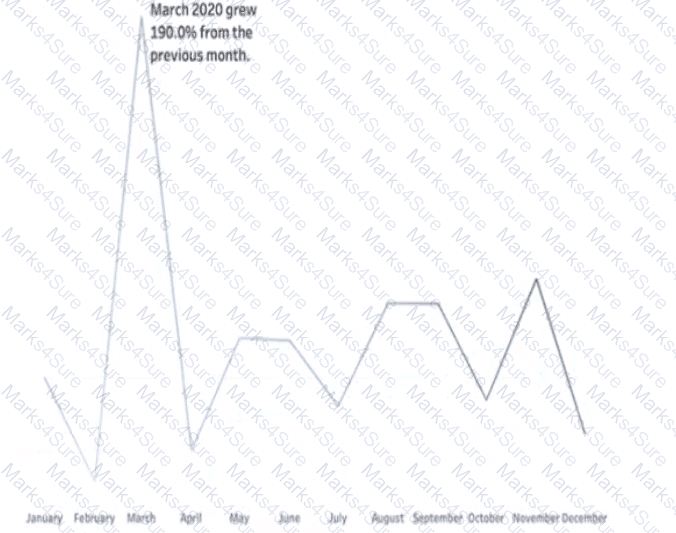
You have a line chart on a worksheet.
You want to add a comment to March 2020 as shown in the following visualization.
What should you do?
You plan to create a Tableau subscription for several users.
Which two formats can you use? Choose two.
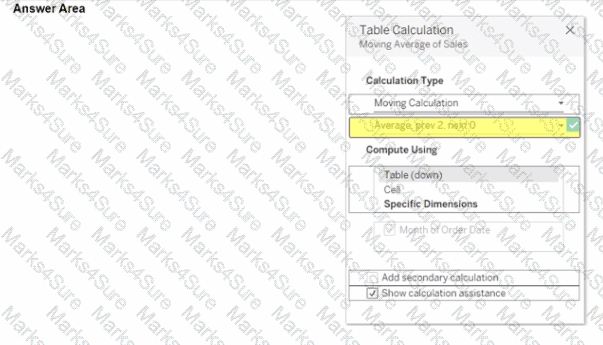
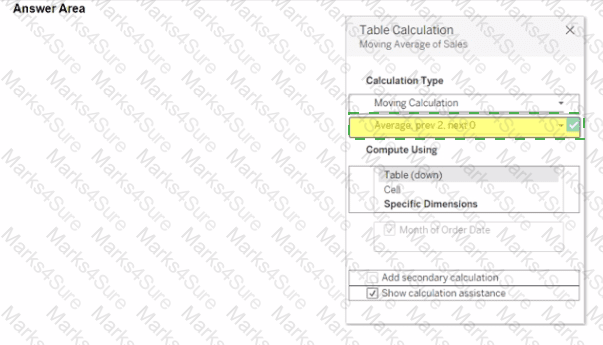
You use a quick table calculation lo calculate the moving average of a measure named Sales.
You need to calculate the moving averages of the last three years.
Which setting should you change in the Table Calculation dialog box? {Click the appropriate Option in the Answer Area)
You have the following dataset in Microsoft Excel.
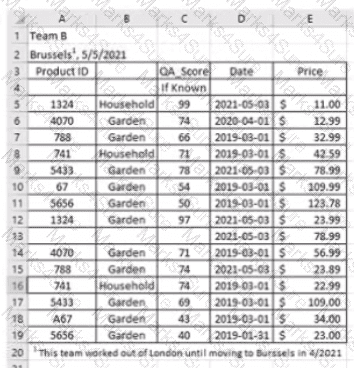
You are using Data interpreter to cleans the dataset. Data interpreter provides the following results.
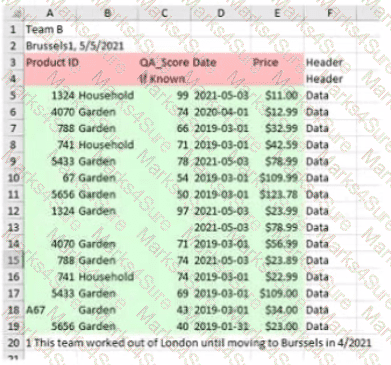
How many rows of data will be ingested into Tableau as values?
You have the following table.
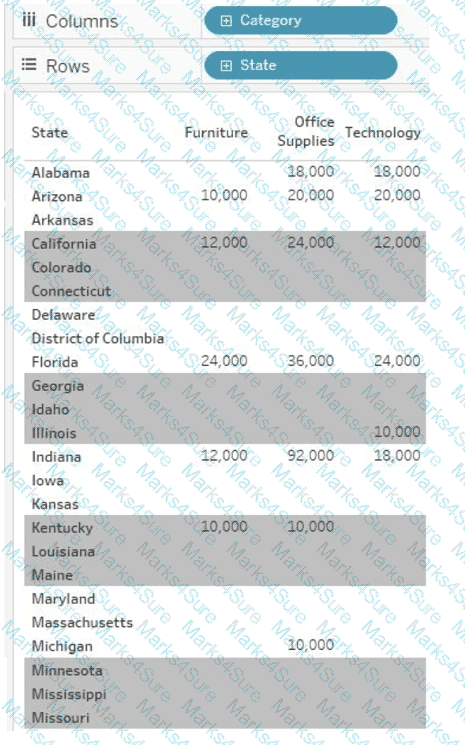
You need each record to alternate between grey and white.
What should you change in the Format Shading pane?
A Data Analyst has a dataset that contains people and the awards they have won.
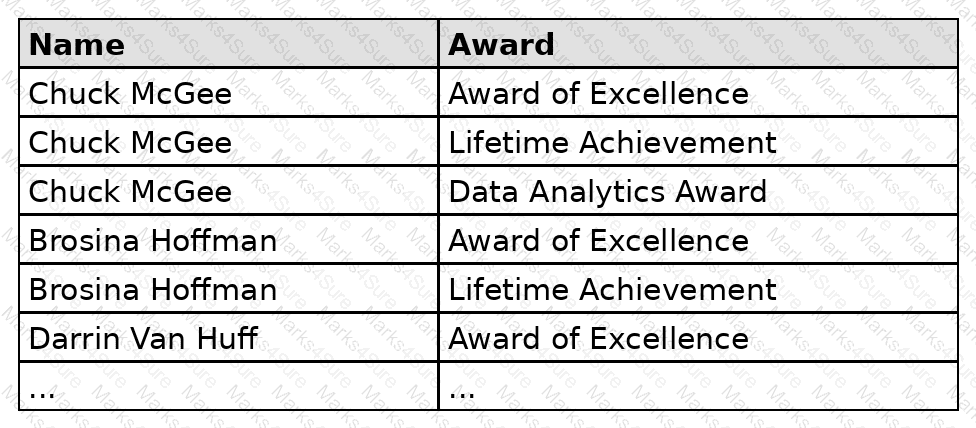
Which formula should the analyst use to get the number of people who won an award?
A Data Analyst has the following visualization.
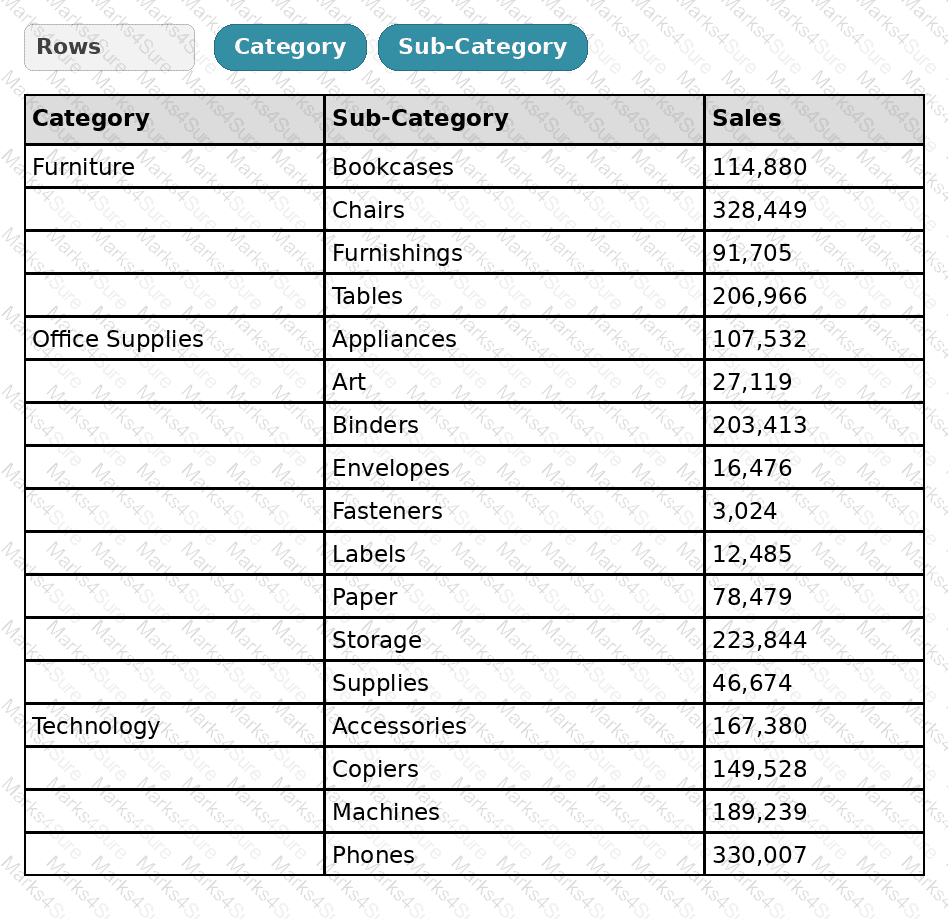
The analyst needs to add totals to the table as shown in the following visualization.
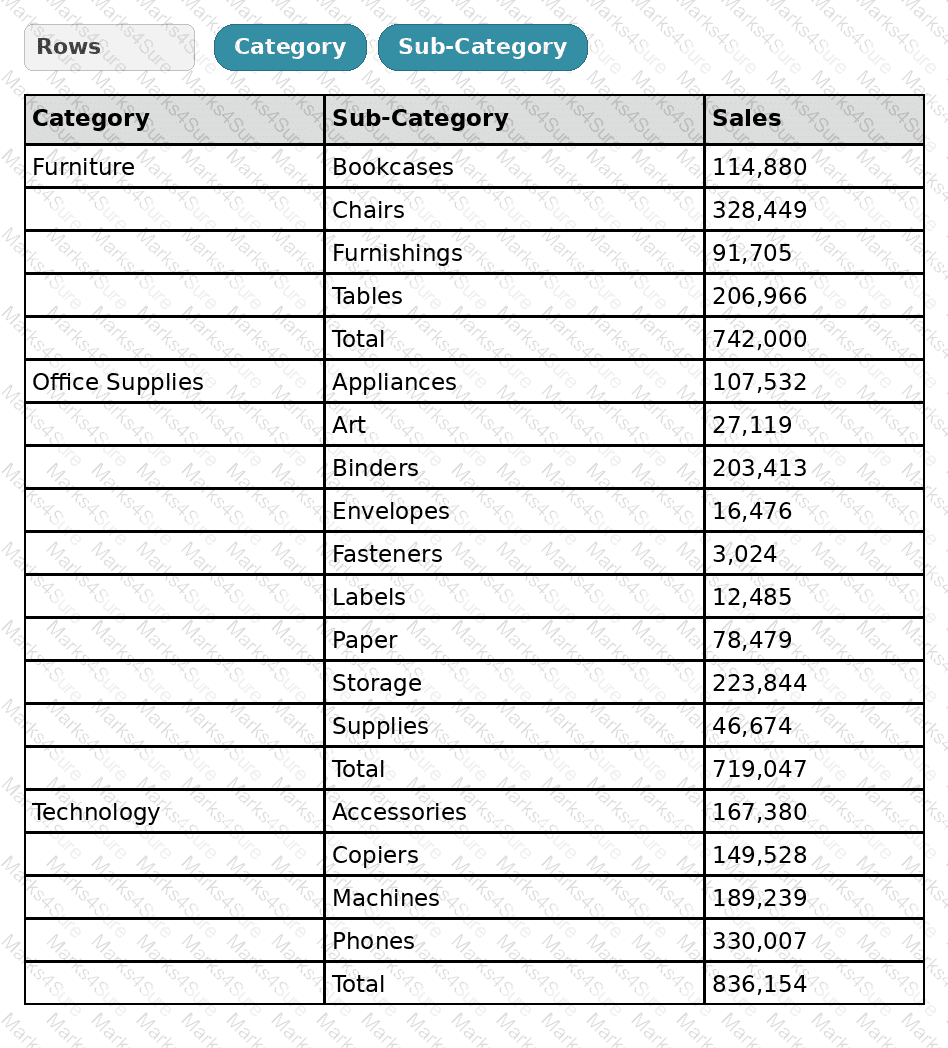
What should the analyst use from Totals on the Analysis menu?
You have the following:
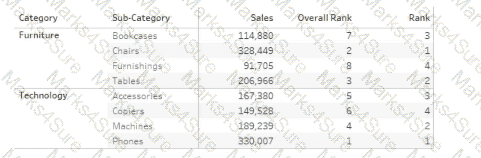
Overall Rank and Rank are calculated fields that use the RANK function.
You filter out the sub-category where [Ovorall Rank] - 1.
For which three the sub-categories will the value of Rank change? Choose three.
A Data Analyst has the following dashboard.
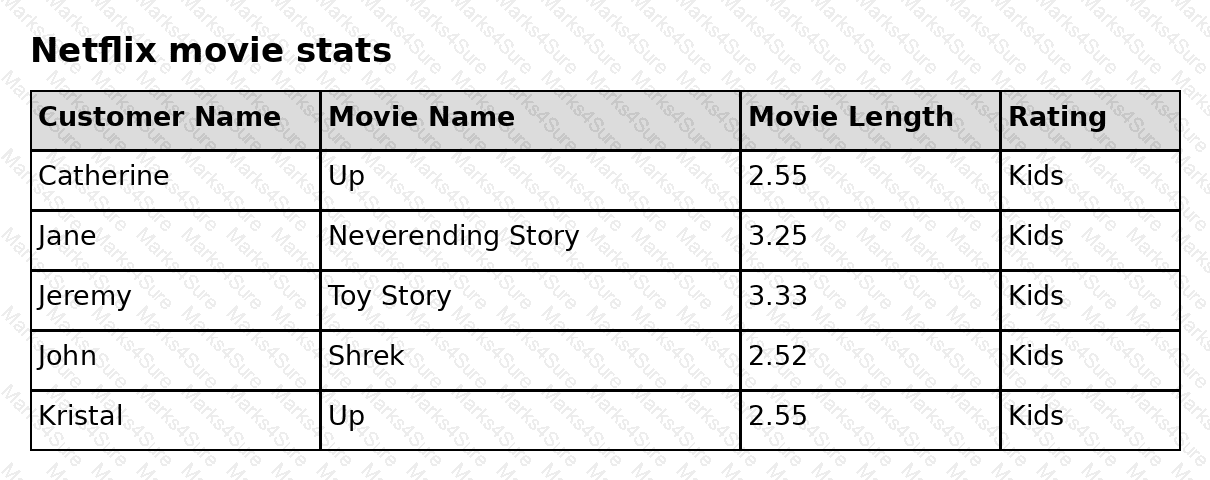
The analyst wants a specific web page to open in the default web browser when a user clicks the sheet.
What should the analyst do?
You have the following two tables.
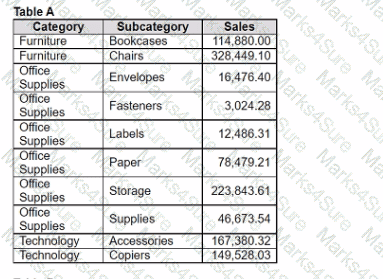
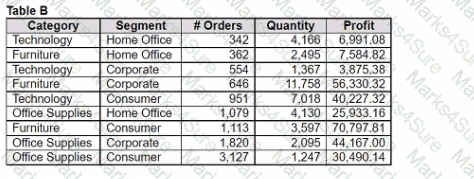
Table A is the primary table.
Which type of join is established when a blend is created by using the join key of Category?
A Data Analyst needs to create a dashboard to show sales rep revenue tracking against goals. The revenue data source has already been published to the corporate Tableau site. The goals data is stored in a Microsoft Excel file and must be updated on a regular basis by the sales managers.
How should the analyst set up the data sources to meet these requirements?
You are subscribed to several views.
You need to unsubscribe from the views.
What should you use?
You have a Tableau workbook that contain three worksheets named Sheet1 Sheet2 and Sheet3.
You create several filters.
From the Data Source page you plan to add data source fillers
When type of filter will appear in the Edit Data Source Filters dialog box?
PDF + Testing Engine

Testing Engine
PDF (Q&A)