
Free Practice Questions for the Google Developers Certification Associate-Android-Developer Exam (2026 Updated)
At Marks4sure, we are dedicated to providing IT professionals with the most accurate and reliable preparation materials for the Google Associate-Android-Developer exam. To support your certification journey, we have made a selection of our premium 2026 Google Developers Certification practice questions and answers available completely free. You can take this practice test as many times as you need. Every question includes a detailed, expertly verified explanation to ensure you fully grasp the core security concepts before test day.
In a class extended PreferenceFragmentCompat. What method is used to inflate the given XML resource and add the preference hierarchy to the current preference hierarchy?
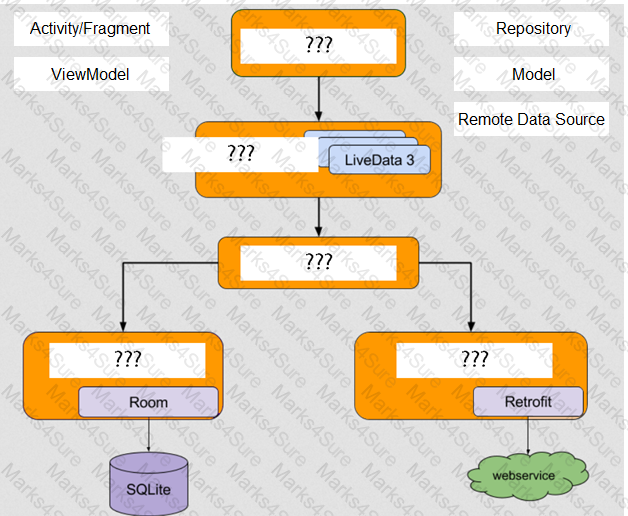
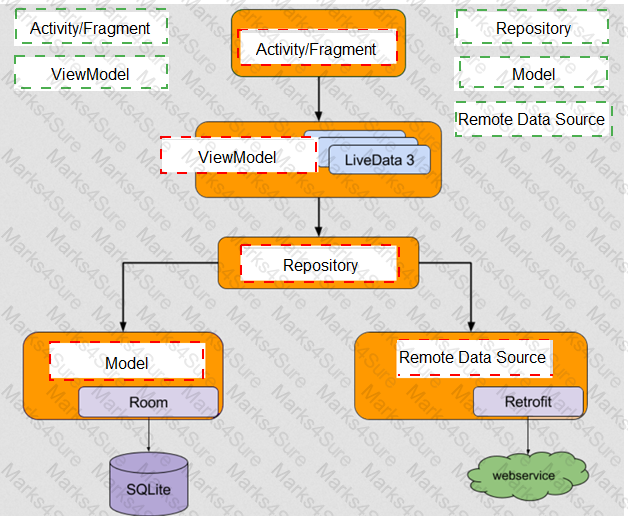
With recommended app architecture. Fill the following diagram, which shows how all the modules usually should interact with one another after designing the app (drag modules to correct places).
Each time your test invokes onView(), Espresso waits to perform the corresponding UI action or assertion until the following synchronization conditions are met: (Choose three.)
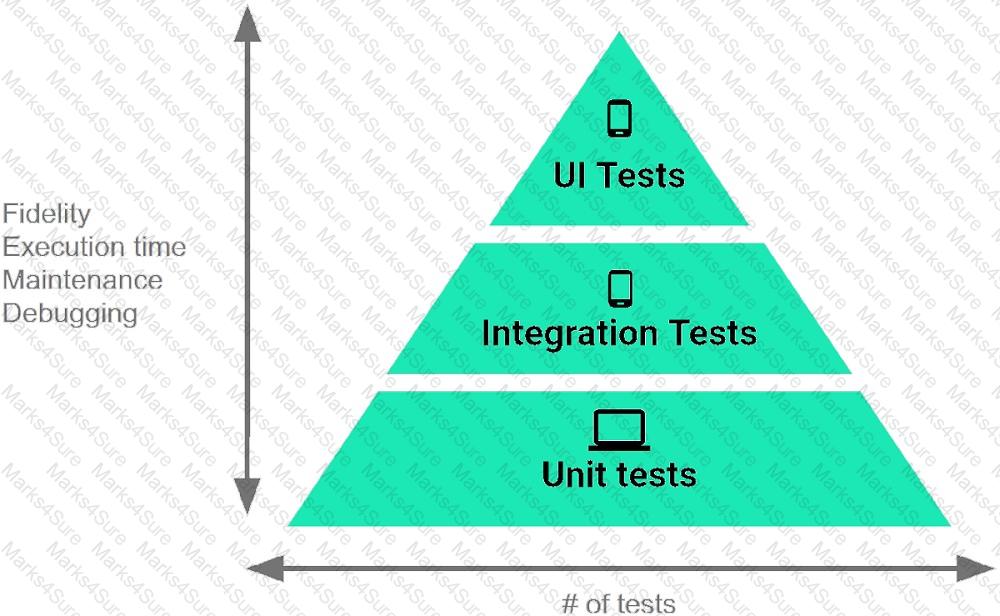
The Testing Pyramid, shown in the Figure, illustrates how your app should include the three categories of tests: small, medium, and large. Small tests are unit tests that :
Interface for a callback to be invoked when a shared preference is changed. Interface is named:
In a class PreferenceFragmentCompat. As a convenience, this fragment implements a click listener for any preference in the current hierarchy. So, in what overridden method we can handle that a preference in the tree rooted at this PreferenceScreen has been clicked?
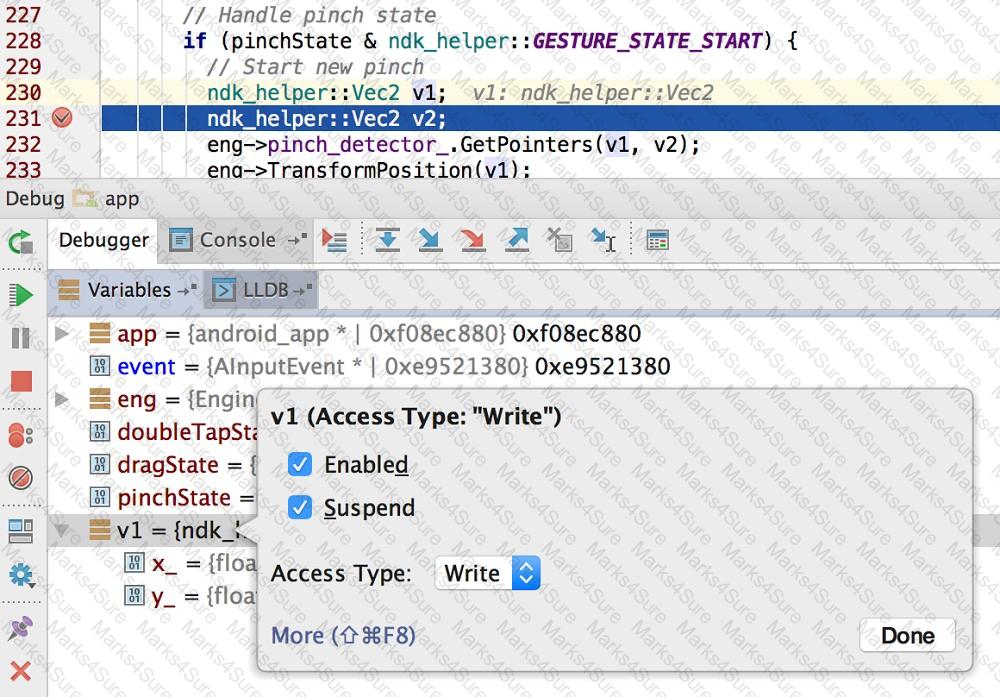
About running a debuggable build variant. Usually, you can just select the default " debug " variant that ' s included in every Android Studio project (even though it ' s not visible in the build.gradle file). But if you define new build types that should be debuggable, you must add ‘debuggable true’ to the build type. Is that mostly true?
In a class PreferenceFragmentCompat. What method is called during onCreate(Bundle) to supply the preferences for this fragment. And where subclasses are expected to call setPreferenceScreen (PreferenceScreen) either directly or via helper methods such as addPreferencesFromResource (int)?
What do you want from Room when you create a DAO method and annotate it with @Update?
Example:
@Dao
interface MyDao {
@Update
fun updateUsers(vararg users: User)
}
Filter logcat messages. If in the filter menu, a filter option “Show only selected application”? means:
Android Tests. You can use the childSelector() method to nest multiple UiSelector instances. For example, the following code example shows how your test might specify a search to find the first ListView in the currently displayed UI, then search within that ListView to find a UI element with the text property Apps.
What is the correct sample?
To create a basic JUnit 4 test class, create a class that contains one or more test methods. A test method begins with the specific annotation and contains the code to exercise and verify a single functionality in the component that you want to test. What is the annotation?
For example, our preferences.xml file was added by addPreferencesFromResource (R.xml.preferences). Our preferences.xml file contains such item:
< ListPreference android:id= " @+id/order_by " android:key= " @string/pref_sort_key "
android:title= " @string/pref_sort_title " android:summary= " @string/pref_sort_summary " android:dialogTitle= " @string/pref_sort_dialog_title " android:entries= " @array/sort_oder " android:entryValues= " @array/sort_oder_value " android:defaultValue= " @string/pref_default_sort_value " app:iconSpaceReserved= " false " / >
In our Fragment, we can dynamically get current notification preference value in this way:
“workManager” is an instance of WorkManager. Select correct demonstration of WorkRequest cancellation:
Content labels. What attribute to use to indicate that a View should act as a content label for another View?
LiveData.postValue() and LiveData.setValue() methods have some differences. So if you have a following code executed in the main thread:
liveData.postValue( " a " ); liveData.setValue( " b " );
What will be the correct statement?
An example. In our ViewModelFactory (that implements ViewModelProvider.Factory) we have an instance of our Repository, named mRepository. Our ViewModel has such constructor:
public MyViewModel(MyRepository myRepository)...
Next, in our ViewModelFactory create ViewModel method (overriden) looks like this:
@NonNull
@Override
public < T extends ViewModel > T create(@NonNull Class < T > modelClass) { try {
//MISSED RETURN VALUE HERE
} catch (InstantiationException | IllegalAccessException | NoSuchMethodException | InvocationTargetException e) {
throw new RuntimeException( " Cannot create an instance of " + modelClass, e);
}
}
What should we write instead of “//MISSED RETURN VALUE HERE”?
Android Tests. You can use the childSelector() method to nest multiple UiSelector instances. For example, the following code example shows how your test might specify a search to find the first ListView in the currently displayed UI, then search within that ListView to find a UI element with the text property Apps.
What is the correct sample?
When scheduling unique work, you must tell WorkManager what action to take when there is a conflict. You do this by passing an enum when enquing the work. For one-time work, you provide an ExistingWorkPolicy, which supports some options for handling the conflict. (Choose four.)
To handle an options menu item click in an activity, we usually should override method named:
Move the major components of the Android platform to correct places in diagram.
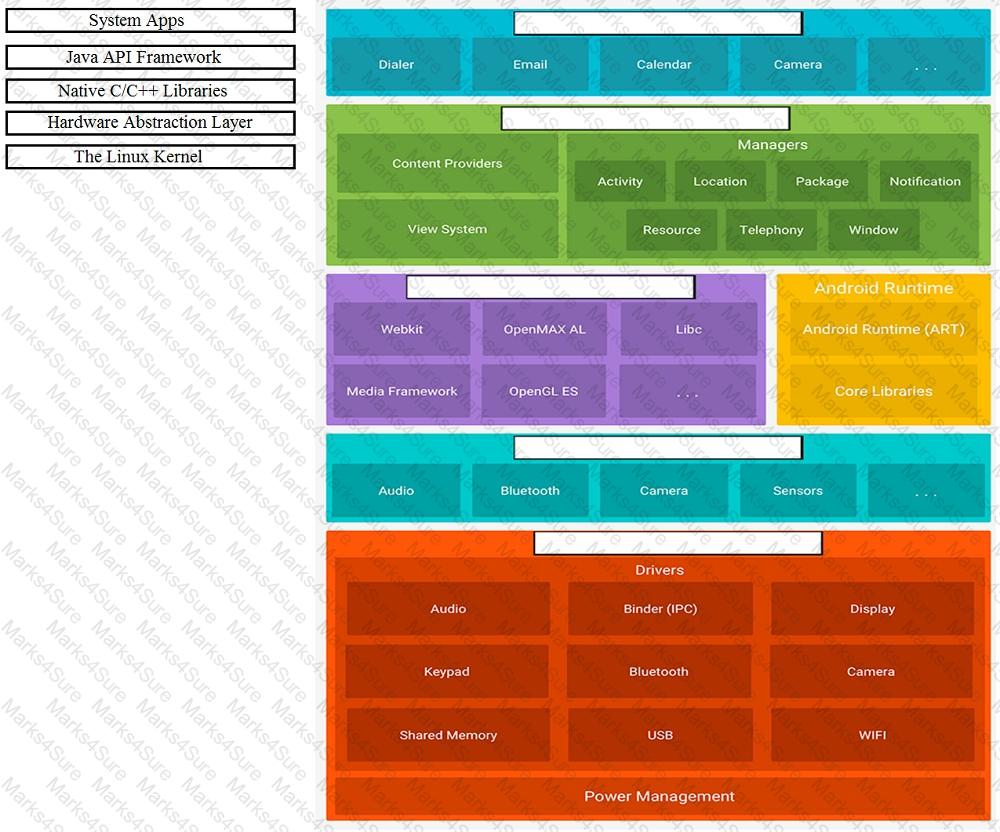
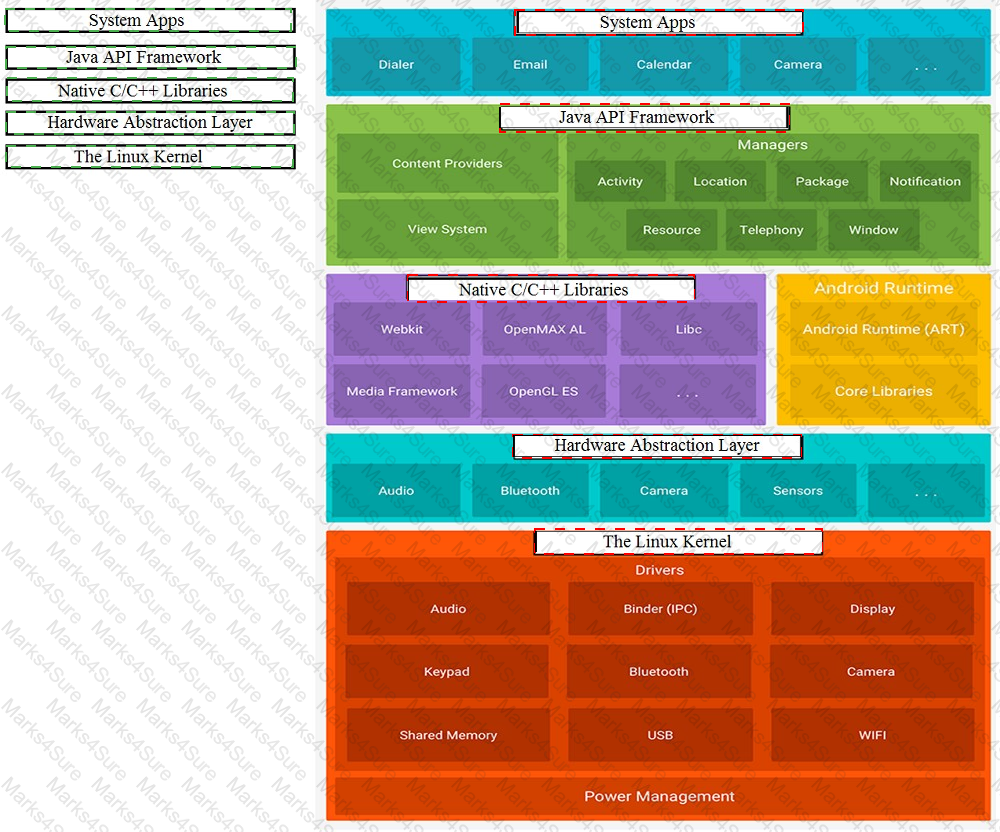
To build a debug APK, you can open a command line and navigate to the root of your project directory. To initiate a debug build, invoke the assembleDebug task:
gradlew assembleDebug
This creates an APK named [module_name]-debug.apk in [project_name] /[module_name]/build/outputs/apk/
Select correct statements about generated file. (Choose all that apply.)
In a common Paging Library architecture scheme, move instances to the correct positions.
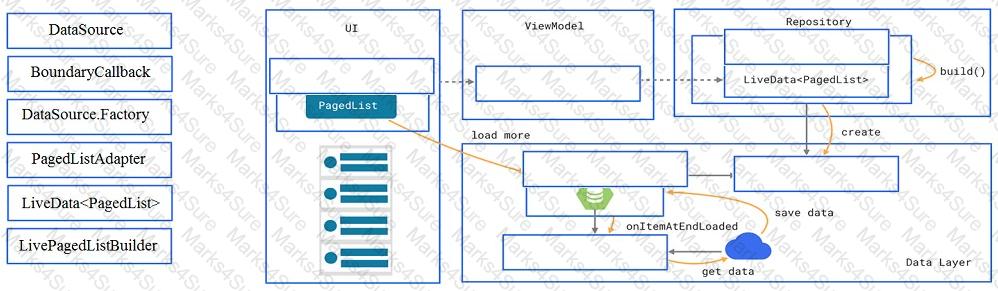
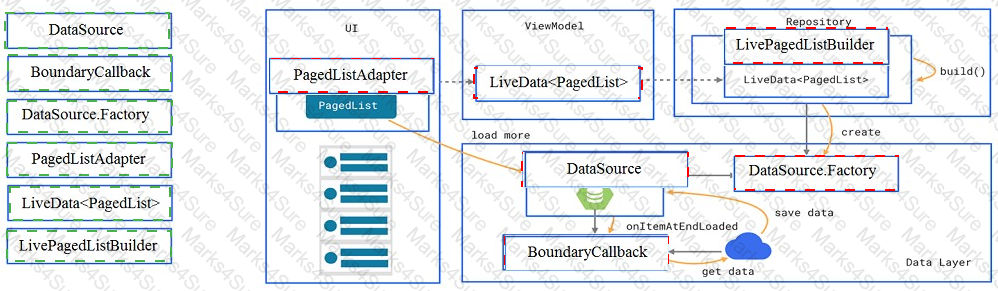
In application theme style, flag windowNoTitle ( < item name= " windowNoTitle " > ) indicates:
For example, our preferences.xml file was added by addPreferencesFromResource (R.xml.preferences). Our preferences.xml file contains such item:
< SwitchPreference android:id= " @+id/notification " android:key= " @string/pref_notification_key "
android:title= " @string/pref_notification_title " android:summary= " @string/pref_notification_summary " android:defaultValue= " @bool/pref_notification_default_value " app:iconSpaceReserved= " false " / >
In our Fragment, we can dynamically get current notification preference value in this way:
An overridden method onCreateOptionsMenu in an Activity returns boolean value. What does this value mean?
Custom views and directional controller clicks. On most devices, clicking a view using a directional controller sends (to the view currently in focus) a KeyEvent with:
Which build options in the Build menu to choose to delete all intermediate/cached build files.
For example, we have a file in our assets folder app/src/main/assets/sample_teas.json. To get an
InputStream for reading it, from out Context context, we can try doing this:
Assume that an app includes a default set of graphics and two other sets of graphics, each optimized for a different device setup:
res/drawable/
Contains default graphics. res/drawable-small-land-stylus/
Contains graphics optimized for use with a device that expects input from a stylus and has a QVGA low- density screen in landscape orientation.
res/drawable-ja/
Contains graphics optimized for use with Japanese.
What happens if the app runs on a device that is configured to use Japanese and, at the same time, the device happens to be one that expects input from a stylus and has a QVGA low-density screen in landscape orientation?
PDF + Testing Engine

Testing Engine
PDF (Q&A)
