Free Practice Questions for the Microsoft Certified: Windows Virtual Desktop Specialty AZ-140 Exam (2026 Updated)
At Marks4sure, we are dedicated to providing IT professionals with the most accurate and reliable preparation materials for the Microsoft AZ-140 exam. To support your certification journey, we have made a selection of our premium 2026 Microsoft Certified: Windows Virtual Desktop Specialty practice questions and answers available completely free. You can take this practice test as many times as you need. Every question includes a detailed, expertly verified explanation to ensure you fully grasp the core security concepts before test day.
You need to implement network security to meet the security requirements and the performance requirements.
Which two actions should you perform? Each correct answer presents a complete solution.
NOTE: Each correct selection is worth one point.
You need to configure the virtual machines that have the Pool1 prefix. The solution must meet the technical requirements.
What should you use?
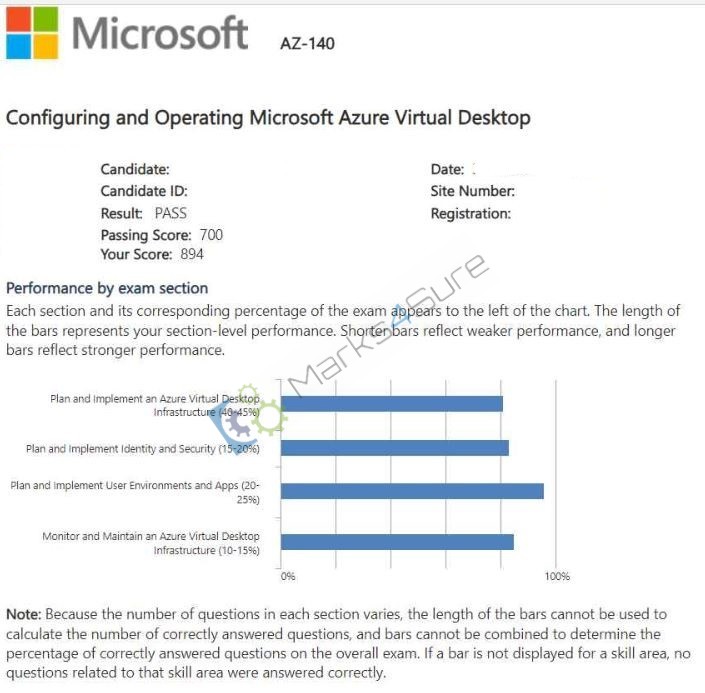
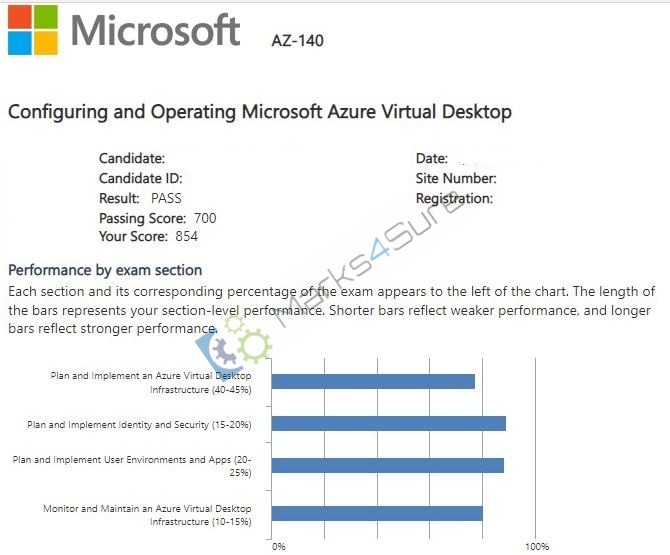
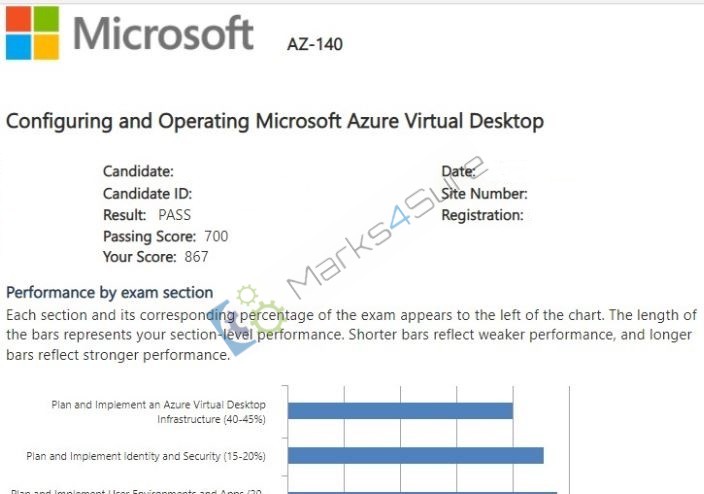
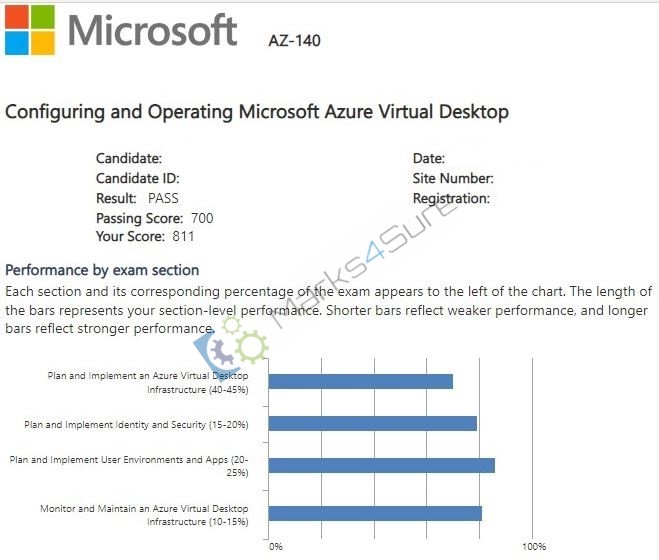
AZ-140 Report Card
You need to configure a conditional access policy to meet the authentication requirements.
What should you include in the policy configuration? To answer, select the appropriate options in the answer area.
NOTE Each correct selection is worth one point.


You plan to implement the FSLogix profile containers for the Seattle office.
Which storage account should you use?
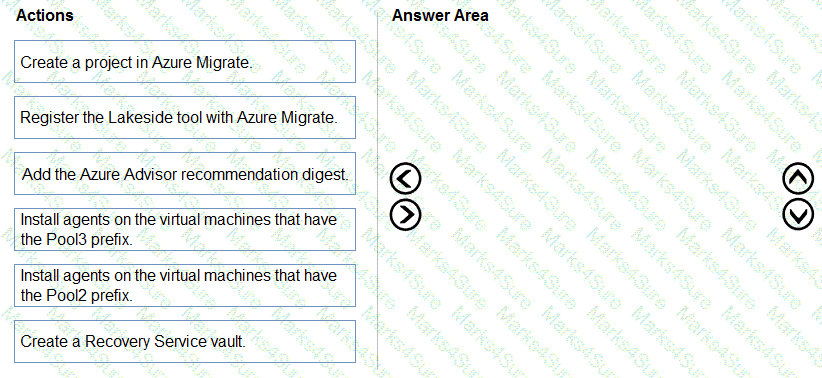
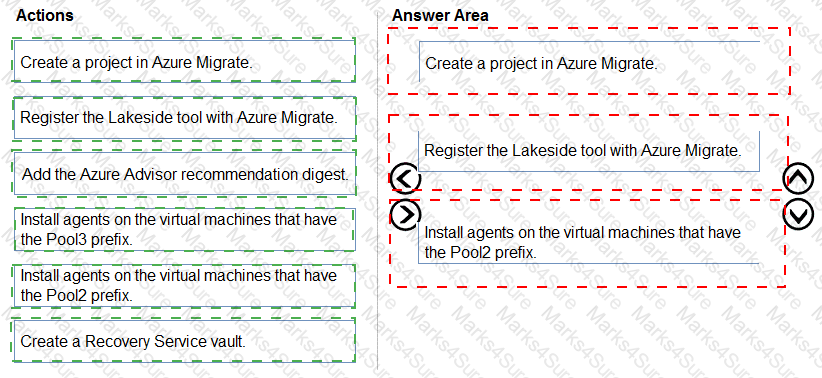
You need to evaluate the RDS deployment in the Seattle office. The solution must meet the technical requirements.
Which three actions should you perform in sequence? To answer, move the appropriate actions from the list of actions to the answer area and arrange them in the correct order.
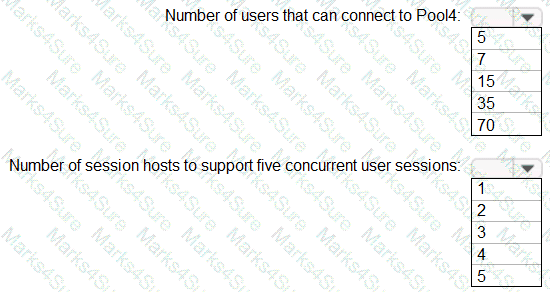
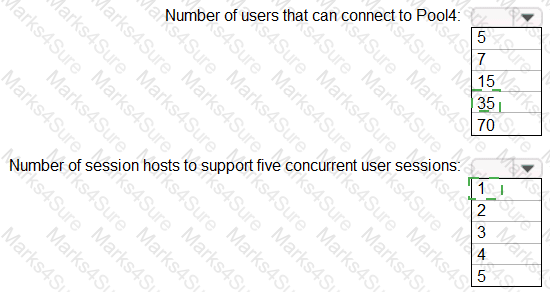
You are planning the deployment of Pool4.
What will be the maximum number of users that can connect to Pool4, and how many session hosts are needed to support five concurrent user sessions? To answer, select the appropriate options in the answer area.
NOTE: Each correct selection is worth one point.
You need to configure the device redirection settings. The solution must meet the technical requirements.
Where should you configure the settings?
Which three PowerShell modules should you install on Server1 to meet the technical requirements? Each correct answer presents part of the solution.
NOTE: Each correct selection is worth one point.
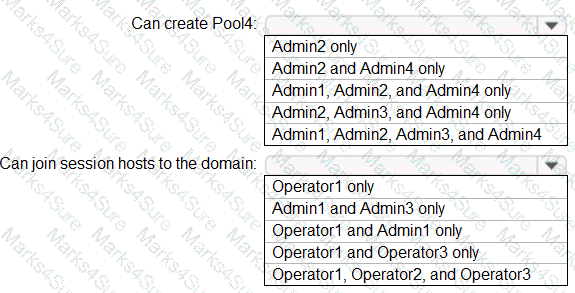
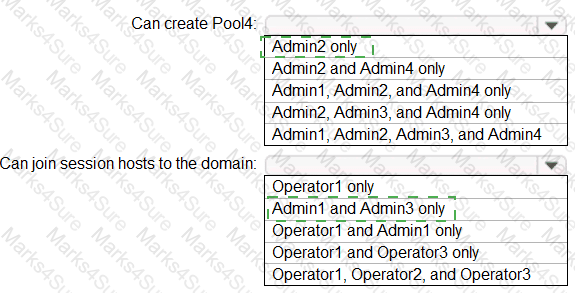
Which users can create Pool4, and which users can join session hosts to the domain? To answer, select the appropriate options in the answer area.
NOTE: Each correct selection is worth one point.
You need to deploy the session hosts to meet the deployment requirements Which PowerShell cmdlel should you run first?
You need to recommend a DNS infrastructure that meet the performance requirements. What should you recommend? To answer, select the appropriate options in the answer area. NOTE: Each correct selection is worth one point.


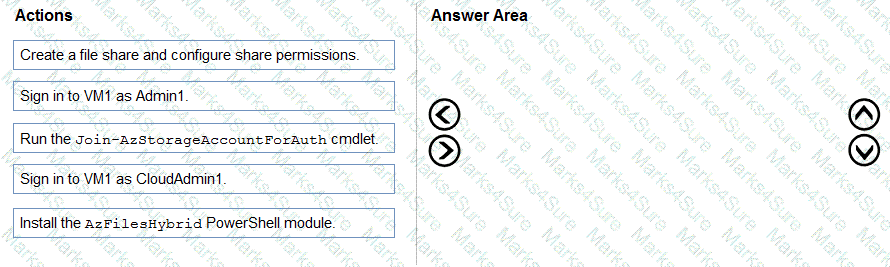
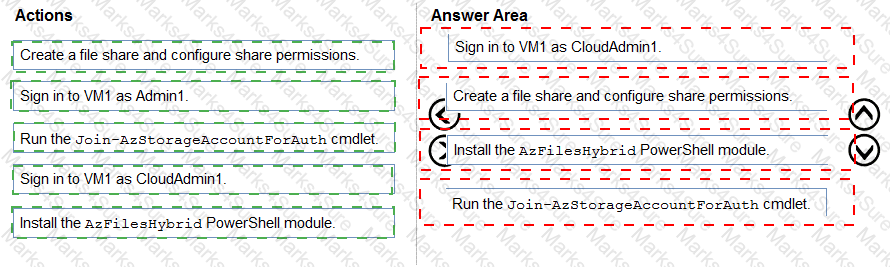
You need to ensure that you can implement user profile shares for the Boston office users. The solution must meet the user profile requirements.
Which four actions should you perform in sequence? To answer, move the appropriate actions from the list of actions to the answer area and arrange them in the correct order.
You need to ensure the resiliency of the user profiles for the Boston office users. The solution must meet the user performance requirements.
What should you do?
You need to configure the user settings of Admin1 to meet the user profile requirements.
What should you do?
Which two actions should you perform to meet the security requirements for Defender for Endpoint? Each correct answer presents a complete solution.
NOTE: Each correct selection is worth one point.
You need to create a Conditional Access policy to meet the security require-ments.
How should you configure the policy? To answer, select the appropriate options in the answer area.
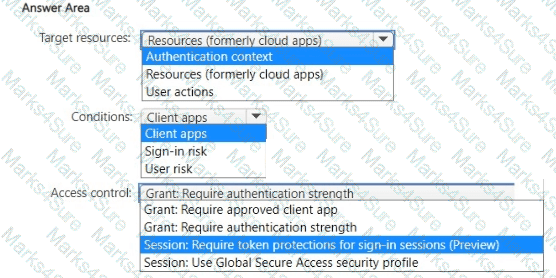
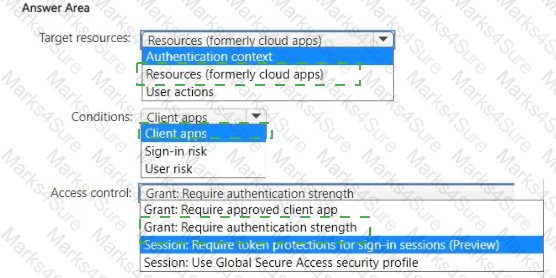
What should you do to meet the application requirements? To answer, select the appropriate options in the answer area.
NOTE: Each correct selection is worth one point.
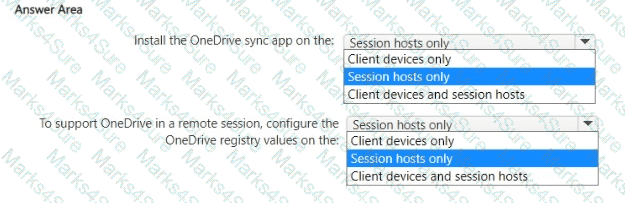
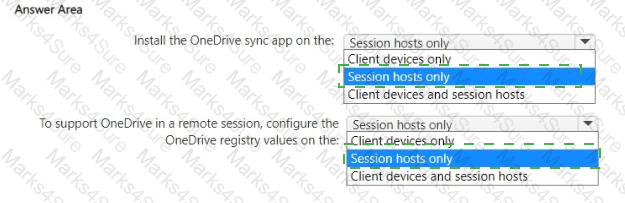
You need to prepare the disk on VM1 for use with the Azure Virtual Desktop deployment. Which two actions should you perform? Each correct answer presents part of the solution. NOTE: Each correct selection is worth one point.
You have an Azure Virtual Desktop deployment.
You have a Microsoft Entra tenant that contains the users shown in the following table.
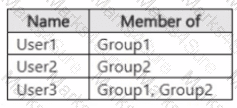
The users have smart devices that have the Microsoft Authenticator app installed. You create a Conditional Access policy that has the following settings:
• Name: CAPolicy1
• Assignments
o Users: Group1
o Target resources: All resources (formerly All cloud apps)
• Access controls
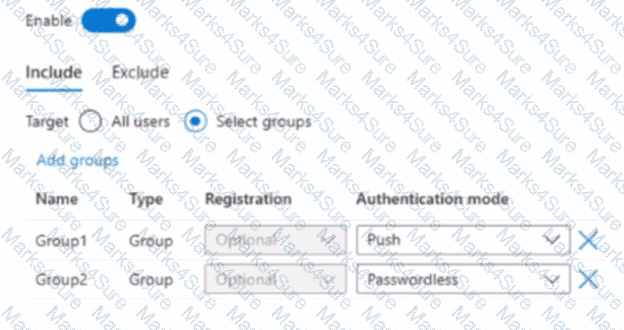
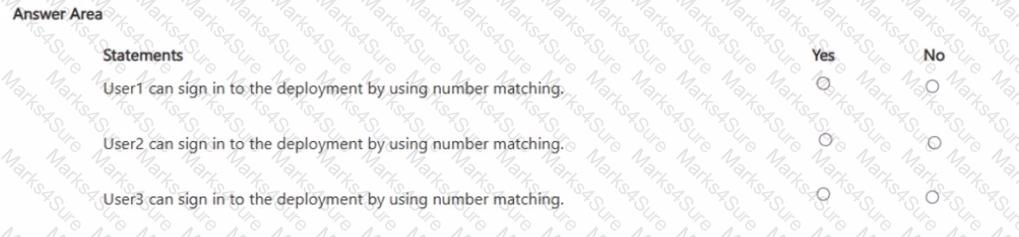
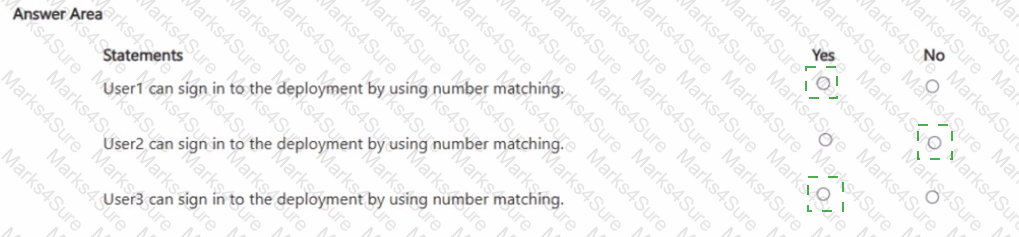
For each of the following statements, select Yes if the statement is true. Otherwise, select No.
NOTE: Each correct selection is worth one point.
Your network contains an on-premises Active Directory domain named contoso.com that syncs to an Azure Active Directory (Azure AD) tenant You have an Azure Virtual Desktop host pool named Pool1 that has the following settings:
• Host pool name- Pool 1
• Host pool type: Personal
• Number of VMs: 3
The session hosts have the following configurations:
• Image used to create the virtual machines: Windows 10 Enterprise
• Virtual machines domain-Joined to: On-premises conroso.com domain
You need to ensure that you can use Microsoft EndPoint Manager to manage security updates on the session hosts. What should you do?
You have a Azure Virtual Desktop deployment.
You need to monitor the deployment of using the Azure Virtual Desktop Insights solution in Azure Monitor.
What should you use as the Diagnostic settings destination for the host pool?
You have an Azure Virtual Desktop deployment and the Azure Storage accounts shown in the following table.
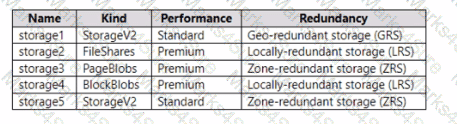
You plan to create FSLogix profile containers and store the containers in the storage accounts.
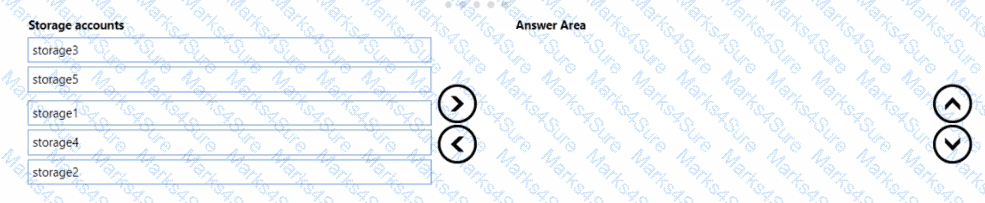
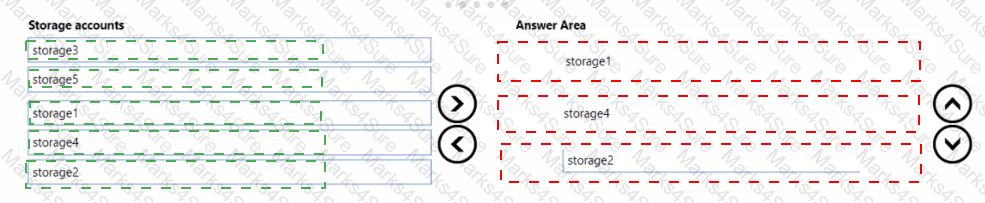
You need to identify which storage accounts support the FSlogix profile containers, and then order the accounts from highest to lowest redundancy.
Which three storage accounts should you identify in sequence? To answer, move the appropriate accounts from the list of accounts to the answer area and arrange them in the correct order.
You have an Azure subscription that contains two users named User1 and User2 and the Microsoft Entra groups shown in the following table.
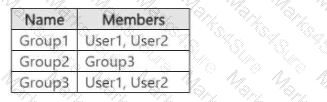
You have an Azure Virtual Desktop host pool named Pool! that contains two session hosts named Host1 and Host2. The session hosts use FSLogix user profiles.
Host1 contains the local groups shown in the following table.
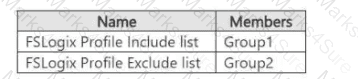
Host2 contains the local groups shown in the following table.
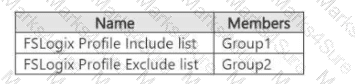
User1 connects to Pool1 and modifies his desktop.
User1 reports that when he reconnects to Pool1, the desktop modifications fail to appear.
You need to ensure that User1 sees the modified desktop when he connects to Pool1. The solution must minimize the impact on other user profiles.
What should you do?
You have two Azure subscriptions that are linked to an Azure Active Directory (Azure AD) tenant named contoso.com and contain an Azure Virtual Desktop deployment. The tenant contains a user named User1.
When User1 signs in to Azure Security Center, the user receives the message shown in the following exhibit.
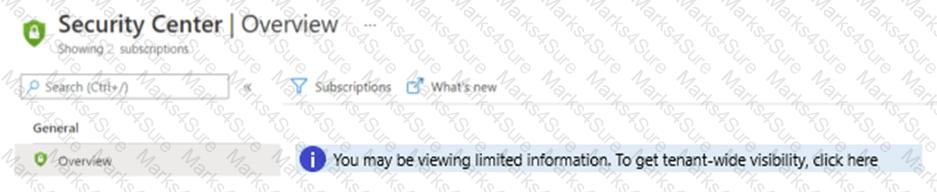
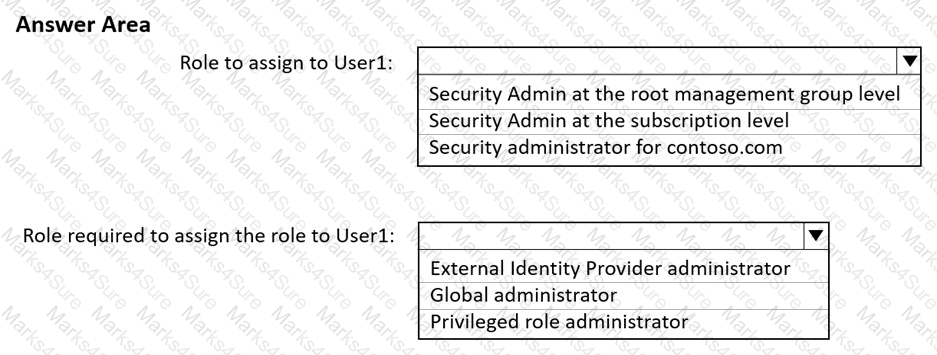
You need to ensure that User1 can manage security information for the tenant. The solution must use the principle of least privilege.
What should you do? To answer, select the appropriate options in the answer area.
NOTE: Each correct selection is worth one point.
Hot Area:
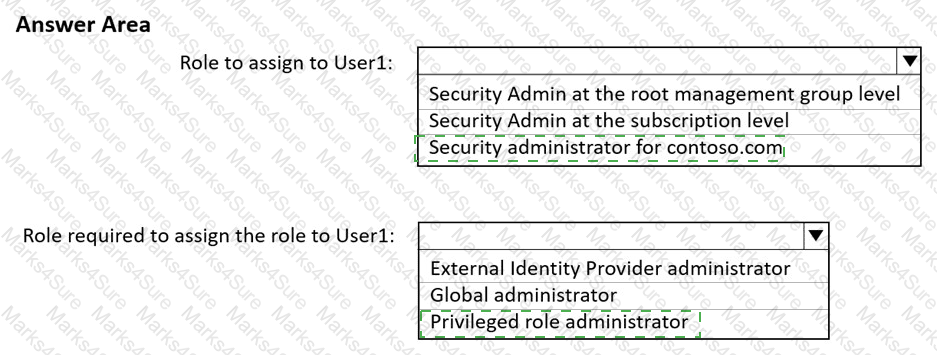
You have an Azure Virtual Desktop host pool named Pool1. Pool1 contains session hosts that run Windows 11 Enterprise multi-session.
You need to use Performance Monitor to troubleshoot a poor frame quality issue that is affecting a current user session to Pool1.
Which performance counter should you use?
You have an Azure subscription that contains an Azure Virtual Desktop host pool named Pool1 All the session hosts in Pool! are Microsoft Entra joined.
Users connect to Pool1 by using macOS devices.
You need to ensure that remote users can authenticate to RemoteApp sessions by using their Microsoft Entra credentials.
Which RDP property should you configure?
You have an Azure subscription that is linked to a hybrid Microsoft Entra tenant and contains a storage account named storage1.
You have an Azure Virtual Desktop deployment that contains a host pool named Pool1. Pool1 contains session hosts that are Microsoft Entra joined.
You plan to implement FSLogix profile containers for the session hosts of Pool1.
In storage1, you create a new Azure Files share named share1.
You need to ensure that share! can store the FSLogix profile containers.
What should you enable for share!?
You have an Azure subscription that contains a storage account named account 1.
You plan to deploy an Azure Virtual Desktop host pool that will contain multiple session hosts and use FSLogix profile containers. The profile containers will be stored in account1.
You need to provide the session hosts with access to account1. The solution must minimize the number of permissions granted to each session host.
What should you use?
You have an Azure Virtual Desktop deployment that contains a host pool named Pool1.
Pool1 contains 10 session hosts.
You need to enable screen capture protection on all the session hosts in Pool1. The solution must minimize administrative effort.
What should you do?
You have an Azure Virtual Desktop deployment that contains the resources shown in the following table.
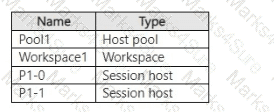
You need to ensure that users can connect to a session host in the deallocated state. On which resources can you enable Start VM on Connect?
Note: This question is part of a series of questions that present the same scenario. Each question in
the series contains a unique solution that might meet the stated goals. Some question sets might have more than one correct solution, while others might not have a correct solution.
After you answer a question in this section, you will NOT be able to return to it. As a result, these
questions will not appear in the review screen.
You have a Windows Virtual Desktop host pool that contains five session hosts. The session hosts run
Windows 10 Enterprise multi-session.
You need to prevent users from accessing the internet from Windows Virtual Desktop sessions. The session hosts must be allowed to access all the required Microsoft services.
Solution: You modify the IP configuration of each session host.
Does that meet the goal?
You have an Azure Virtual Desktop deployment that contains a host pool named Pool 1. Pool 1 contains 10 session hosts that were deployed by using an Azure Resource Manager (ARM) template.
You discover that Windows licenses were NOT applied to the session hosts. You need to use a PowerShell script to update the licenses. Which cmdlet should you include in the solution?
You have an Azure Virtual Desktop deployment.
You deploy and configure Azure Virtual Desktop in a secondary location.
You plan to perform a test failover to the secondary location, but discover existing user sessions to the primary location.
You need to sign out users from the session hosts in the primary location.
Which PowerShell cmdlet should you run?
You have an Azure Virtual Desktop deployment that contains the resources shown in the following table.

You have a Windows 11 device named Device1 that has Azure Command-Line Interface (CLI) installed.
You need to use Remote Desktop Connection (mstsc.exe) on Device1 to connect to Host1.
Which three actions should you perform in sequence? To answer, move the appropriate actions from the list of actions to the answer area and arrange them in the correct order.
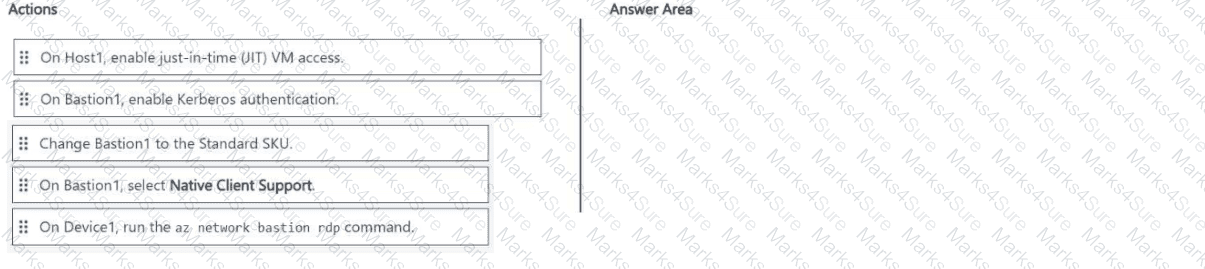
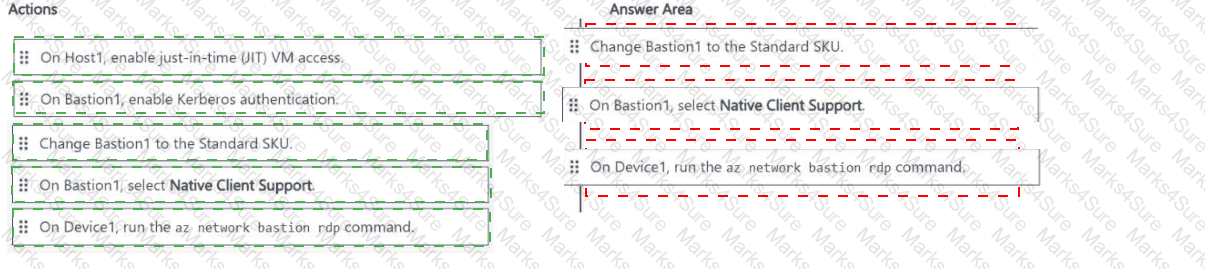
You have an Azure Virtual Desktop deployment that contains the resources shown in the following table.
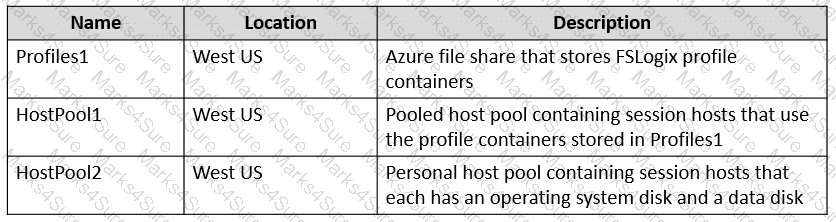
You create the resources shown in the following table.
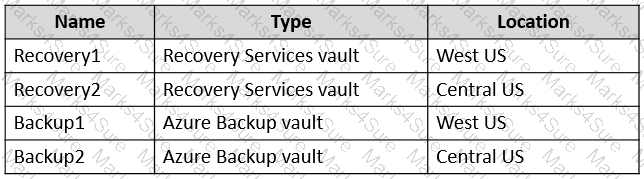
You need to meet following requirements:
• Back up the FSLogix profile containers used by HostPool1.
• Backup the data disks in HostPool2.
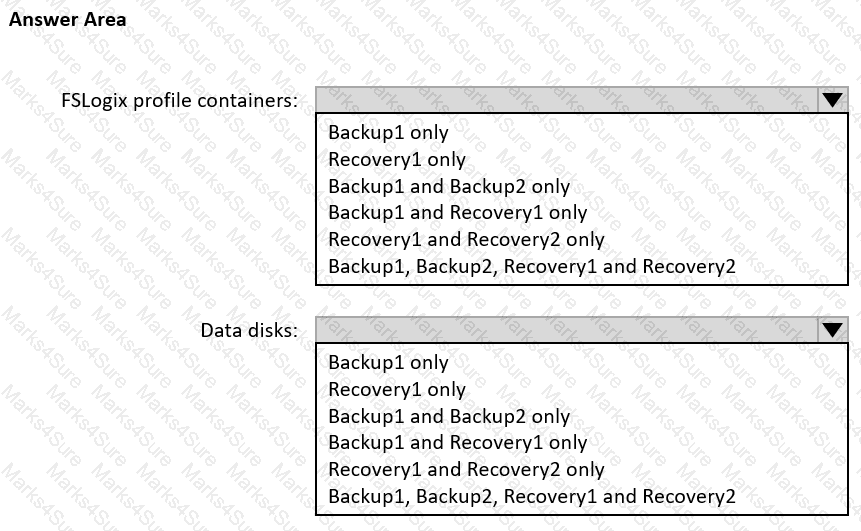
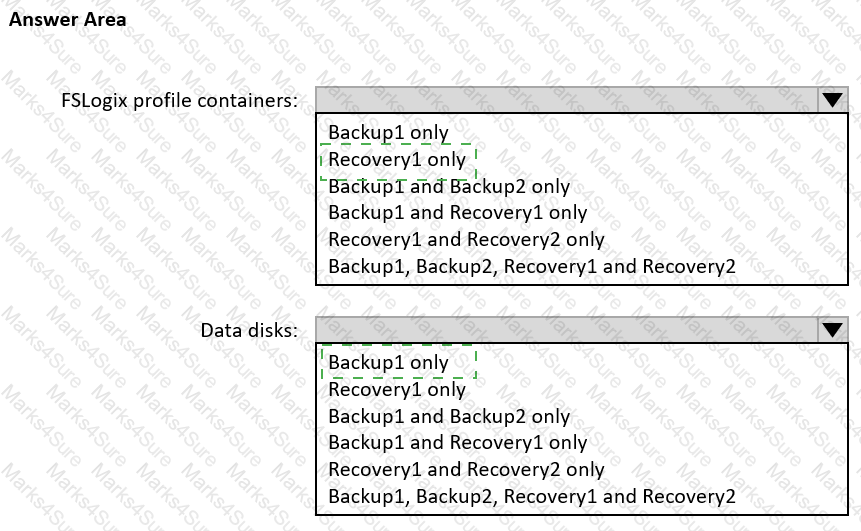
To which resources can you back up the profile containers and the data disks? To answer, select the appropriate options in the answer area.
NOTE: Each correct selection is worth one point.
You have an Azure subscription named Sub! that contains the resources shown in the following table.
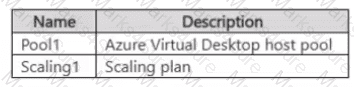
You have a user named Admin1 that is assigned the Desktop Virtualization Contributor role for Sub1. You need to ensure that Admin1 can assign Scaling1 to Pool1.
Solution: You assign the Azure Virtual Desktop service principal the Owner role for Sub1. Does this meet the goal?
You have a Azure Virtual Desktop deployment.
You plan to implement the Start/Stop VMs during off-hours feature.
You need to ensure that you can stop the session hosts automatically based on the CPU utilization.
What should you do on the session hosts?
You have a Windows Virtual Desktop deployment.
Many users have iOS devices that have the Remote Desktop Mobile app installed.
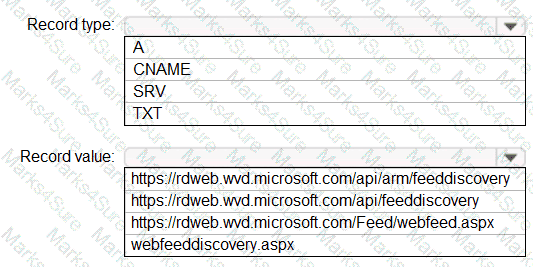
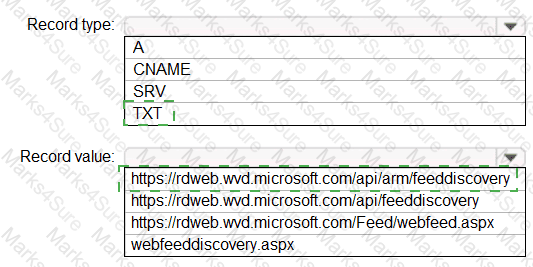
You need to ensure that the users can connect to the feed URL by using email discovery instead of entering the feed URL manually.
How should you configure the _msradc DNS record? To answer, select the appropriate options in the answer area.
NOTE: Each correct selection is worth one point.
You plan to deploy Azure Virtual Desktop.
You are deploying Storage Spaces Direct to a cluster that will store FSLogix profile containers. The cluster will NOT use Cloud witness.
What is the minimum number of virtual machines required for the cluster?
You have an Azure Virtual Desktop deployment that contains a host pool named Pool1. You plan to create a Windows 10 image named Image1 to deploy new session hosts to Pool1.
You need to ensure that all the new session hosts deployed by using Image1 are onboarded to Microsoft Defender for Endpoint. What should you do?
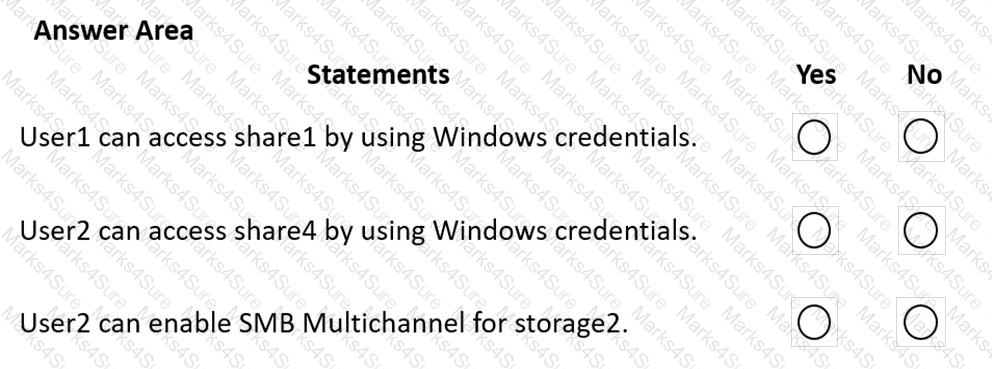
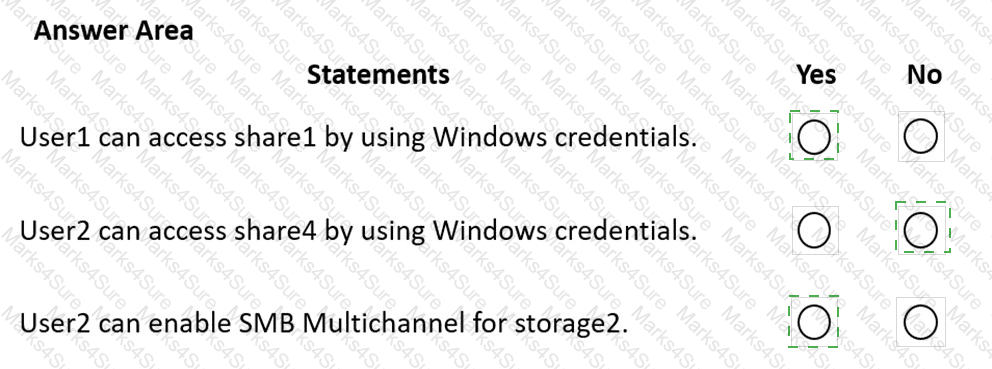
You have an Azure Virtual Desktop deployment that contains two users named User1 and User2 and the storage accounts shown in the following table.

The File share settings for storage1 are configured as shown in the following exhibit.
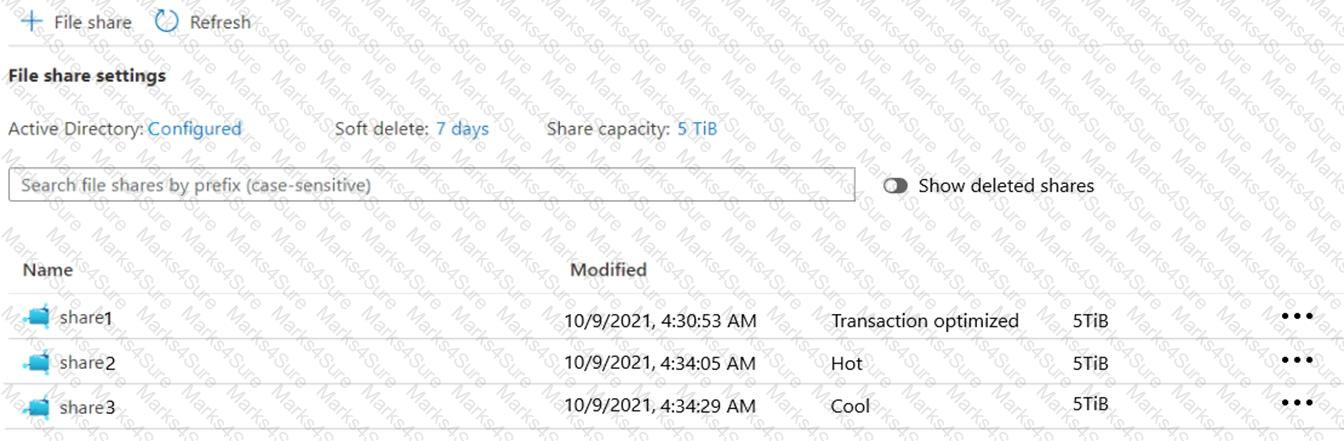
The File share settings for storage2 are configured as shown in the following exhibit.
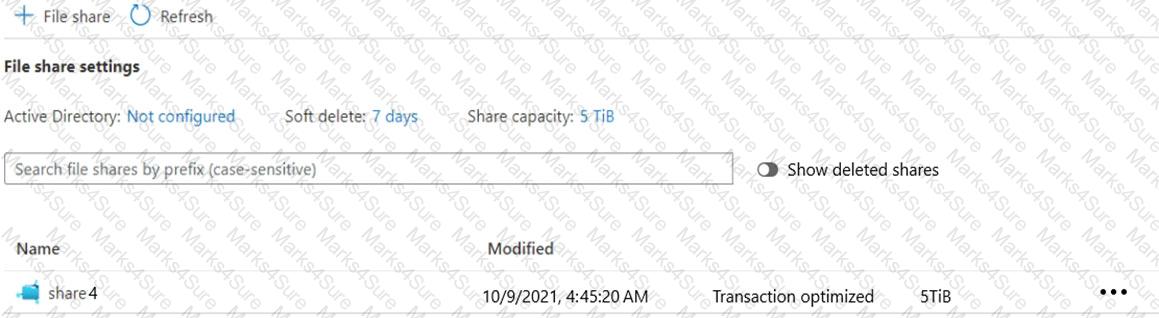
For each of the following statements, select Yes if the statement is true. Otherwise, select No.
NOTE: Each correct selection is worth one point.
Hot Area:
You have an Azure Virtual Desktop deployment that contains a host pool named Pool1. Pool1 has the following settings:
• Host pool type: Pooled
• Load balancing algorithm: Breadth-first
• Max session limit: 5
• Start VM on connect: Yes
Pool1 contains the session hosts shown in the following table.
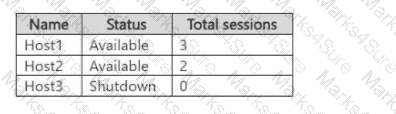
How many additional users must connect to Pool1 to start Host3?
PDF + Testing Engine

Testing Engine
PDF (Q&A)