
Free Practice Questions for the Dassault Systemes ENOV613X-3DE Exam (2026 Updated)
At Marks4sure, we are dedicated to providing IT professionals with the most accurate and reliable preparation materials for the Dassault Systemes ENOV613X-3DE exam. To support your certification journey, we have made a selection of our premium 2026 Dassault Systemes practice questions and answers available completely free. You can take this practice test as many times as you need. Every question includes a detailed, expertly verified explanation to ensure you fully grasp the core security concepts before test day.
Which tool allows CATIA V6 designers to understand the effect of their design change on other data that might be related?

What command allows you to generate thumbnails of the selected objects on the fly?
Which tool allows the Designers to bookmark a specific CATIA V6 Product or 3D Part for subsequent easy access?
Which quadrant of the Compass will you use, if you want to get information and tools required to transfer the ownership of an object?
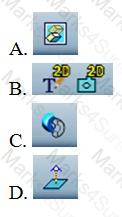
Which of the following tools will you use to hide/show objects in the Examine window?
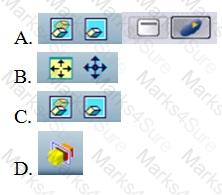
Which of the following commands will you use to see to which assembly does a selected part belong?
When setting up Web-meetings with ENOVIA, what responsibilities can a participant perform?
Which quadrant of the Compass will you click to view information regarding the versions of the parts of an assembly?
Which of the following Volume Filtering options, filters objects within a certain clearance around a CATIA V6 Part?
Which of the following tools will you use to transfer the ownership of a selected object?
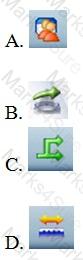
Which tool allows the user to access PLM information associated to CATIA V6 design data in 3D color coded dashboards?
When a BOM Engineer increases the quantity of a part by 1 or n, how is it communicated to the CATIA V6 Designer?
Which statement is NOT a benefit of the Minor Version capability within CATIA V6?
PDF + Testing Engine

Testing Engine
PDF (Q&A)
