
Free Practice Questions for the F5-CA F5CAB5 Exam (2026 Updated)
At Marks4sure, we are dedicated to providing IT professionals with the most accurate and reliable preparation materials for the F5 F5CAB5 exam. To support your certification journey, we have made a selection of our premium 2026 F5-CA practice questions and answers available completely free. You can take this practice test as many times as you need. Every question includes a detailed, expertly verified explanation to ensure you fully grasp the core security concepts before test day.
A traffic group includes four devices. The failover method is HA order. The failover order is:
BIGIP-D
BIGIP-B
BIGIP-C
BIGIP-A
Auto fallback is enabled. BIGIP-D has been forced to standby. BIGIP-B was active before being rebooted. Which device is active when BIGIP-B is up after the reboot?
Users are unable to reach an application. The BIG-IP Administrator checks the Configuration Utility and observes that the Virtual Server has a red diamond in front of the status. What is causing this issue?
Which file should the BIG-IP Administrator check to determine when a Virtual Server changed its status from RED to GREEN?
A BIG-IP Administrator makes a configuration change to the BIG-IP device. Which file logs the message regarding the configuration change?
A BIG-IP Administrator notices that one of the servers that runs an application isNOTreceiving any traffic. The BIG-IP Administrator examines the configuration status of the application and observes the displayed monitor configuration and affected pool member status.
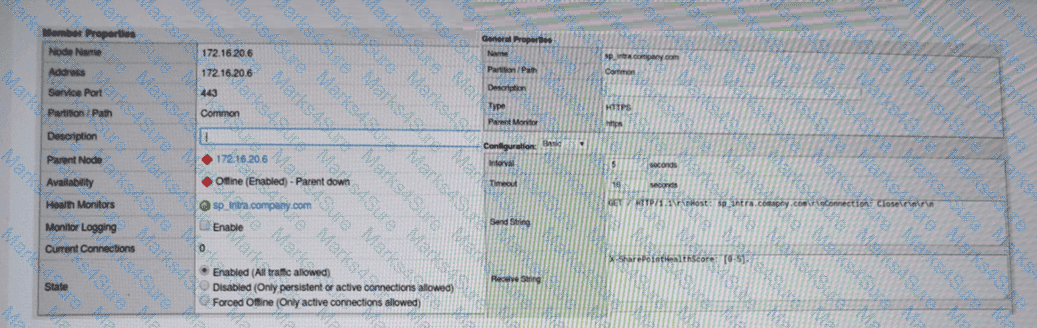
What is the possible cause of this issue? (Choose one answer)
A BIG-IP Administrator needs to collect HTTP status code and HTTP method for traffic flowing through a virtual server. Which default profile provides this information?
Which two methods should the BIG-IP Administrator use to troubleshoot a pool member that has been markedDOWNby its health monitor? (Choose two answers)
A BIG-IP Administrator observes the following pool member status message:
Pool /Common/testpool member /Common/10.120.0.5:8090 monitor status down
[/Common/http: up, /Common/http2: down; last error:]
Why is this pool member being marked down? (Choose one answer)
A BIG-IP Administrator is informed that traffic on Interface 1.1 is expected to increase over the maximum bandwidth capacity on the link. There is a single VLAN on the Interface. What should the BIG-IP Administrator do to increase the total available bandwidth?
Pool /Common/testpool member /Common/10.120.0.5:8090 monitor status down. [ /Common/http: up, /Common/http2: down; last error: ] [ was up for lhr:0min:43sec ]
Why is this pool member being marked down?
Refer to Exhibit:
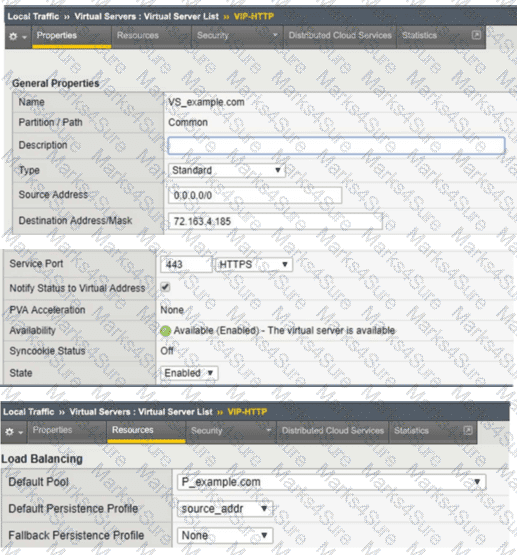
An organization is reporting slow performance accessing their Intranet website, hosted in a public cloud. All employees use a single Proxy Server with the public IP of 104.219.110.168 to connect to the Internet. What should the BIG-IP Administrator of the Intranet website do to fix this issue?
A custom HTTP monitor is failing to a pool member 10.10.3.75:8080 that serves up www.example.com . A ping works to the pool member address. The SEND string is: GET / HTTP/1.1 \r\nHost: www.example.com\r\nConnection: Close\r\n\r\n. Which CLI tool syntax will show whether the web server returns the correct HTTP response?
Where should the BIG-IP Administrator go in the GUI to verify the status of pool members of a pool?
A BIG-IP Administrator configured a virtual server with a pool of 3 members and selected the Round Robin load balancing method to evenly distribute traffic across the pool members. During initial testing, the virtual server failed to respond to http requests.
Plaintext
ltm virtual http.vs {
destination 10.10.1.100:http
ip-protocol tcp
mask 255.255.255.255
pool http.pool
profiles {
tcp{}
}
serverssl-use-sni disabled
source 0.0.0.0/0
translate-address enabled
translate-port enabled
}
ltm pool http_pool {
members {
10.10.1.101:http {
address 10.10.1.101
session monitor-enabled
state checking
}
10.10.1.102:http {
address 10.10.1.102
session monitor-enabled
state checking
}
}
monitor tcp
}
What configuration change on the BIG-IP will resolve this issue?
A BIG-IP device sends out the following SNMP trap: big-ipo.f5.com - bigipExternalLinkChange Link: 1.0 is DOWN. Where in the BIG-IP Configuration utility should the BIG-IP Administrator verify the current status of Link 1.0?
PDF + Testing Engine

Testing Engine
PDF (Q&A)
