Spring Sale Limited Time 65% Discount Offer - Ends in 0d 00h 00m 00s - Coupon code: pass65

FCP_FMG_AD-7.6 Fortinet NSE 5 - FortiManager 7.6 Administrator Questions and Answers

Questions 4

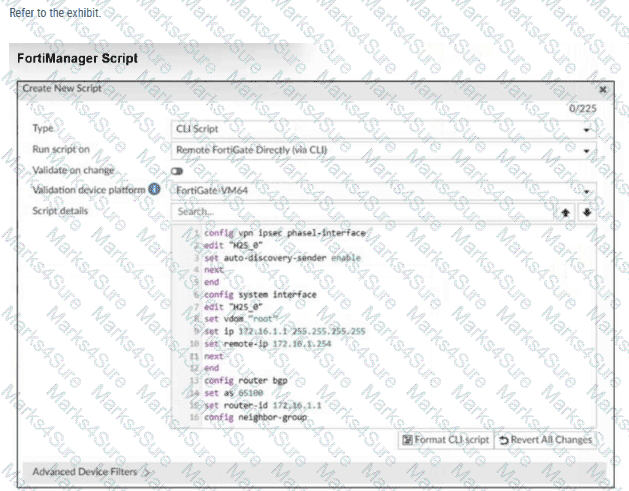
Refer to Exhibit:

FCP_FMG_AD-7.6 Question 4

Which two actions will occur if you run the script using the Remote FortiGate Directly via CLI option? Choose two answers

Options:

A.

FortiManager will provide a preview of CLI commands before executing this script on a managed FortiGate.

B.

FortiManager will create a new revision history.

C.

FortiGate will auto-updated the FortiManager device-level database.

D.

You will have to install these changes using the Install Wizard.

Buy Now
Questions 5

An administrator has assigned a global policy package to a new ADOM named ADOM1.

What will happen if the administrator tries to create a new policy package in ADOM1?

Options:

A.

The administrator will be able to select the option to assign the global policy package to the new policy package.

B.

FortiManager will automatically assign the global policy package to the new policy package.

C.

FortiManager will automatically install policies on the policy package in ADOM1.

D.

The administrator will have to assign the global policy package from the global ADOM.

Buy Now
Questions 6

What are two outcomes of ADOM revisions? Choose two answers.

Options:

A.

ADOM revisions can save the current state of the entire ADOM.

B.

ADOM revisions do not increase the size of configuration backups.

C.

ADOM revisions can save the current state of all policy packages and objects for an ADOM.

D.

ADOM revisions appear in the Install Policy and Package Settings section of the install wizard.

Buy Now
Questions 7

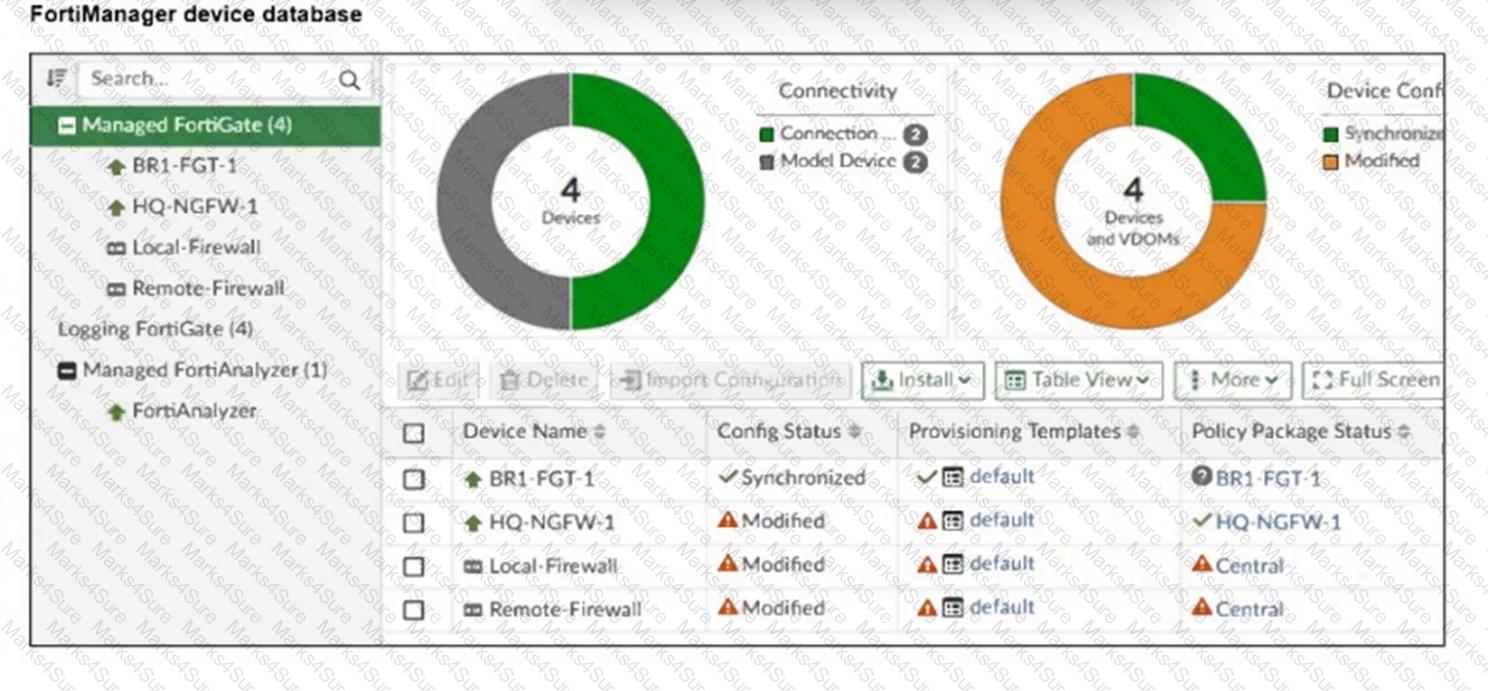
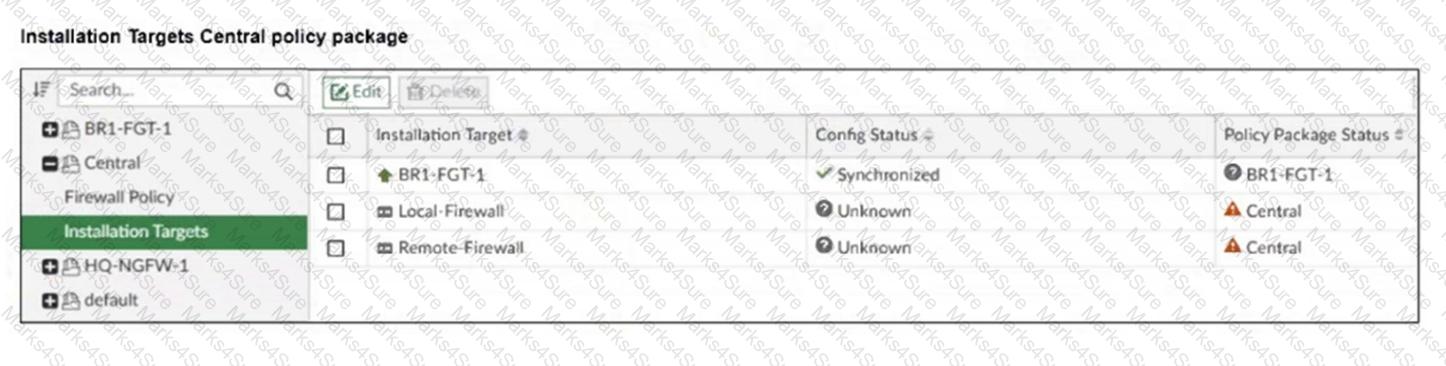
Refer to the exhibits.

FCP_FMG_AD-7.6 Question 7

FCP_FMG_AD-7.6 Question 7

An administrator has been asked to install the same policies from a central policy package onto the BR1-FGT-1 firewall.

The administrator added BR1-FGT-1 as a target in the central policy package installation.

What should the administrator do when reinstalling the central policy package on the BR1-FGT-1 firewall?

Options:

A.

Assign only one policy package to the firewall because FortiManager does not allow more than one policy package assigned per device at the same time.

B.

Import the policy package to change the unknown status and synchronize the policy package.

C.

Use the install wizard to install the central policy package on the BR1-FGT-1 firewall.

D.

First resolve the modified status in the configuration and provisioning templates to allow a smooth installation.

Buy Now
Questions 8

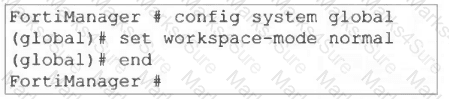
Refer to the following configuration. FortiManager # config system global global# set workspace-mode normal global# end FortiManager # What are two results from the configuration shown in the exhibit? Choose two answers

Options:

A.

The same administrator can lock more than one ADOM at the same time.

B.

Multiple administrators can lock and work on separate ADOMs at the same time.

C.

All changes must be approved before they can be installed on a device.

D.

Concurrent read-write access to an ADOM is disabled.

Buy Now
Questions 9

An administrator has a FortiGate-HQ device with VDOMs—root, HR and Facilities, currently managed under the FortiManager ADOM—Site1. They try to move VDOM HR to the FortiManager ADOM—Site2, but it does not work.

Why is the administrator not able to move FortiGate-HQ VDOM HR to FortiManager ADOM—Site2?

Options:

A.

The FortiGate-HQ must be managed under the FortiManager ADOM—root to allow moving its VDOMs to different ADOMs.

B.

The administrator must have full access in the device layer of FortiGate-HQ VDOM-root before they can VDOMs to different ADOMs.

C.

FortiManager must be in ADOM normal mode, which does not allow VDOMs to be managed separately.

D.

The administrator must delete the FortiGate-HQ device from FortiManager and add it again using the Add Device wizard before moving the VDOM.

Buy Now
Questions 10

An administrator assigned the Training global policy package to the Branches policy package in ADOM1. Later, the administrator created a new policy package named Remotes on ADOM1.

What should the administrator do to sync the Training global policy package with the Remotes policy package in ADOM1?

Options:

A.

Manually add and assign the Remotes policy package to the Training global policy package

B.

Use the automatically install policies to ADOM devices method to sync from the Training global policy package to the Remotes policy package

C.

Assign the Training global policy package to the Remotes policy package

D.

Unassign the Training policy package and reassign it to all policy packages within ADOM1

Buy Now
Questions 11

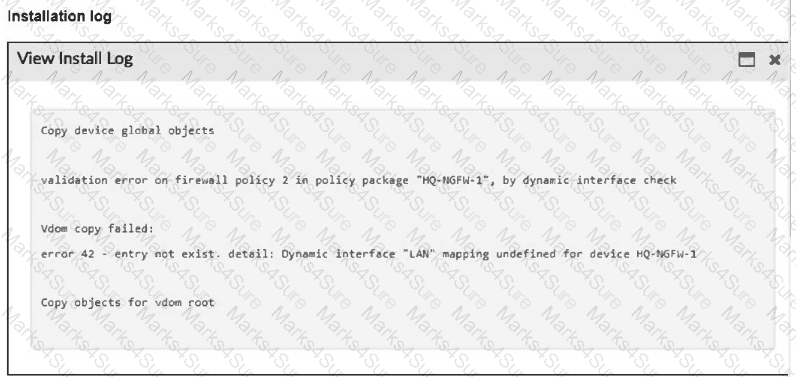
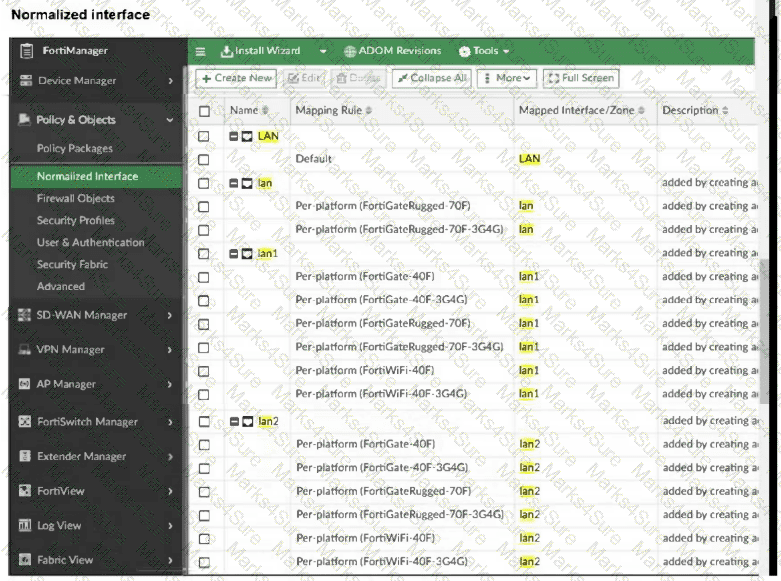
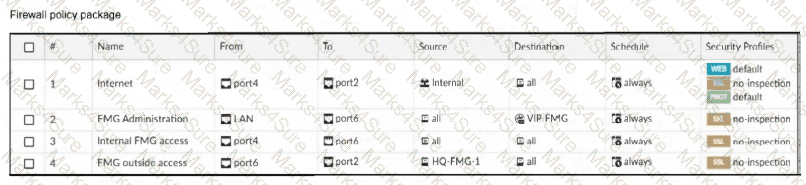
Refer to the exhibits.

FCP_FMG_AD-7.6 Question 11

FCP_FMG_AD-7.6 Question 11

FCP_FMG_AD-7.6 Question 11

An administrator must replace the source LAN interface in policy ID 2 on their FortiGateRugged-70F.

However, when they try to install the policy package, they receive the error shown in the exhibit.

What should the administrator do to resolve the error?

Options:

A.

Use the API to assign a system template interface for FortiGateRugged-70F model.

B.

Use a metadata variable to dynamically assign an interface when this error occurs.

C.

Create a per-device mapping for the LAN interface.

D.

Replace LAN with lan1, which is supported by FortiGateRugged-70F models.

Buy Now
Questions 12

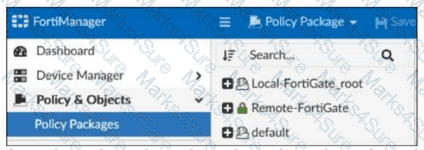
Refer to the exhibit.

FCP_FMG_AD-7.6 Question 12

Which two statements about the configuration shown in the exhibit are true? Choose two answers.

Options:

A.

An administrator can lock the Local-FortiGate_root policy package.

B.

The administrator created a snapshot of the Remote-FortiGate policy package.

C.

The FortiManager ADOM workspace mode is set to normal.

D.

The FortiManager is in workflow mode.

Buy Now
Questions 13

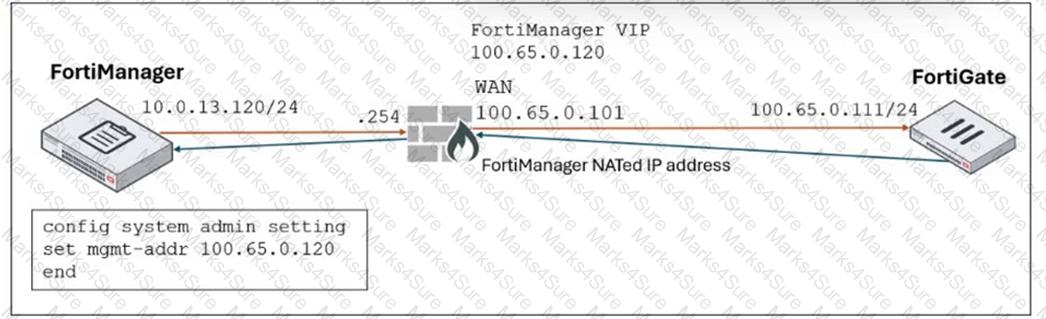
Refer to the exhibit.

FCP_FMG_AD-7.6 Question 13

FortiManager is operating behind a network address translation (NAT) device, and the administrator configured the FortiManager NATed IP address under the FortiManager system administration settings.

What is the expected result during discovery?

Options:

A.

FortiManager sets both the 100.65.0.120 IP address and 10.0.13.120 IP address on FortiGate.

B.

FortiManager sets both the 100.65.0.120 IP address and 100.65.0.101 IP address on FortiGate.

C.

FortiManager sets the 100.65.0.101 IP address on FortiGate.

D.

FortiManager sets the 100.65.0.120 IP address on FortiGate.

Buy Now
Questions 14

The administrator uses FortiManager to push a CLI script using the Remote FortiGate Directly (via CLI) option to configure an IPsec VPN. However, when running the script, the administrator receives the following error:

config vpn ipsec phase2-interface [parameter(s) invalid. detail: object mismatch]

What must the administrator do to resolve the script error and successfully apply the IPsec configuration?

Options:

A.

Add the end command after finishing the IPsec phase 1-interface configuration block.

B.

Use IPsec templates to deploy provisioning templates.

C.

Add a second config vpn ipsec phase2-interface block without linking it to phase1.

D.

Run the script using the policy package or ADOM database method.

Buy Now
Questions 15

Refer to the exhibit.

FCP_FMG_AD-7.6 Question 15

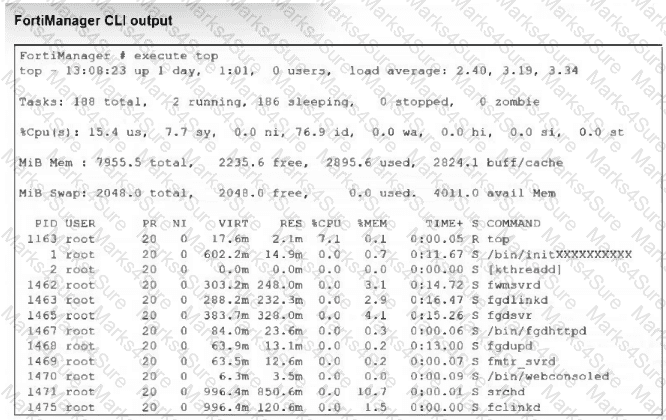
What percentage of the available RAM is being used by the process in charge of downloading the web and email filter databases from the public FortiGuard servers?

Options:

A.

1.5

B.

3.1

C.

4.1

D.

2.9

Buy Now
Questions 16

A FortiManager administrator has moved a FortiGate device to a new ADOM, but they cannot see the policy or object configurations for that FortiGate.

What should the administrator do to see the policy or object configurations?

Options:

A.

Use ADOM shared objects to restore all missing data.

B.

Reset the device and add it to the new ADOM again.

C.

Import the policy package manually using the Import Configuration wizard.

D.

Use ADOM sync to restore the missing configurations.

Buy Now
Questions 17

An administrator upgrades FortiManager with workspace mode per ADOM enabled to the latest version but notices that the ADOM versions did not change.

Why were the ADOMs not upgraded?

Options:

A.

The administrator did not run the database integrity check before performing the upgrade.

B.

FortiManager does not automatically upgrade ADOMs after a firmware upgrade.

C.

A FortiManager process task is stuck and blocking the ADOM upgrade, so the administrator must fix it.

D.

A user had all ADOMs locked before the upgrade, which stopped them from being upgraded.

Buy Now
Questions 18

Refer to the exhibits.

FCP_FMG_AD-7.6 Question 18

FCP_FMG_AD-7.6 Question 18

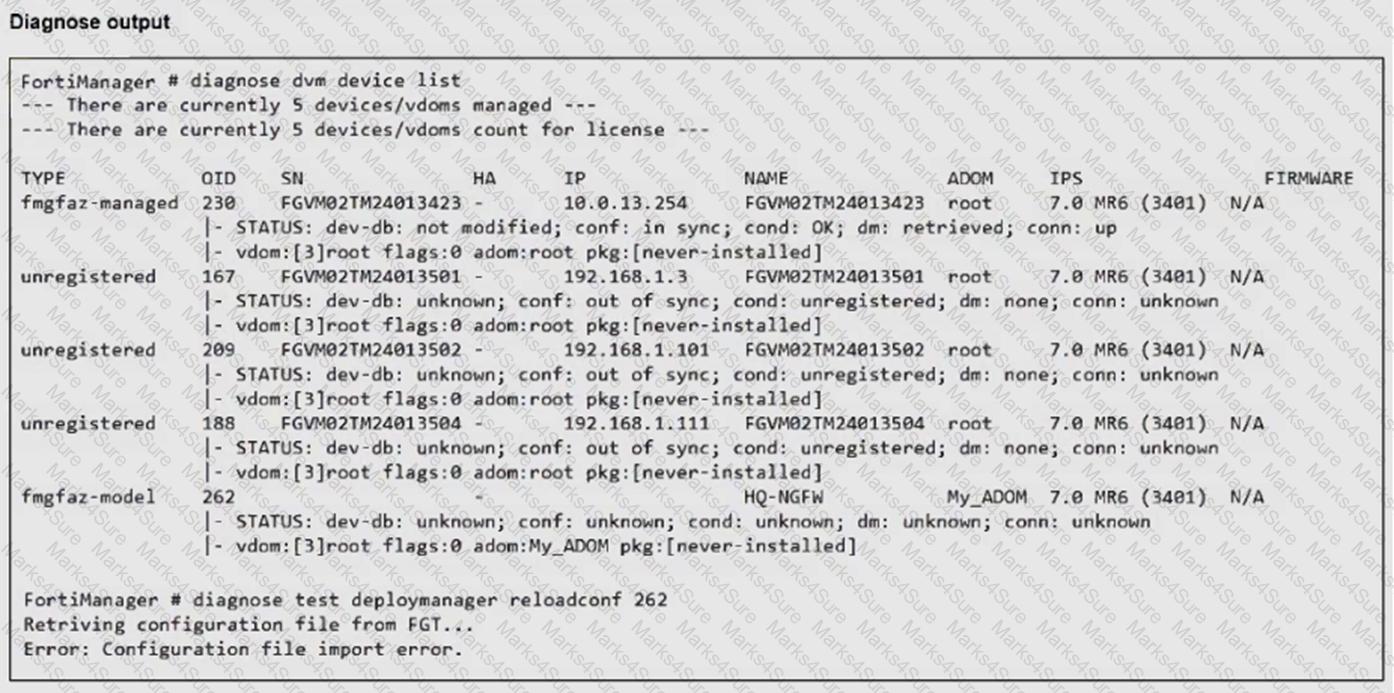
An administrator runs the reload failure command diagnose test deploymanager reloadconf 262 on FortiManager.

Why does the administrator receive an error message?

Options:

A.

The administrator must use the FortiGate name instead of the ID number.

B.

The administrator just recently added FortiGate HQ-NGFW as a model device.

C.

FortiManager requires the FortiGate serial number instead of the ID number.

D.

FortiManager does not support FortiOS version 7.0.

Buy Now
Questions 19

Refer to the exhibit.

FCP_FMG_AD-7.6 Question 19

What are two results from the configuration shown in the exhibit? Choose two answers.

Options:

A.

The same administrator can lock more than one ADOM at the same time.

B.

Multiple administrators can lock and work on separate ADOMs at the same time.

C.

All changes must be approved before they can be installed on a device.

D.

Concurrent read-write access to an ADOM is disabled.

Buy Now
Exam Code: FCP_FMG_AD-7.6
Exam Name: Fortinet NSE 5 - FortiManager 7.6 Administrator
Last Update: May 21, 2026
Questions: 65

PDF + Testing Engine

$64.99   $185.69

Testing Engine

$49.99   $142.83

PDF (Q&A)

$54.99   $157.11