
Free Practice Questions for the Fortinet Certified Solution Specialist FCSS_LED_AR-7.6 Exam (2026 Updated)
At Marks4sure, we are dedicated to providing IT professionals with the most accurate and reliable preparation materials for the Fortinet FCSS_LED_AR-7.6 exam. To support your certification journey, we have made a selection of our premium 2026 Fortinet Certified Solution Specialist practice questions and answers available completely free. You can take this practice test as many times as you need. Every question includes a detailed, expertly verified explanation to ensure you fully grasp the core security concepts before test day.
In each user certificate, you can define the subject field, expiration date. User Principal Name (UPN), URL for CRL download, and the OCSP URL. How does the detailed configuration of these attributes impact the certificate?
Refer to the exhibits.
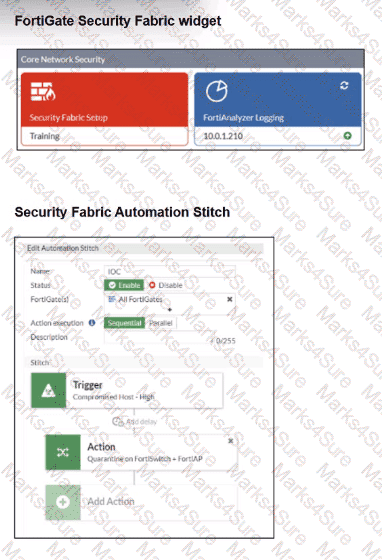
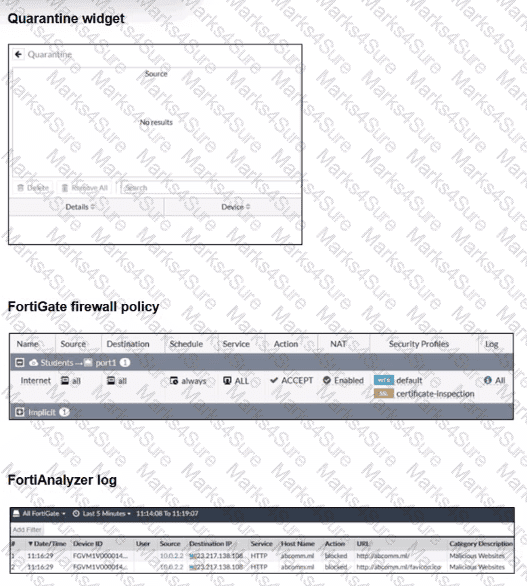
Examine the FortiGate configuration, FortiAnalyzer logs, and FortiGate widget shown in the exhibits.
Security Fabhc quarantine automation has been configured to isolate compromised devices automatically. FortiAnalyzer has been added to the Security Fabric, and an automation stitch has been configured to quarantine compromised devices.
To test the setup, a device with the IP address 10.0.2.1 that is connected through a managed FortiSwitch attempts to access a malicious website. The logs on FortiAnalyzer confirm that the event was recorded, but the device does not appear in the FortiGate quarantine widget.
Which two reasons could explain why FortiGate is not quarantining the device? (Choose two.)
A network engineer is deploying FortiGate devices using zero-touch provisioning (ZTP). The devices must automatically connect to FortiManager and receive their configurations upon first boot. However, after powering on the devices, they fail to register with FortiManager.
What could be a possible cause of this issue?
A FortiSwitch is not appearing in the FortiGate management interface after being connected via FortiLink. What could be a first troubleshooting step?
Refer to the exhibits.
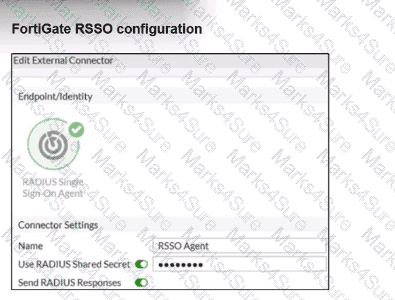
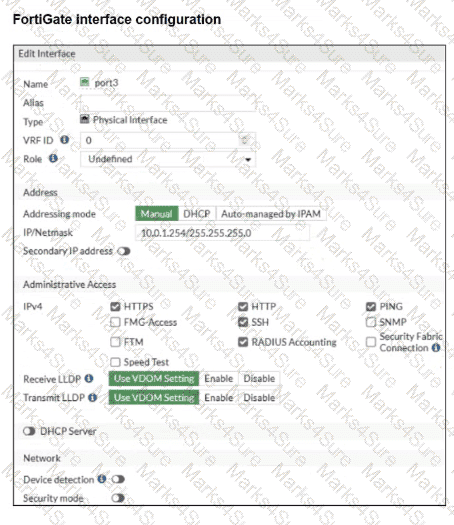
Examine the FortiGate RSSO configuration shown in the exhibit.
FortiGate is set up to use RSSO for user authentication. It is currently receiving RADIUS accounting messages through port3. The incoming RADIUS accounting messages contain the username in the User-Name attribute and group membership in the Class attribute. You must ensure that the users are authenticated through these RADIUS accounting messages and accurately mapped to their respective RSSO user groups.
Which three critical configurations must you implement on the FortiGate device? (Choose three.)
In addition to requiring a FortiAnalyzer device to configure the Security Fabric, which license must be added to FortiAnalyzer to use Indicators of Compromise (IOC) rules?
Refer to the exhibits.
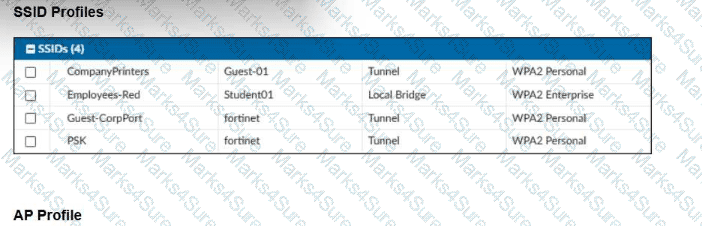
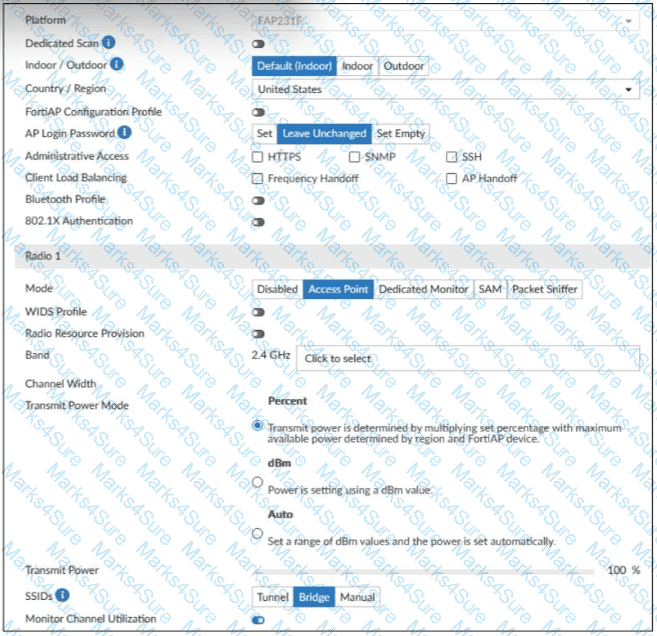
A set of SSID profiles has been configured on FortiManager, and an AP profile has been assigned to a group of APs managed by FortiGate. However, none of the designated SSIDs are being broadcast by these APs.
Which configuration change is required to make the APs broadcast these SSIDs as intended?
Refer to the exhibits.

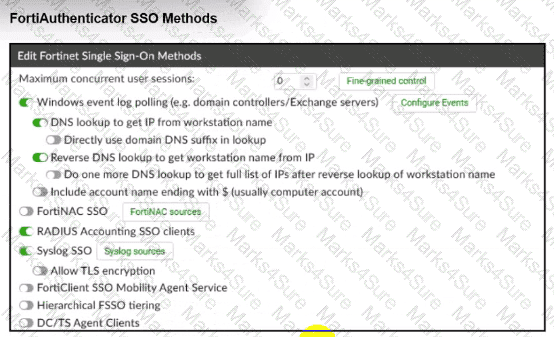
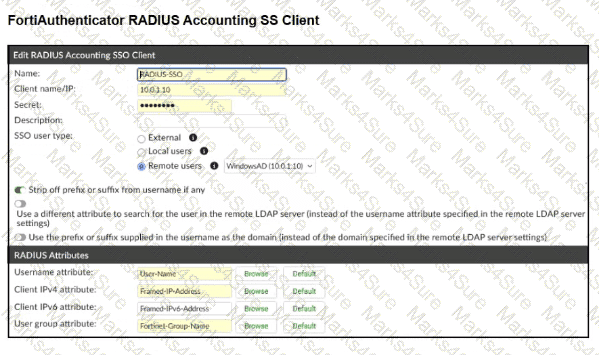
A company has multiple FortiGate devices deployed and wants to centralize user authentication and authorization. The administrator decides to use FortiAuthenticator to convert RSSO messages to FSSO, allowing all FortiGate devices to receive user authentication updates.
After configuring FortiAuthenticator to receive RADIUS accounting messages, users can authenticate, but FortiGate does not enforce the correct policies based on user groups. Upon investigation, the administrator discovers that FortiAuthenticator is receiving RADIUS accounting messages from the RADIUS server and successfully queries LDAP for user group information. But, FSSO updates are not being sent to FortiGate devices and FortiGate firewall policies based on FSSO user groups are not being applied.
What is the most likely reason FortiGate is not receiving FSSO updates?
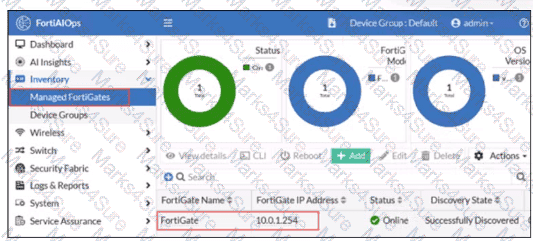
FortiGate has been added to FortiAIOps for management.
Which step must be performed on FortiAIOps to add a FortiSwitch device connected to the recently added FortiGate?
Refer to the exhibit.
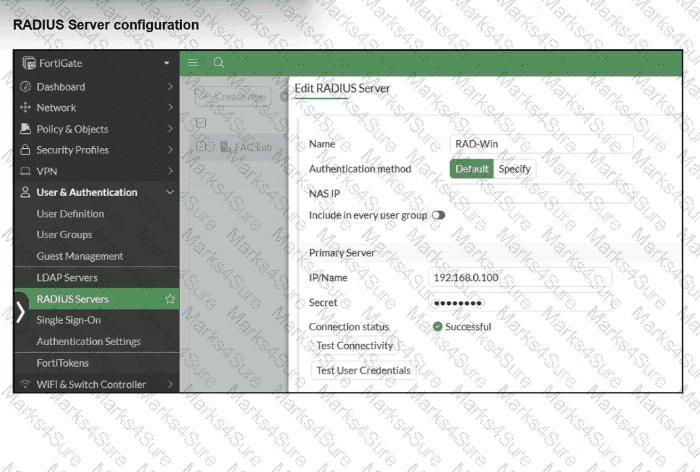
On FortiGate, a RADIUS server is configured to forward authentication requests to FortiAuthenticator, which acts as a RADIUS proxy. FortiAuthenticator then relays these authentication requests to a remote Windows AD server using LDAP.
While testing authentication using the CLI command diagnose test authserver. the administrator observed that authentication succeeded with PAP but failed when using MS-CHAFV2.
Which two solutions can the administrator implement to enable MS-CHAPv2 authentication? (Choose two.)
Refer to the exhibits.
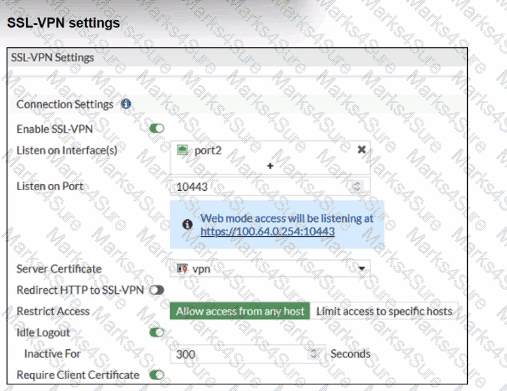
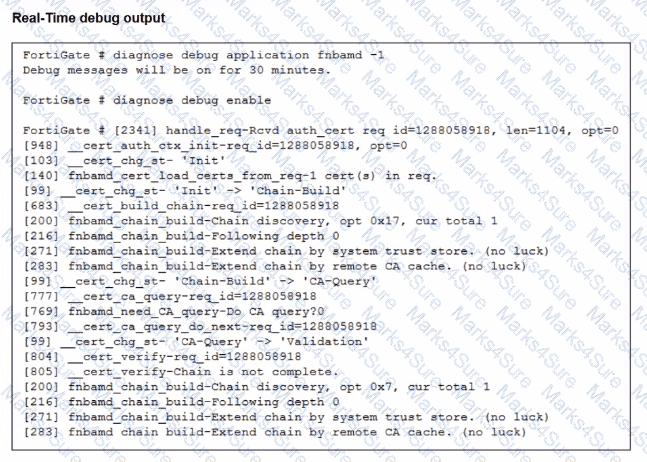
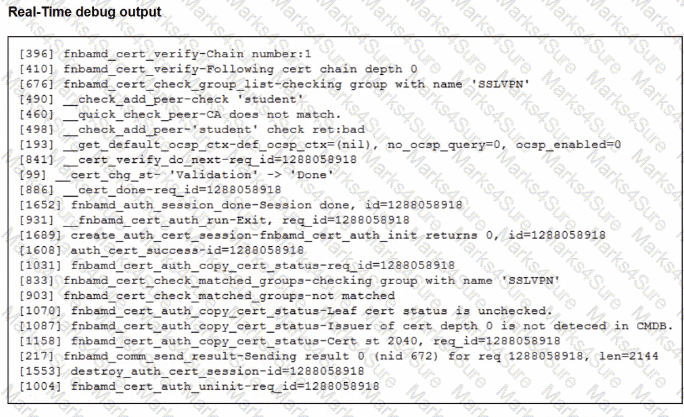
Which include debug output and SSL VPN configuration details.
An SSL VPN has been configured on FortiGate. To enhance security, the administrator enabled Required Client Certificate in the SSL VPN settings. However, when a user attempts to connect, authentication fails.
Which configuration change is needed to fix the issue and allow the user to connect?
PDF + Testing Engine

Testing Engine
PDF (Q&A)
