
Free Practice Questions for the Nutanix NCM-MCI NCM-MCI-6.10 Exam (2026 Updated)
At Marks4sure, we are dedicated to providing IT professionals with the most accurate and reliable preparation materials for the Nutanix NCM-MCI-6.10 exam. To support your certification journey, we have made a selection of our premium 2026 NCM-MCI practice questions and answers available completely free. You can take this practice test as many times as you need. Every question includes a detailed, expertly verified explanation to ensure you fully grasp the core security concepts before test day.
Task 15
An administrator found a CentOS VM, Cent_Down, on the cluster with a corrupted network stack. To correct the issue, the VM will need to be restored from a previous snapshot to become reachable on the network again.
VM credentials:
Username: root
Password: nutanix/4u
Restore the VM and ensure it is reachable on the network by pinging 172.31.0.1 from the VM.
Power off the VM before proceeding.
Task 14
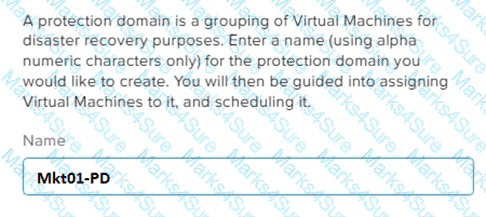
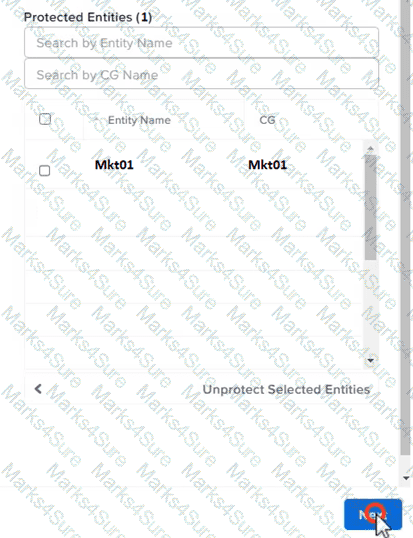
The application team has requested several mission-critical VMs to be configured for disaster recovery. The remote site (when added) will not be managed by Prism Central. As such, this solution should be built using the Web Console.
Disaster Recovery requirements per VM:
Mkt01
RPO: 2 hours
Retention: 5 snapshots
Fin01
RPO: 15 minutes
Retention: 7 days
Dev01
RPO: 1 day
Retention: 2 snapshots
Configure a DR solution that meets the stated requirements.
Any objects created in this item must start with the name of the VM being protected.
Note: the remote site will be added later

Task 2
An administrator needs to configure storage for a Citrix-based Virtual Desktop infrastructure.
Two VDI pools will be created
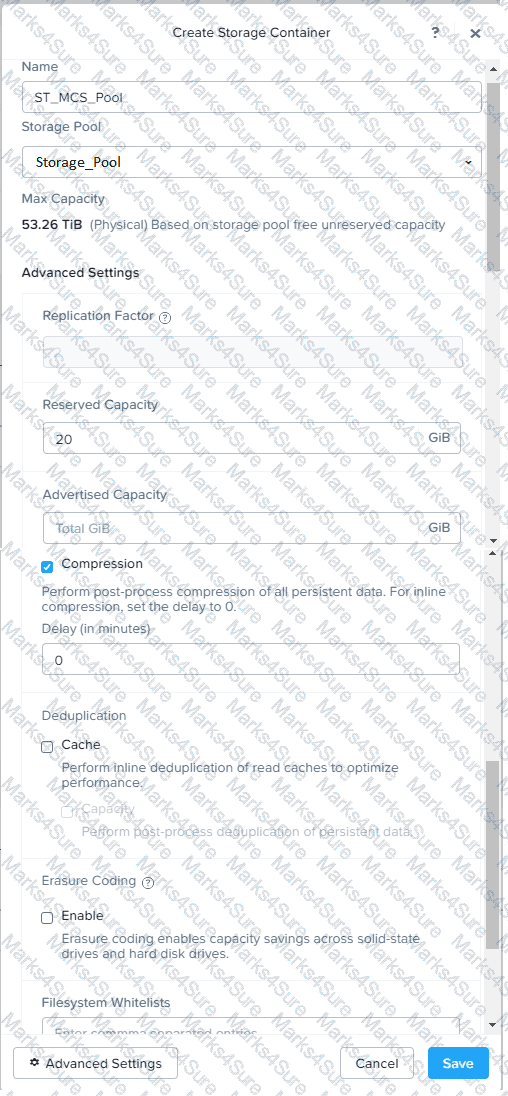
Non-persistent pool names MCS_Pool for tasks users using MCS Microsoft Windows 10 virtual Delivery Agents (VDAs)
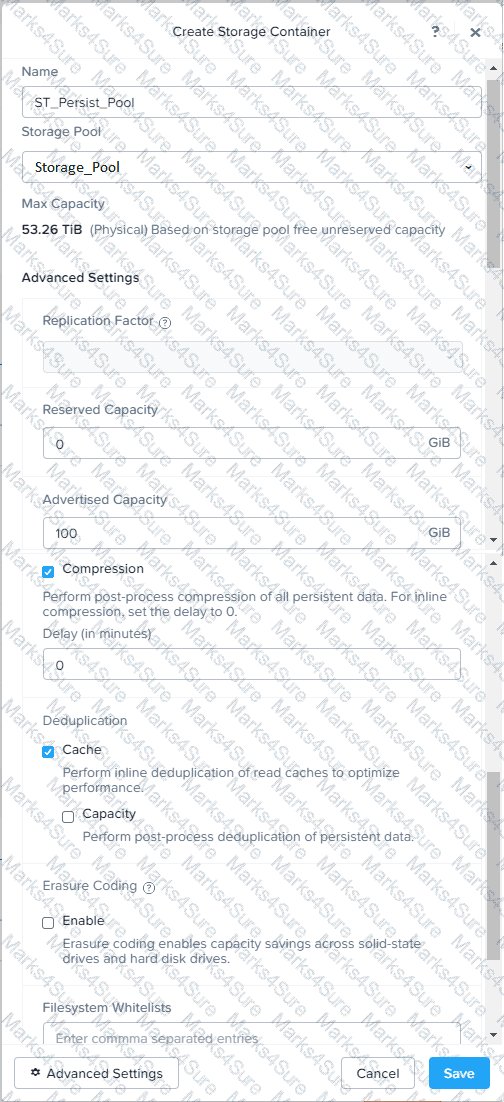
Persistent pool named Persist_Pool with full-clone Microsoft Windows 10 VDAs for power users
20 GiB capacity must be guaranteed at the storage container level for all power user VDAs
The power user container should not be able to use more than 100 GiB
Storage capacity should be optimized for each desktop pool.
Configure the storage to meet these requirements. Any new object created should include the name of the pool(s) (MCS and/or Persist) that will use the object.
Do not include the pool name if the object will not be used by that pool.
Any additional licenses required by the solution will be added later.
Task4
An administrator will be deploying Flow Networking and needs to validate that the environment, specifically switch vs1, is appropriately configured. Only VPC traffic should be carried by the switch.
Four versions each of two possible commands have been placed in Desktop\Files\Network\flow.txt. Remove the hash mark (#) from the front of correct First command and correct Second command and save the file.
Only one hash mark should be removed from each section. Do not delete or copy lines, do not add additional lines. Any changes other than removing two hash marks (#) will result in no credit.
Also, SSH directly to any AHV node (not a CVM) in the cluster and from the command line display an overview of the Open vSwitch configuration. Copy and paste this to a new text file named Desktop\Files\Network\AHVswitch.txt.
Note: You will not be able to use the 192.168.5.0 network in this environment.
First command
#net.update_vpc_traffic_config virtual_switch=vs0
net.update_vpc_traffic_config virtual_switch=vs1
#net.update_vpc_east_west_traffic_config virtual_switch=vs0
#net.update_vpc_east_west_traffic_config virtual_switch=vs1
Second command
#net.update_vpc_east_west_traffic_config permit_all_traffic=true
net.update_vpc_east_west_traffic_config permit_vpc_traffic=true
#net.update_vpc_east_west_traffic_config permit_all_traffic=false
#net.update_vpc_east_west_traffic_config permit_vpc_traffic=false
Task 11
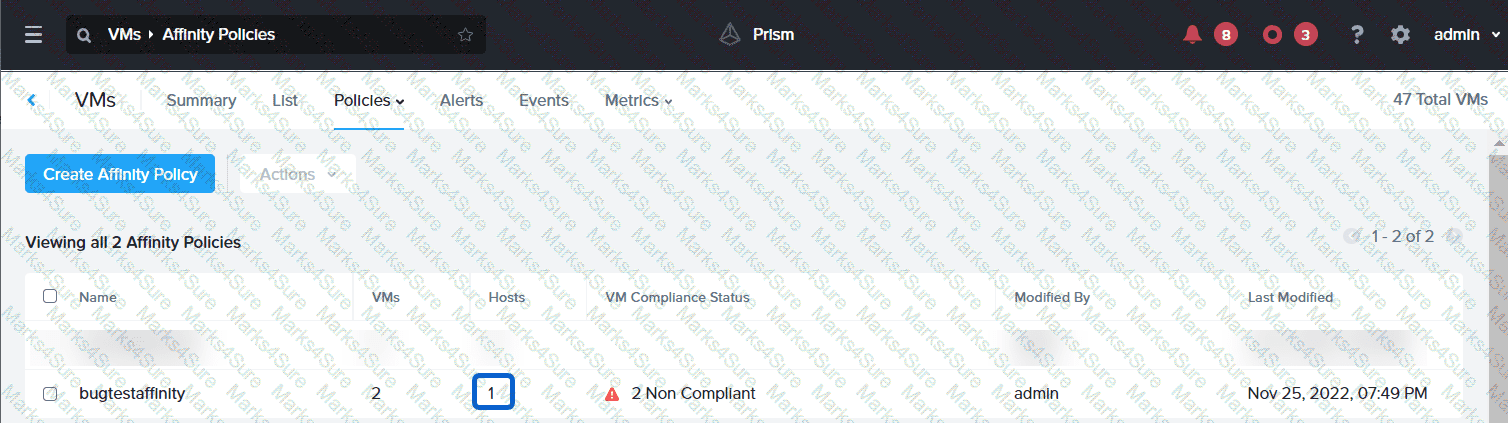
An administrator has noticed that after a host failure, the SQL03 VM was not powered back on from another host within the cluster. The Other SQL VMs (SQL01, SQL02) have recovered properly in the past.
Resolve the issue and configure the environment to ensure any single host failure affects a minimal number os SQL VMs.
Note: Do not power on any VMs
 A screenshot of a computer
Description automatically generated with medium confidence
A screenshot of a computer
Description automatically generated with medium confidenceAn administrator needs to configure a new write-intensive MS-SQL VM on Cluster 1.
VM specifications:
vCPU: 12
vRAM: 128GB
Storage: 100 GB OS, 750 GB Data
Create the VM and any objects needed in the current environment to meet requirements, maximizing performance for the production environment. Include NEWSQL in the name of any new objects.
Production environment:
4 nodes
Each node has two 8-core CPUs
Each node has 1024 GB RAM
Storage: 4 × 7.16 TB SSD Disks and 8 × 8 TB HDD disks
Make sure the VM is configured for maximum performance for the production environment.
Note: Network configuration is not required at this time. Do not power on the VM.
PDF + Testing Engine

Testing Engine
PDF (Q&A)
