
Free Practice Questions for the Supermicro MI300X GPU SMI300XS Exam (2026 Updated)
At Marks4sure, we are dedicated to providing IT professionals with the most accurate and reliable preparation materials for the Supermicro SMI300XS exam. To support your certification journey, we have made a selection of our premium 2026 MI300X GPU practice questions and answers available completely free. You can take this practice test as many times as you need. Every question includes a detailed, expertly verified explanation to ensure you fully grasp the core security concepts before test day.
To disengage a PCIe, motherboard, or GPU tray on the AS-8125GS-TNMR2 system, loosen the screws on either side of the tray, then slowly pull the tray out to disengage it. True or False?
Exhibit:
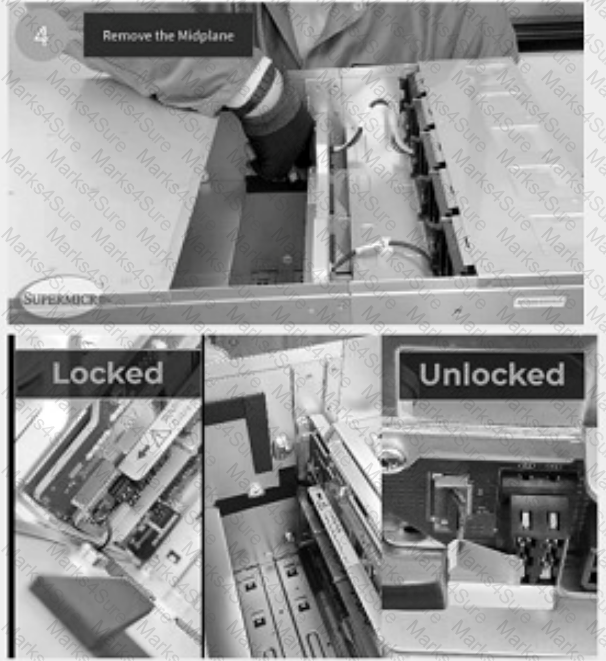
There is a flap door over the ribbon cable connection. To open it, use your finger to press down on the top of the flap door and pop it open. True or False?
Before removing the midplane from the AS-8125GS-TNMR2, what are some of the required steps? (Choose 2 answers.)
In order to remove the midplane from the AS-8125GS-TNMR2 system, and after you remove all the PSUs, you will need to disengage 3 trays. What is the correct order for disengagement?
What equipment is required in order to remove the heatsink from the motherboard tray?
Exhibit:
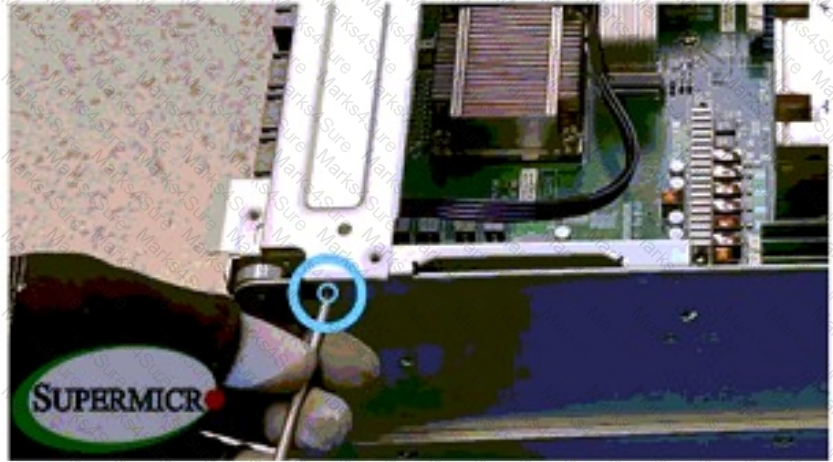
How many screws need to be removed from the support bar located at the rear of the motherboard tray?
When lowering the midplane bracket back into the chassis, what should you make sure to do with all the cables?
It is essential to connect the purple 5-volt power connector to the correct port to avoid damaging the AS-8125GS-TNMR2 system. True or False?
PDF + Testing Engine

Testing Engine
PDF (Q&A)