
Free Practice Questions for the Android Certified Trainer AND-802 Exam (2026 Updated)
At Marks4sure, we are dedicated to providing IT professionals with the most accurate and reliable preparation materials for the Android AND-802 exam. To support your certification journey, we have made a selection of our premium 2026 Android Certified Trainer practice questions and answers available completely free. You can take this practice test as many times as you need. Every question includes a detailed, expertly verified explanation to ensure you fully grasp the core security concepts before test day.
Any Android application can protect itself by declaring permissions that can be accessed by other applications. This can be achieved using the < permission > tag in the activity_main.xml file of the Android applications providing the permission.
Android SQLite database files are stored under the........................................ directory.
What is the result of click the Button1 in the code which is illustrated in the following image? Assuming that write_to_external_storage is the name of an activity that allows users to write to external storage.

During an application run-time, permissions may be enforced at a number of places when calling into the system, starting an activity, sending and receiving broadcasts, accessing and manipulating a content provider, and binding to or starting a service.
getExternalFilesDir( ) method is used to get the directory of the external storage.
It is not necessary that every application installed on an Android device be signed by the developer before being published.
What is the purpose of adding the following permission tag to your app’s AndroidManifest.xml file?
< uses-permission android:name="android.permission.INTERNET" / >
Android uses “Intents” to communicate and send data between different components which make it vulnerable to malicious attacks. Which of the following choices are component-level Permissions to protect this type of communication? (Select Four)
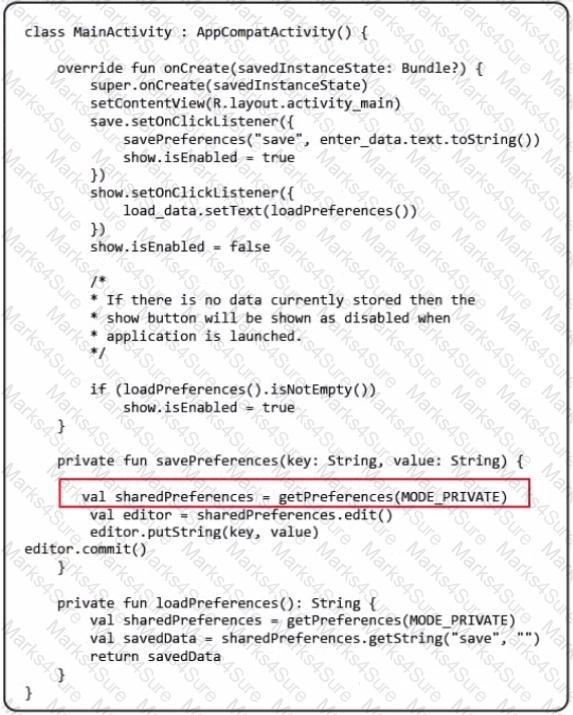
In the following image of code, what is the purpose of using MODE_PRIVATE in the method getPreferences( )?
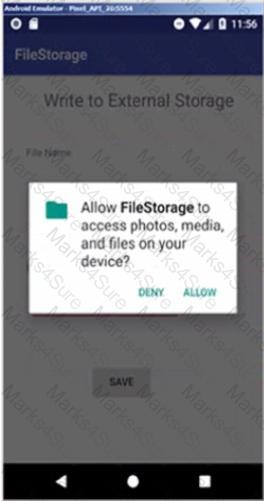
Which of the following choices was added to AndroidManifest.xml to produce the following dialog below when the app tries to save data to external storage?
PDF + Testing Engine

Testing Engine
PDF (Q&A)
